
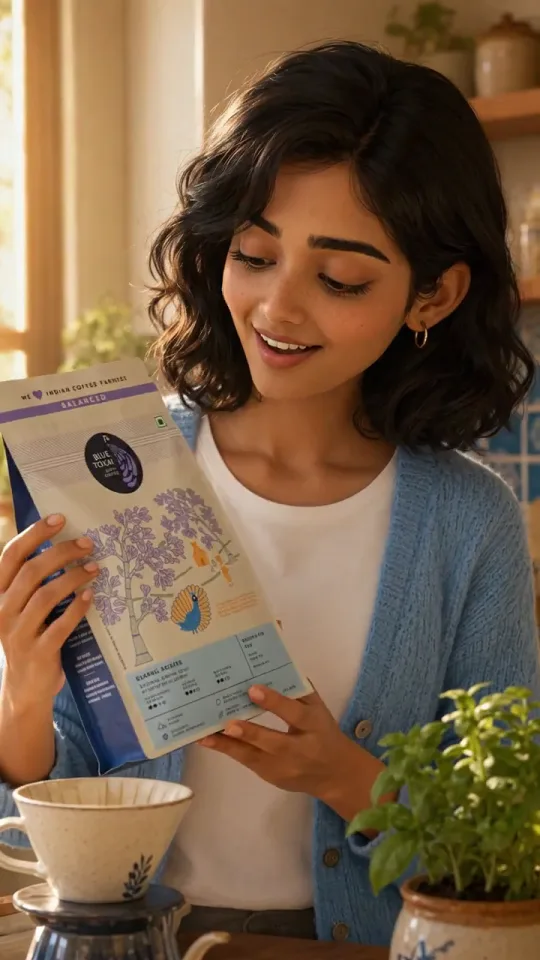

What is the Pixar-Style Ad template?
Turn a product benefit into a compact, emotionally legible 3D story. Advibly creates an original expressive cast, maps the problem, reveal, mechanism, and resolution, locks visual continuity through approved storyboard frames, then animates, narrates, scores, and assembles the final ad.
It is a guided production workflow, not a one-click filter. Planning and review happen before expensive renders, each approval keeps the next stage grounded, and every generated asset remains available for reuse or iteration.
Best for
- 01Products with a visual mechanism or transformation
- 02Friendly education and benefit storytelling
- 03Launch films and paid-social hero ads
- 04Brands that want cinematic character appeal
You approve. It renders.
- 1
Define the product and creative direction
Attach a store product when relevant and describe the problem, metaphor, setting, or character idea. The template uses your brand and product context without forcing every story into the same plot.
- 2
Approve the original cast and story
Advibly plans a concise feature-film-style arc with expressive characters, a clear product reveal, friendly mechanism mascots, and a visual payoff. Names, actions, dialogue, and narration remain editable.
- 3
Lock the storyboard continuity
One polished 3D still is generated per beat. Approved character frames anchor later shots, while the real product photo references the reveal and call-to-action moments where packaging accuracy matters.
- 4
Animate each approved shot
The stills become cinematic clips with purposeful character performance, readable product action, controlled camera movement, and native environmental sound effects.
- 5
Finish with voice and music
Advibly stitches the clips, generates one continuous narration track and an instrumental score, then mixes them under the final picture with automatic voice clarity.
The problem gets a face. Your product gets the ending.
Approve the cast and story, then the storyboard. Clips, voice and score only render after you say so.
A new cast for every brand.
The planner reads your brand and your brief, then writes a cast sheet: a protagonist, the problem turned into a character with a mood, and small mascots that show how the product works. Every name and description on that sheet is editable, and the same wording goes into every still and every shot. Three brands on this page, three casts, the same four beats.
- Original characters and settings only, never a franchise character or a studio logo
- Four 8-second beats: the problem, the reveal, the mascots, the call to action
- Stills render in order, each anchored on the last one with your hero in it, so the face holds
The still sets the look, the clip only moves it.
A quality menu on the first screen decides which image and video models render your run. Balanced is the default, Best costs roughly three times as much, and Fast is the cheapest way to see the whole cut. Planning, voice and music stay the same on every tier.
- One finished cinematic 3D animated product ad
- An editable cast, continuity sheet, and story plan
- A consistent storyboard frame and clip for every beat
- Separate voiceover, music, and stitched-video assets
- All source generations retained for reuse and iteration

Gemini 3.8 FlashWrites the cast sheet, the four beats and the narration from your brief
GPT Image 2Renders the storyboard stills on the default Balanced tier
Gemini Omni Flash 1.1Animates each still into an 8-second shot with sound effects only, on Balanced

Seedance 2.5The video model on the Best tier, with GPT Image 2.5 Sunburst for the stills
Hailuo 03 MaxThe video model on the Fast tier, and the stand-in for square runs

xAI TTSOne continuous narrator across all four beats, from five voices you pick
MiniMax Music 3The instrumental score, ducked under the voice in the final mix
Good to know.
Does the template copy existing animated movie characters?
No. It creates original characters, settings, and visual metaphors. The intended result has the warmth and expressive clarity of a contemporary 3D family film without reproducing protected characters or studio-specific assets.
Can it accurately show my product packaging?
Yes. Attach a product photo and it becomes a reference on the reveal and closing beats. The pipeline aims to preserve silhouette, package colors, and recognizable label details within the 3D world.
What can I edit before animation starts?
You can edit the cast, character descriptions, locations, every beat, camera direction, action, narration, and product appearances before approving the storyboard and spending on motion.
What aspect ratio does it create?
The guided workflow is designed for social advertising and uses the aspect ratio configured for the template. Individual storyboard frames and clips remain available for repurposing.
Your product, starring in its own short film.
Click Use this template, write one line about the story, and approve each stage before it renders.
Planning is free. Credits are only spent on renders you approve.