
Grok Imagine is most useful to marketers as a rapid visual exploration model. It is not an automatic source of finished, factual advertising. Use it to widen the concept space, produce scene directions and generate candidate images. Then review product fidelity, claims, text, hands, logos and brand fit before anything leaves the workspace.
The model is only one part of the system. Marketing quality depends on the input, the review standard and how easily a good idea can become the formats a campaign actually needs. It also depends on picking the right version, because “Grok Imagine” now refers to a family of models with different prices and different ceilings.
Key Takeaways
- Treat Grok Imagine as a fast way to explore visual directions, not as a finished source of factual advertising.
- Know which version you are calling. Image 2.0 and Video 1.5 are the current models, and the older tiers are still live at separate endpoints and separate prices.
- Brief it with fixed facts (product, claims, logos) kept separate from open visual choices, then reject errors before refining anything.
- Score every candidate against product truth, hierarchy, brand fit, channel fit and risk before it leaves the workspace.
- Carry the approved direction into a system that keeps saved brand context and produces the actual campaign formats.
Which Grok Imagine you are actually using
This matters before anything else, because the name covers several models. xAI released Imagine Image 2.0 as the new Quality Mode on grok.com/imagine and in the iOS and Android apps, exposed in its API as grok-imagine-image-2.0. xAI describes it as planning typography and layout the way a designer would, so dense multi-part visuals hold together and small text stays sharp, and it adds a magic wand that edits only the region you point at, segmentation, background removal with transparency, and multi-reference editing that accepts up to five input images in one generation.
Imagine Video 1.5 is the current video model, announced on 16 June 2026, and it generates sound effects, ambience and dialogue in the same pass as the picture rather than as a separate step. Image and voice references followed on 31 July 2026, taking up to seven references per generation so a character face, a location or a product can be locked while everything else changes.
One naming trap is worth knowing. On fal.ai, the endpoints under /quality/ are the earlier pro tier, while Image 2.0 lives under /v2.0/. The word “quality” in a path does not mean you are on the newest model.
|
Endpoint family |
What it is for |
Cost per image, checked 18 August 2026 |
|---|---|---|
|
|
Current model. Best typography and layout control. |
$0.04 low or $0.06 medium at 1K; $0.06 low or $0.08 medium at 2K |
|
|
Current model, editing an image you supply. |
Same as above plus $0.01 per input image |
|
|
Earlier pro tier, text-to-image and edit. |
$0.05 at 1K, $0.07 at 2K, plus $0.01 per input image on edit |
|
|
Base tier. Cheapest way to explore volume. |
$0.02, or $0.022 on the edit endpoint |
All of the image endpoints share the same envelope: one to four images per request, 1K or 2K output, JPEG, PNG or WebP, and a wide aspect list that runs from 2:1 through 1:1 to 9:20. The edit endpoints add an auto aspect that preserves the input image. Only the 2.0 endpoints expose the low and medium quality switch, which is also the price switch.
What the video side adds
Video 1.5 is worth understanding even if your immediate job is static, because the same approved still frequently becomes the start frame for motion. On fal.ai it is split into three endpoints, all of them 1 to 15 seconds:
|
Mode |
Ceiling |
Cost per second, checked 18 August 2026 |
|---|---|---|
|
Text to video |
Up to 1080p |
$0.08 at 480p, $0.14 at 720p, $0.25 at 1080p |
|
Image to video |
Up to 1080p |
Same per-second rate, plus $0.01 per reference image |
|
Reference to video |
Up to 720p |
$0.08 at 480p, $0.14 at 720p, plus $0.01 per reference image |
The earlier video endpoints are still published and are cheaper, at $0.05 per second for 480p and $0.07 for 720p, but they top out at 720p and lack the newer model's audio and physics work. That generation also carries extend-video and edit-video endpoints, which have no 1.5 equivalent yet, so a workflow that depends on extending an existing clip is still on the older model. Budget accordingly: a 10 second 1080p clip on 1.5 is roughly $2.50, while the same length at 480p is around $0.80. Resolution, not duration, is the expensive decision.
Marketing jobs it fits
|
Marketing job |
Fit |
Review burden |
|---|---|---|
|
Strong |
Check whether the idea supports the product truth |
|
|
Lifestyle and environmental backgrounds |
Strong with a clean reference |
Check contact shadows, scale and product geometry |
|
Dense, text-heavy layouts |
Improved on 2.0, still a verification target |
Read every character rather than assuming it rendered |
|
Exact packaging or regulated claims |
Use cautiously |
Require source-based product proof and human approval |
The briefing pattern that produces useful candidates
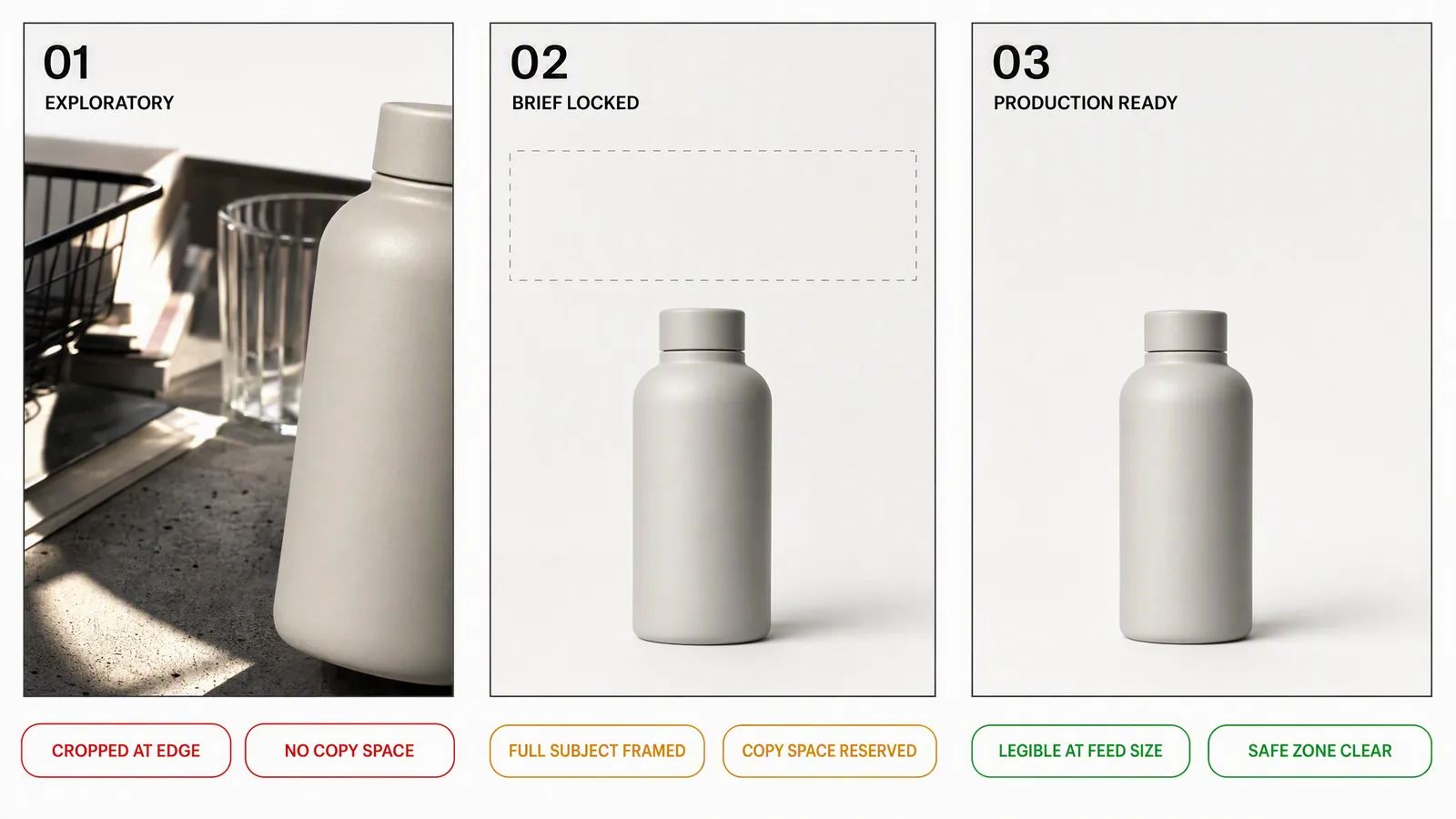
A good brief separates facts from visual choices. Start with the exact product source and the non-negotiables: what must remain unchanged, what claim is approved, which logo may appear and which element cannot be invented. Then describe the audience, moment, composition, camera, light, material and intended placement.
Example structure: Preserve the uploaded bottle, label and cap. Place it on a wet stone beside a gym towel at first light. Low three-quarter camera, crisp condensation, restrained blue-grey palette, empty upper-right area for approved copy. No extra logos, no health claim, no altered label text.
This is more useful than a long adjective pile because it tells the model what is fixed and what it may explore. On the 2.0 edit endpoint, the references do part of that work for you: supply the real product image rather than describing it, and spend the prompt on the scene instead.
Run a selection pass before a polishing pass
- Generate a small batch with one controlled brief. Four images per request is the ceiling, and the base tier is the cheap place to do this.
- Reject candidates with product or claim errors immediately.
- Select the best composition, not the most decorative image.
- Refine one variable at a time: camera, background, lighting or crop.
- Re-run the winner at 2K, and only then adapt it into channel-specific sizes.
Changing five things at once makes it difficult to know why an output improved. A controlled second pass is faster than repeatedly rewriting the whole brief. Exploring at the $0.02 tier and finishing at the $0.08 tier also costs a fraction of exploring at the top tier throughout.
A practical quality scorecard
|
Check |
Question |
Fail condition |
|---|---|---|
|
Product truth |
Is the shape, colour, label and count correct? |
Any invented or altered product detail |
|
Visual hierarchy |
Can the product and message be understood at feed size? |
Decoration overwhelms the subject |
|
Brand fit |
Does the image belong beside the brand’s existing assets? |
Style depends only on generic “premium” cues |
|
Channel fit |
Is there safe space for the intended copy and crop? |
Important information sits at an edge |
|
Risk |
Would a reasonable viewer infer a claim the business cannot prove? |
Visual implies unapproved performance |
Where Advibly changes the workflow
Using Grok Imagine inside a broader workspace is valuable when the same product needs more than one isolated image. Advibly exposes both the earlier Grok Imagine image tier and Grok Imagine 2 side by side, alongside other image models, so a direction can be tested on more than one model without rebuilding the brief. Grok Imagine video runs on the 1.5 endpoints, from 1 to 15 seconds, up to 1080p, with native audio and reference images.
Advibly can begin from a website, app listing, store, screenshot or product image, then preserve reusable product and brand context across every generation, so an approved direction carries into carousels, posts or video concepts. The human still decides what is true and what is good.
When not to use it
Choose photography, CGI or controlled compositing when exact geometry, legal substantiation or repeatable manufacturing detail is the core requirement. Choose another model or workflow when a specific motion, audio or editing capability matters more than the image model’s strengths. “One model for everything” is a procurement shortcut, not a creative strategy.
Bottom line
Grok Imagine can expand the number of credible visual directions a marketer can inspect, and the 2.0 generation narrowed the gap on the layout and typography work that used to force everything into a separate design step. The win still comes from disciplined inputs and fast rejection, then from turning the chosen direction into a campaign without losing product truth.
Try a model-led creative workflow in Advibly.
Sources
- Imagine Image 2.0, xAI, accessed 18 August 2026.
- Imagine Video 1.5, xAI, published 16 June 2026, accessed 18 August 2026.
- Imagine Video 1.5 with References, xAI, accessed 18 August 2026.
- xAI image-generation documentation, accessed 18 August 2026.
- Grok Imagine model pages on fal.ai, pricing and parameters checked 18 August 2026. Recheck before relying on any figure.
- Advibly product surface, checked 18 August 2026.