
Faceless video AI works when the idea does not need a presenter to carry trust. Product demonstrations, screen walkthroughs, narrated explainers, kinetic-text stories and visual case studies can all work without a face. A generic voice over unrelated stock clips usually cannot.
The fastest path is to choose the format first, write for what the viewer will see, and generate or gather each shot against a single source of product truth.
Key Takeaways
- Pick the faceless format before writing anything. Screen walkthroughs, product montages, kinetic text, voiceover explainers and animated case studies each need different evidence on screen, and the wrong pick removes the proof that makes the claim credible.
- Build the video from a five-beat spine and an eight-shot plan before generating a single frame, then run a friction test (muted playback, visual support for every claim, legible captions) before calling it done.
- Disclosure is not optional. YouTube and Meta both apply rules to realistic synthetic content, and the editor still owns pacing, claim accuracy and rights review after generation.
Step 1: choose the faceless format
|
Format |
Best for |
Evidence on screen |
|---|---|---|
|
Screen walkthrough |
Software features and workflows |
Real interface and cursor actions |
|
Product montage |
Physical products and campaign hooks |
Product images, short motion shots and details |
|
One sharp argument or announcement |
Readable claims and purposeful motion |
|
|
Voiceover explainer |
Teaching a process or comparison |
Diagrams, examples and source material |
|
Animated case study |
Showing change over time |
Dated data, before/after evidence and caveats |
If the proof requires a human experience or endorsement, a faceless format may remove the very thing that makes the claim credible.
Step 2: write the spine before the script
Use five beats: the problem, the tension, the mechanism, the proof and the next step. Write one sentence for each. Only then turn the spine into spoken lines.
Example spine: Marketing teams lose time rebuilding the same product context. The result is disconnected ads and slow reviews. A reusable workspace keeps product truth available. One approved brief can become several reviewable formats. Start with one campaign and keep the winning context.
Step 3: make a shot-level plan
For each line, specify what the viewer sees, where the evidence comes from, how long the shot lasts and what changes on screen. Alternate information density. A ten-second sequence of similar stock clips feels longer than a 45-second video with deliberate visual progression.
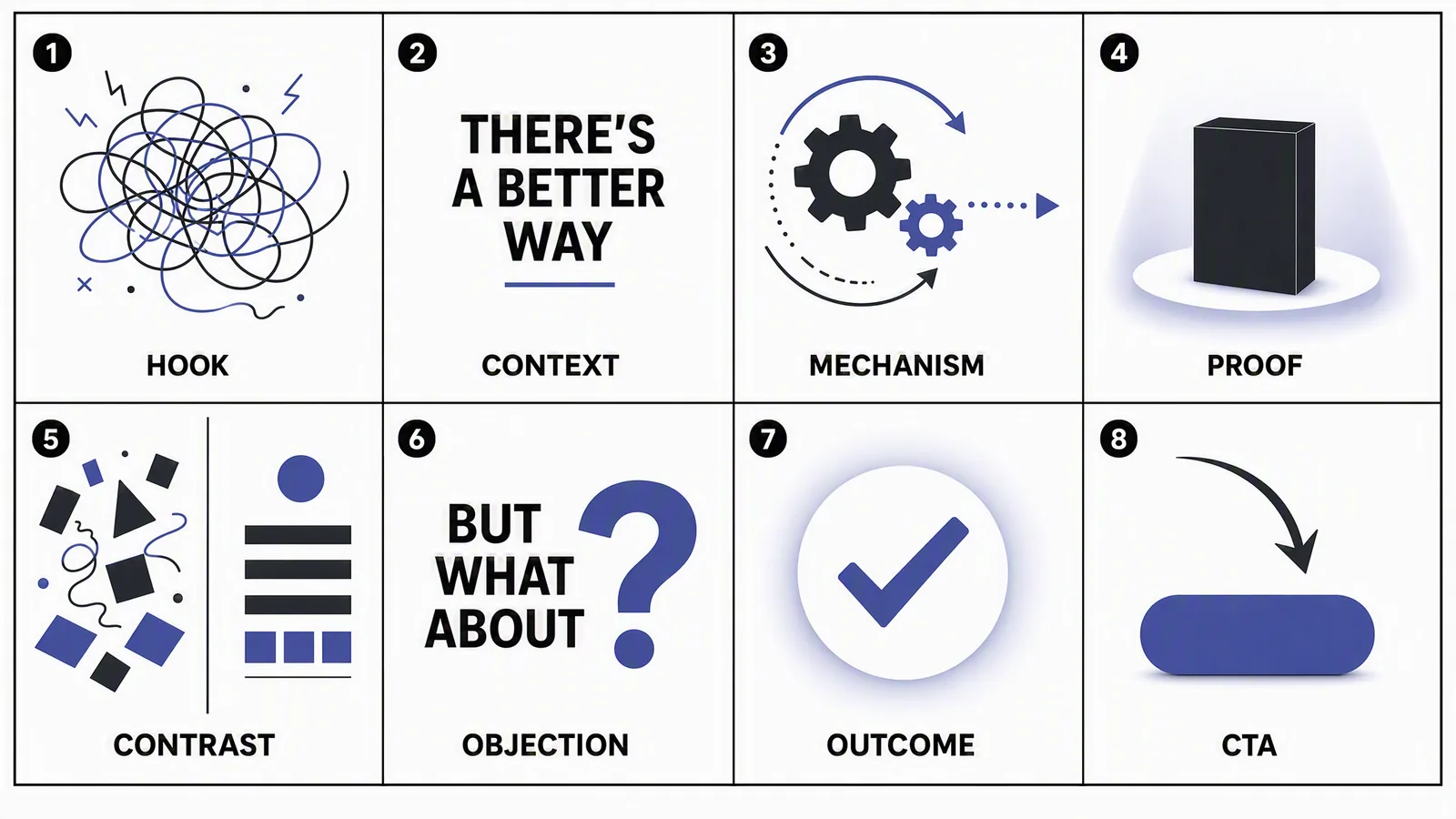
- Hook: show the costly or frustrating moment.
- Context: name who experiences it.
- Mechanism: demonstrate the change.
- Proof: show the actual product, output or source.
- Contrast: make the before/after legible without exaggeration.
- Objection: answer one likely doubt.
- Outcome: state what becomes easier.
- CTA: give one relevant next step.
Step 4: generate only what does not already exist
Use real screenshots, product images and footage when they are the best evidence. Generate transitions, environments, diagrams or motion shots where they add explanatory value. "AI-generated" is not a quality signal; relevance and continuity are.
Step 5: direct the voice for listening
Write short sentences around visual changes. Use punctuation to create breath, not drama. Spell out abbreviations that a text-to-speech system may misread. Record or synthesize the voice after the rough visual sequence so emphasis matches the edit.
Step 6: assemble and run the friction test
- Can a muted viewer understand the video?
- Does every spoken claim have visual support?
- Does the product look consistent from shot to shot?
- Is the first useful proof visible early?
- Can the CTA be understood without replaying?
- Are captions inside channel-safe areas?
Step 7: disclose synthetic media when required
YouTube requires creators to disclose realistic altered or synthetic content in specified circumstances. Meta also applies labels to some AI-generated or manipulated media. The exact obligation depends on the content and platform. Independently, verify claims, likeness rights, music, voice rights and whether a reasonable viewer could be misled.
Where Advibly fits
Advibly supports faceless and voiceover-style video alongside UGC-style and product video. A team can begin from product sources and saved context. From there, choose among available models and skills, then generate shots and adapt the approved direction into other campaign formats. This reduces tool switching, but the editor still owns pacing, truth and final approval.
Build a faceless marketing-video workflow in Advibly.
Sources
- YouTube: altered or synthetic content disclosure, accessed 4 August 2026.
- Meta approach to AI-generated content labels, accessed 4 August 2026.