

Choose Advibly when your AI agent needs to create brand-aware images or videos and schedule the finished assets in the same workflow. Choose Buffer when the creative is already handled and documented team approvals are the priority. Choose Predis.ai when you want to create and schedule mainly inside a social dashboard, while checking its API coverage separately.
That distinction matters because scheduled is not the same as published. A connection can expire. A media URL can become inaccessible. A network can accept a post for processing and fail it later. Some formats still require a person to finish the post in the native app.
A social media scheduler for AI agents should be judged on the full job: creation, exact account targeting, authorization, scheduling and delivery readback. Advibly’s native tools now cover scheduling and per-platform publication results; the remaining questions concern the controls around those calls.
Which scheduler can prove and recover the weakest destination in our real publishing workflow?
Key Takeaways
- Model each destination as its own publication object. One campaign with three networks is three approvals, three delivery states and three possible failures, not one row with a status badge.
- The approval boundary is a permission, not a comment box. An agent should be able to create and submit without holding the right to publish, and a material edit should invalidate the previous approval.
- Test recovery before features. Permission expiry, notification publishing, rate limits and duplicate-safe retries decide whether a workflow can close every destination.
The unit of work is a destination-specific publication
Teams often model a campaign as one post with several channels attached. That is convenient in a calendar, but it hides the operational reality.
A LinkedIn document, Instagram Reel, and TikTok video can start from the same campaign idea while having different captions, media constraints, approval decisions, delivery methods, and final states. One may publish automatically. Another may need native music added by a person. A third may fail because its account connection expired.
Treat each destination as its own publication object:
- one approved asset version;
- one destination and account;
- one destination-valid caption and media package;
- one scheduled time;
- one approval state;
- one delivery state;
- one returned post ID or URL when published;
- one named recovery action when it is not.
This model prevents a partial success from being reported as a completed campaign. It also makes edits safer: changing the Instagram asset does not silently alter what was approved for LinkedIn.
The create-to-publish state machine
The hardest part of social scheduling is the transition from an approved creative to verified publication. A useful workflow makes that transition visible instead of compressing it into a cheerful "success" message.
A complete path looks like this:
created → destination-valid → draft → approval requested → approved → scheduled → processing → published
Real workflows also need explicit branches:
rejected · edited after approval · notification required · failed · permission expired · rate-limited · retry pending
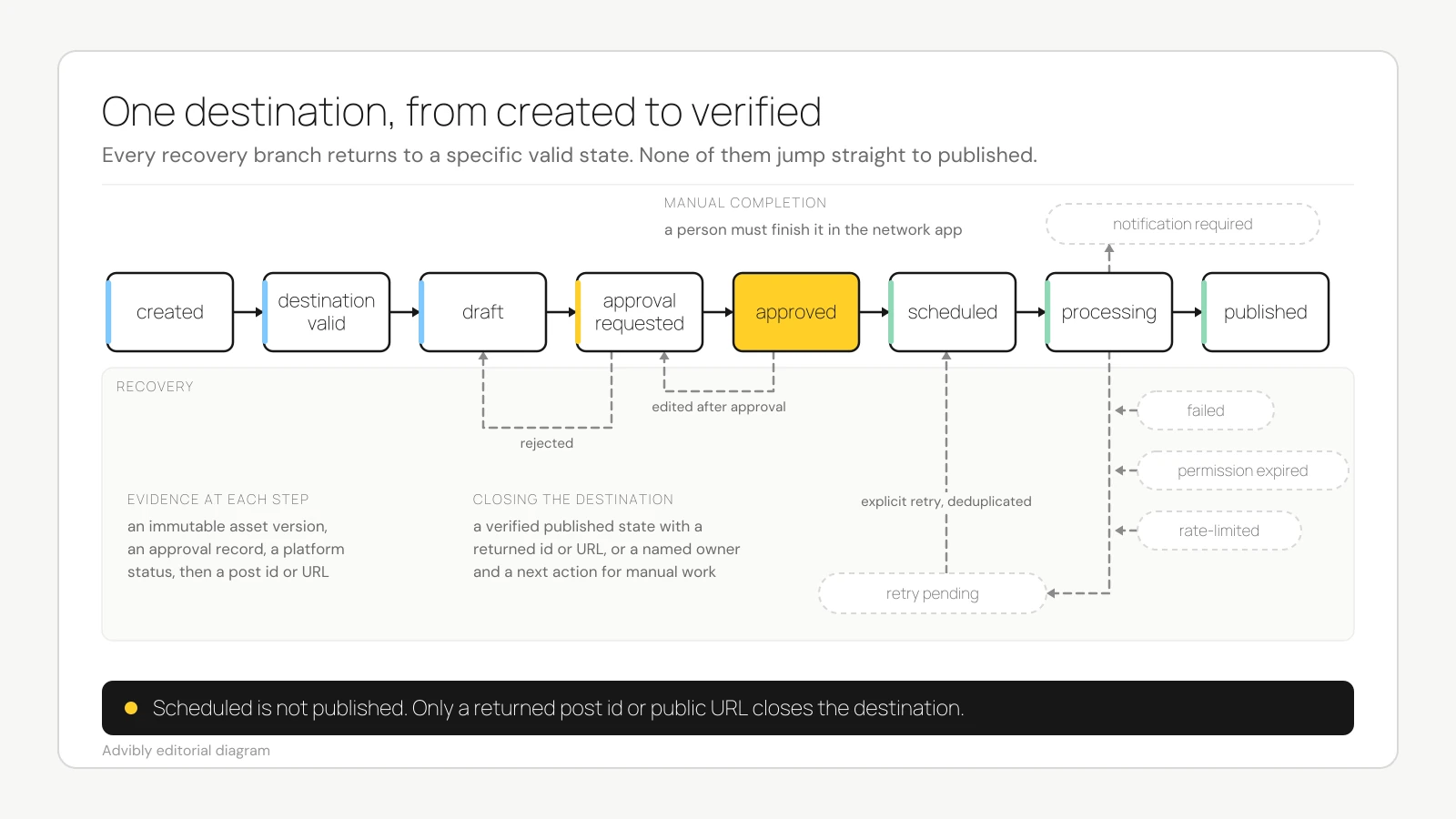
Each transition should answer three questions:
- What changed? The asset was approved, accepted into the queue, sent to the network, or confirmed as published.
- Who or what changed it? A creator, reviewer, agent, scheduler, or social network.
- What evidence exists? An immutable asset version, approval record, scheduled object, platform status, post ID, public URL, or actionable error.
The state names are not theoretical decoration. LinkedIn's official Posts API documents states including DRAFT, PROCESSING, PUBLISHED, and PUBLISH_FAILED, and notes that publication can complete asynchronously. A workflow that stops observing at "scheduled" or even "request accepted" can miss the final result. (LinkedIn Posts API)
Approval should be a permission boundary
An agent can prepare and submit work without holding the authority to publish it. That is a better control than either extreme: manual copy-and-paste for every post or unrestricted agent access to every connected account.
Buffer provides a concrete example. Its current approval documentation says posts created by a user with the Needs Approval role stay as drafts awaiting approval, including posts created through the API, MCP server or a third-party app. The creation route does not bypass that boundary. (Buffer approval documentation)
For an AI-native team, test whether a scheduler can:
- separate create permission from approve or publish permission;
- show the exact asset, caption, destination, account, and time being approved;
- require fresh approval after a material edit;
- record who approved the destination-specific object;
- prevent one channel's approval from acting as blanket campaign approval.
An "approval workflow" that is merely a comment box beside a calendar is not enough. The approval must control the state transition.
Read after write
An agent reporting that it scheduled a post is not proof that the scheduler contains the post. The system should return an object identifier, then read that object back and confirm its destination, asset, time, and state.
Buffer's API troubleshooting guide warns that an AI assistant may report success while nothing appears in Buffer because access has expired or permissions are limited. It also documents duplicate workflow triggers, inaccessible media URLs, unsupported media combinations, and rate limits. (Buffer API troubleshooting)
The safe pattern is:
- create or update the destination object;
- capture its stable identifier;
- retrieve it from the scheduler;
- compare the returned fields with the intended fields;
- observe it through a terminal delivery state.
If retries are automated, they also need duplicate protection. A timeout can mean "nothing happened" or "the post was created but the response was lost." Retrying blindly turns uncertainty into duplicate publication.
Repair is not retry
Connection repair and post recovery are separate actions. Buffer's connection documentation says refreshing a channel does not automatically retry failed posts; the failed items must be retried explicitly. (Buffer channel refresh guidance)
That is a useful design rule even when another scheduler behaves differently. After repairing credentials, the workflow should inspect the failed object, confirm the approved version is still current, and make an explicit retry decision. Otherwise, an old campaign may publish simply because an account was reconnected.
Compare the workflow, not the feature badges
Capabilities and pricing below were checked on September 11, 2026. This is a source-based comparison, not a matched hands-on test of all three products. Advibly’s native tool schemas and one existing published YouTube post readback provide additional operational evidence.
|
Workflow test |
Advibly |
Buffer |
Predis.ai |
|---|---|---|---|
|
Starting context |
Verified product and brand context from websites, app listings, stores, screenshots, and brand assets; multi-format creative generation |
AI-assisted creation and repurposing are documented; equivalent persistent product-source brand memory was not established |
AI content and creative generation are positioned alongside scheduling |
|
Agent operation |
Native MCP supports brand context, image/video generation, social post creation and scheduling, plus post readback. |
MCP and API pages document drafting, scheduling, upcoming-content retrieval, and broader post operations |
API documentation establishes asynchronous content generation; agent-operated scheduling and publishing were not established |
|
Approval boundary |
Native reviewer-role enforcement not established; operator authorization is separate. |
Team-plan Needs Approval role applies to posts created through the dashboard, API, MCP or third-party apps. |
An approval flow is publicly positioned; API interaction with approvals was not established |
|
Destination handling |
Explicit profile targeting and platform_configurations are available; complete preflight validation coverage is not established. |
Per-network customization and destination constraints are documented |
Cross-platform scheduling is positioned; exact validation behavior was not established |
|
Publishing |
Calendar and auto-publishing to connected Instagram, TikTok, LinkedIn, X, YouTube, Facebook, and Threads accounts are publicly claimed |
Broad channel scheduling is documented; some formats use notification publishing |
Scheduling and auto-posting are publicly claimed |
|
Delivery proof and recovery |
Native get_post returns per-platform status, permalink and error; one published YouTube readback verified. Automatic recovery and idempotency not established. |
Failure cases, connection repair, post retrieval, rate limits, and retry needs are documented |
Publishing receipts and retry behavior were not established in the reviewed sources |
|
Best fit |
Brand-context-first creation plus agent scheduling and readback, with operator-managed authorization and uncertain-result handling. |
Documented agent operation, role-bounded approvals, broad scheduling, and operational recovery |
AI generation, design, review, and scheduling inside one dashboard, when agent-side publishing is not required |
No product wins every row.
Buffer is the stronger documented fit when reviewer permissions and established publishing operations are the decisive requirements. Its MCP covers drafting, scheduling and upcoming-content retrieval, while its support documentation explains approval roles and common failure cases. That is a control-model advantage, not evidence that Advibly lacks agent scheduling.
Predis.ai is a credible alternative when the priority is creating and scheduling inside one dashboard. Its public pages connect AI creative generation, a calendar, approval, and auto-posting. However, the reviewed developer documentation establishes asynchronous content generation through a webhook, not an agent-operated approval-to-publication loop. (Predis.ai scheduler, Predis.ai developer documentation)
Advibly is the more specific fit when the agent must make the creative and publish it. Its native advibly_social_create_post accepts completed generation IDs or public media URLs, explicit profile targets and an ISO 8601 schedule. advibly_social_get_post returns the post with per-platform status, permalink and error information. Native reviewer-role enforcement, duplicate-safe submission and automatic recovery remain unverified; do not count an operator’s safeguards as product features.
A supported Advibly creation-to-scheduling example
For one launch graphic, the assistant reads the selected brand with advibly_get_brand and resolves the connected account with advibly_social_list_accounts. It calls advibly_generate_image with the brand_id, a source-grounded prompt and any real screenshot references. Generation uses credits. If the asset is pending, advibly_get_generation retrieves it when ready; the human then reviews the final image and caption.
For the approved LinkedIn post, advibly_social_create_post receives that generation_id in generation_ids, the exact caption, brand_id, the account in profile_ids, linkedin in target_platforms and the approved future ISO 8601 time in scheduled_at. Set draft=false and queue=false for an explicitly timed authorized post; a company-page destination also needs its organization_id in platform_configurations.linkedin. Each call includes its required context. Omitted targets can include all connected accounts; omitting scheduling and draft options can publish immediately.
Keep the returned post ID and retrieve it with advibly_social_get_post. Verify the intended target and time, then check the per-platform status and permalink after publication. If the result is uncertain, reconcile that ID before submitting again. This example follows inspected tool contracts; it is not a newly executed test.
Separately, a September 11 readback of an existing scheduled Advibly post returned posted and a YouTube result of published with this video permalink. That supports one scheduling/publication/readback path, not every platform or automatic failure recovery. The public agent reference names the scheduling tool.
Pricing for the same three-channel starting point
These are USD annual commitments divided by 12, checked September 11, 2026, before taxes, add-ons and extra generation. The common job is one brand publishing to three connected channels. The plans do not contain equivalent creative engines or approval controls.
|
Plan |
Annual bill |
Monthly equivalent |
What the three-channel workflow includes |
|---|---|---|---|
|
Advibly Publish |
$531 |
$44.25 |
Up to 10 social accounts and five brands; creative credits plus scheduling. Native reviewer roles not established. |
|
Buffer Essentials, three channels |
$180 |
$15 |
Scheduling and MCP/API access; one user. Creative image/video production is not a like-for-like included engine. |
|
Buffer Team, three channels |
$360 |
$30 |
Scheduling, MCP/API access, unlimited team members and approval workflows. |
|
Predis Rise |
$664 |
$55.33 |
Up to four brands and 20 social accounts, 3,200 monthly credits and auto-posting. API pricing is linked separately. |
For a small queue, Buffer Free supports three channels and 10 scheduled posts per channel at no subscription cost, with one user. It is a useful distribution-only baseline. Advibly Publish is $59 on monthly billing. Predis Core is not the equivalent auto-posting option: its pricing page explicitly excludes auto-posting.
Do not convert these totals into an unqualified cost per finished campaign. A fair production trial would request the same approved static image and eight-second video, then record the chosen model, actual credit quote, rejected takes and final accepted outputs. Predis lists 15 credits per image and 200 per eight-second standard/UGC video, while its summary output estimates differ; Advibly costs vary by model and settings, and Buffer requires an upstream creative source. A matched generation-cost or quality ranking is therefore not established here.
Pricing sources: Advibly homepage, Buffer’s machine-readable pricing, Buffer plan comparison and Predis pricing.
A worked launch scenario
Suppose an agent prepares a product-launch campaign for LinkedIn, Instagram and TikTok. The following scenario explains a recommended operating model, not a claim that each platform or vendor implements every permission and state shown. Its exact outcome is hypothetical.
1. Create from approved product truth
The agent retrieves the current product facts and creates one campaign concept. It then produces destination-specific copy and media rather than resizing one generic asset at the final step.
2. Validate before review
The LinkedIn object gets the correct document or video format. The Instagram object gets its intended aspect ratio and caption. The TikTok object is checked for native features that may not be available through a third-party publishing API.
This check happens before approval. A reviewer should not approve an asset that the destination cannot accept.
3. Submit without self-approval
Where a native create-only role exists, use it to submit the three drafts without publishing authority. Otherwise, keep publishing calls behind an explicit operator-controlled approval gate. In either case the reviewer must see the exact asset version, caption, account and time. Advibly’s draft flag alone does not prove a separate create-only permission.
The reviewer approves LinkedIn and Instagram, but requests a TikTok edit. Only the two accepted objects move into the queue.
4. Observe delivery
At the scheduled time:
- LinkedIn enters
PROCESSING, then returnsPUBLISHEDwith a post identifier. - TikTok remains in review and cannot be mistaken for scheduled.
- Instagram fails because its account permission expired.
Some network-specific features can require notification publishing and native completion. Buffer's documentation gives adding music to Instagram Reels or TikTok videos as examples of work that may need a person in the network app. (Buffer notification publishing)
5. Reconcile the partial result
The workflow records LinkedIn as published, TikTok as awaiting approval, and Instagram as failed. An operator reconnects Instagram, confirms the approved object is still current, and retries that object explicitly.
The campaign closes only when every destination has either:
- a verified published state and returned identifier or URL; or
- a named owner and next action for manual completion, rejection, or failure.
That is what "end to end" should mean. Not that no human ever touches the workflow, but that no destination disappears between creation and delivery.
A six-part scheduler evaluation
Before choosing a scheduler for an agent workflow, run one representative campaign through these tests:
- Asset continuity: Can the scheduler receive the exact approved asset and its source context without a lossy handoff?
- Destination validation: Does it detect unsupported media, account, and format combinations before approval?
- Authority: Can an agent create and submit without granting it approval or publication rights?
- Observability: Can the workflow retrieve the scheduled object and distinguish scheduled, processing, published, and failed?
- Recovery: Are permission expiry, manual completion, rate limits, partial delivery, and retries visible and actionable?
- Duplicate safety: Can the system retry an uncertain operation without publishing the same post twice?
Choose against your weakest required stage. A beautiful calendar does not compensate for an invisible failure state. Nor does an MCP logo prove that approvals, receipts, and recovery are available.
Where Advibly fits
Advibly is not best understood as a generic social scheduler. It is a brand-context-first AI creative generator with a connected publishing layer.
Teams can save a website, app listing, store, screenshots and brand assets as reusable context, generate creative and schedule supported posts. Advibly supports connected Instagram, TikTok, LinkedIn, X, YouTube, Facebook and Threads accounts; the exact format and permission requirements still vary. (Advibly Publish)
The earned use case is a team whose broken handoff sits between brand-aware creation and the calendar. Advibly can reduce that separation by keeping source context, creative generation, and publishing in one workspace.
Scheduling and publication readback are now established on the native tool surface. What remains unverified is role-based approval enforcement, automatic recovery, idempotency guarantees and complete handling of every partial-failure case. Facebook requires a supported Page destination; YouTube Shorts do not accept a custom cover through the post tool. Check your actual format and connected account before buying on a platform logo alone.
If brand-aware production and the handoff into scheduling are your bottleneck, connect Advibly to your assistant and trial one approved post through readback. If permission-enforced team approvals are non-negotiable, evaluate Buffer Team first. If the work happens mainly in a dashboard, compare Predis Rise against the exact formats and account limits you need.