
A useful product demonstration answers one buyer question with something the viewer can inspect. For a creative engine, an actual input image and the returned creative show an output relationship. Physical behavior and app interactions need real evidence of the action.
Creative-engine output: product source to finished advertisement
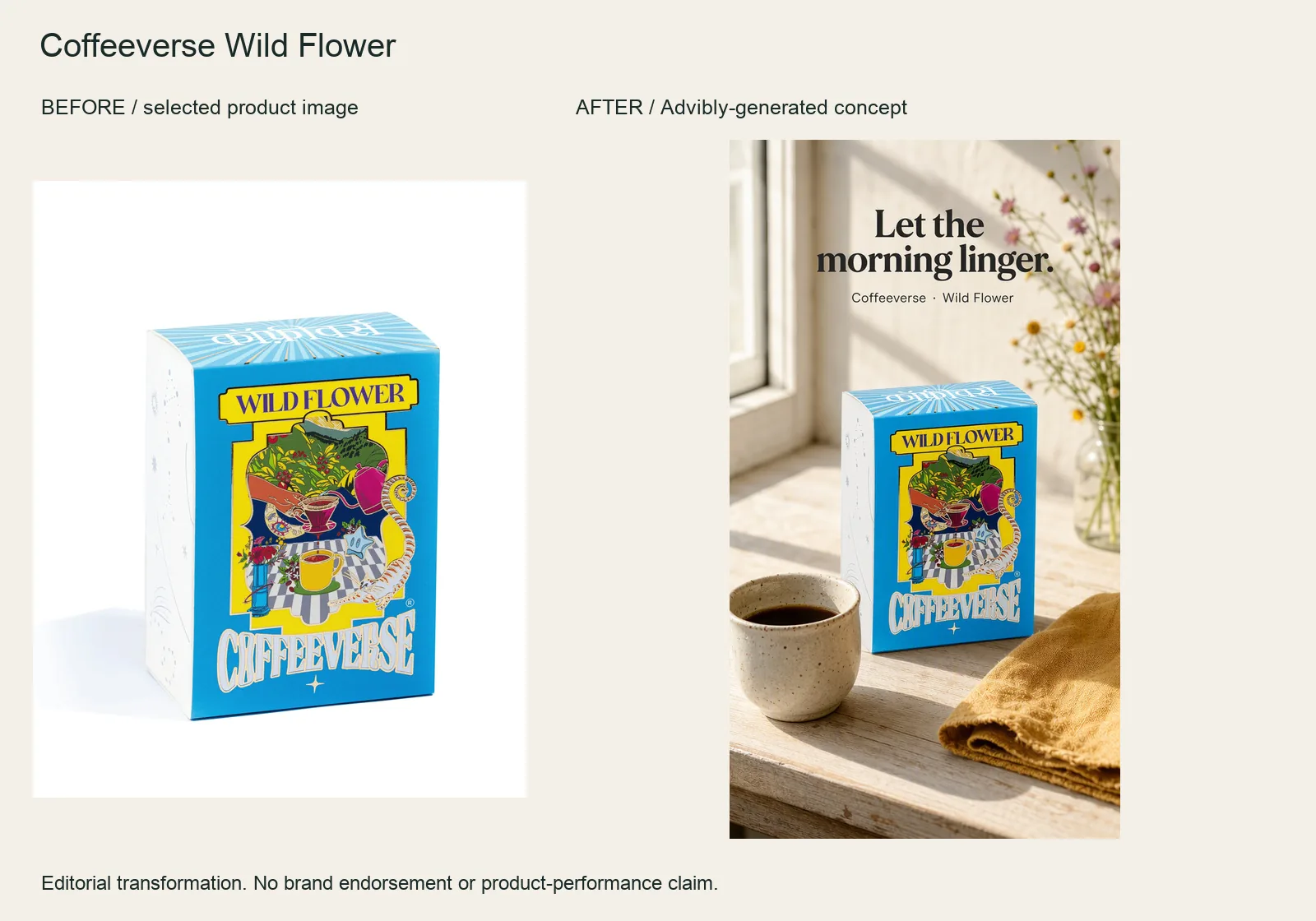
The Wild Flower box starts as an isolated product reference. The finished vertical ad places it beside a cup and morning light, with “Let the morning linger” carrying the occasion.
Supply the box reference, name the morning setting and reserve space for one short line. Check the actual label against the input. The generated cup and flowers are props, not a taste test or a verified description of the coffee.
Coffeeverse Wild Flower product source · Open the finished editorial image
For this example, the selected product image was supplied to Advibly’s native image-generation tool and the resulting file was retrieved and inspected. That establishes this bounded generation job, not a recorded one-click interface walkthrough, generation-speed benchmark or proof of a particular Claude/Codex session. No social post was created.
A useful counterexample: an app visual is not an app demonstration
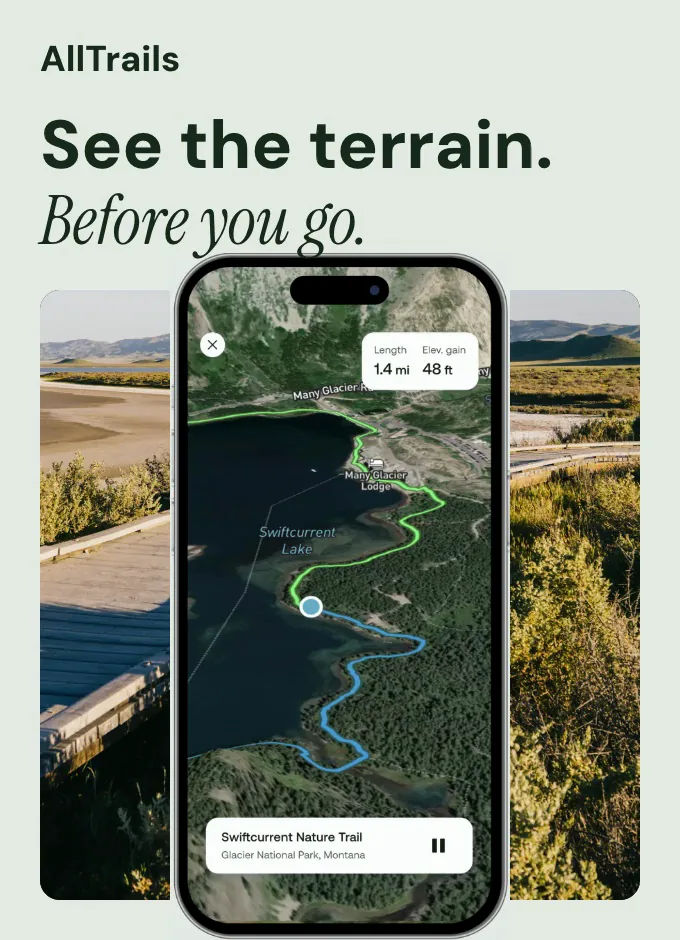
Watch the four-second app-inspired creative (silent MP4). It moves from outdoor context toward a phone-map detail. It is an AllTrails-inspired spec asset, not an official campaign or a screen recording.
The footage gives an app a setting. It does not show someone searching, saving a route or completing navigation. If your buyer's doubt is “Can I save this route?”, the missing shot is the real save action and its resulting saved state. More cinematic scenery will not resolve that doubt.
Use Advibly for supporting visual context, then keep the authentic screen recording as the evidence-bearing shot. This is the difference between demonstrating a creative engine's output and demonstrating the behavior of the app depicted inside that output.
Build supporting product creative in Advibly. Generate your first creatives for free. Use the diagnostic below to identify which part of your own demonstration still needs real capture.
Key takeaways
- Choose the buyer doubt before choosing the video style or length.
- Show the consequential action, not just a beautiful before-and-after pair.
- Use real captures for factual product behavior; use labeled animation to explain it.
- A completeness score helps find missing shots, but cannot excuse an unsupported claim.
Eight product demonstration formats, with examples
These are eight production patterns, not eight performance-ranked campaigns. The first-party references below were checked September 12, 2026. Some are published guides or historical examples rather than demonstrations we personally tested; the proposed adaptations are our editorial recommendations.
1. Direct task completion: show the core job
The viewer wants to know whether the product performs an action. Give them an inspectable input, the operation and its result.
Blendtec's official Will It Blend? collection describes tests involving objects such as rake handles and an iPhone. It is a memorable stress-test reference, not evidence that every normal blending task has the same outcome. We are referencing the brand's published collection, not reporting an independently repeated test.
Adapt the structure, not the stunt. For a kitchen tool, a useful sequence could show the measured food input, the ordinary operation and the resulting texture. Don't replicate hazardous tests or substitute spectacle for the everyday job buyers care about.
2. Mechanism reveal: explain what the camera cannot see
A mechanism demonstration connects an explanation of the inside to a visible effect on the outside.
Dyson's 2021 Demo VR launch material describes virtual product trials, visual animations and engineer explanations. It is a historical example of making internal technology understandable, not a claim that the same VR experience remains available today.
For your product, pair an approved cutaway with a real operating shot. A labeled animation of airflow can explain the intended path; actual performance needs its own evidence. An impressive rendered particle stream is not a measurement.
3. Guided first use: complete the first successful task
First-use demonstrations answer “Can I get started?” The useful sequence is preparation, the necessary controls, the first task and a recognizable completion state.
Apple's iPhone setup guide is an instructional reference: it identifies preparation, shows the power control and distinguishes setup with another device from manual setup. It is not a filmed onboarding trial or evidence of how long a new user takes.
Borrow that practical structure. For a label printer, show the correct roll being loaded, the connection step, a test label and the label applied to its intended surface. End there. A tour of settings that never prints anything leaves the original doubt unresolved.
4. Option selector: keep the job fixed while changing the option
An option demonstration helps someone choose between sizes, modes or configurations. Keep the task and the relevant conditions stable so the difference means something.
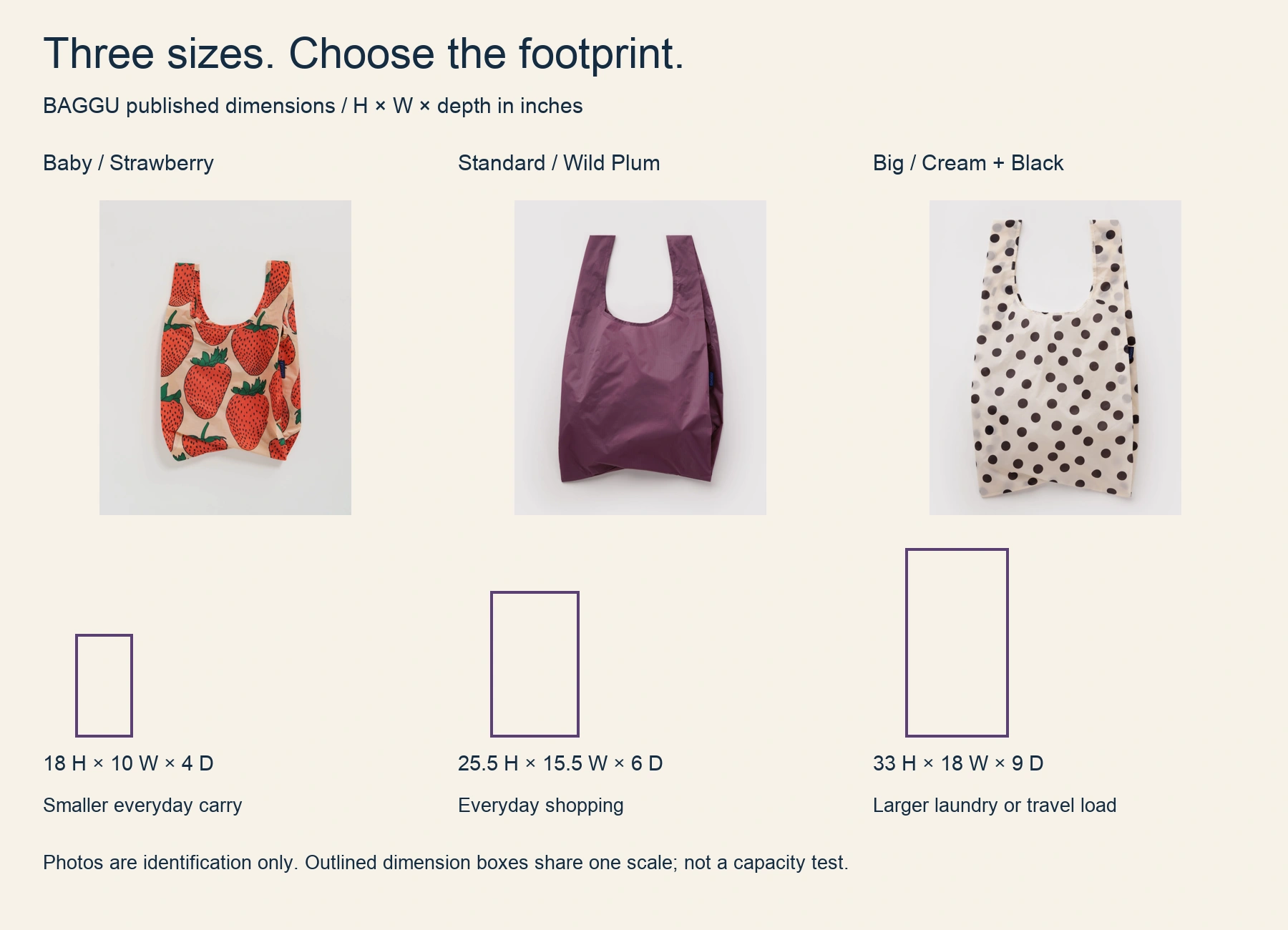
The real Baby, Standard and Big BAGGU variants are identified above. Manufacturer dimensions drive the outlined boxes at one scale; photographs identify the products and are not a measured capacity comparison.
Compare published H × W × depth: Baby 18 × 10 × 4 inches; Standard 25.5 × 15.5 × 6; Big 33 × 18 × 9. Choose around the space and load you need, then inspect the exact product. Do not infer what fits from a differently scaled photograph.
Baby Strawberry source · Standard Wild Plum source · Big Cream and Black Polka Dot source. Dimensions checked September 12, 2026; this is an editorial comparison, not brand endorsement.
Apple's iPhone comparison page is a reference for organizing model choice, not a controlled head-to-head performance test. To turn a comparison into a demonstration, perform the same buyer task with each relevant option and show the trade-off.
For example, place the same desk items in two organizer layouts. Show which arrangement accommodates the ruler without obscuring the other tools. Don't fill one with pencils and the other with bulky scissors, then call that a capacity comparison.
5. Workflow walkthrough: finish beyond the editor
A workflow demonstration must show where the input comes from and where the completed work goes.
Slack's Workflow Builder guide documents workflow steps, connectors and activity showing progress, completion or errors. Connector steps can require authentication and approval. Those details matter when a demonstration depends on another service.
A proposed example is a request form that posts the supplied details to the intended channel. Record the input and the resulting message, not only the workflow diagram. If your claim includes assignment in another system, show that actual downstream state too. A successful-looking editor is not evidence that the handoff happened.
6. Self-directed tour: let the buyer inspect the relevant path
Self-directed demonstrations let visitors choose the job they want to understand. The interaction can be a click-through tour, separate videos or a working sandbox, but those are different experiences.
Slack's features page links to an interactive product tour. Canva's Enterprise demo page advertises four short videos for Enterprise, Business, Marketing and Real Estate and includes a form. These are examples of a tour entry point and audience-specific demo selection, respectively; we have not completed their gated paths or verified every branch.
For your own tour, offer choices such as “Create a request” and “Review an incoming request.” Make each route end with a meaningful result. Don't promise an interactive product trial when the visitor will receive only a recording or a sales callback.
7. Expert live demonstration: let a real question change the route
A live demonstration earns its place when a buyer's condition matters more than a fixed script.
Dyson Live describes livestream shopping events with experts and stylists, live viewer questions and shopping. That establishes the event format, not proof of any particular viewer's result or the availability of an event at the moment you visit.
In your own session, state what was prepared, take a relevant question and show the response using the actual product. If the requested condition cannot be demonstrated safely or reliably, say so. A prerecorded segment can be useful within a live event, but identify it as recorded.
8. Before-and-after transformation: show the intervention too
This format answers “What changed because of the product?” A paired image is not enough when an unseen edit could explain the difference.
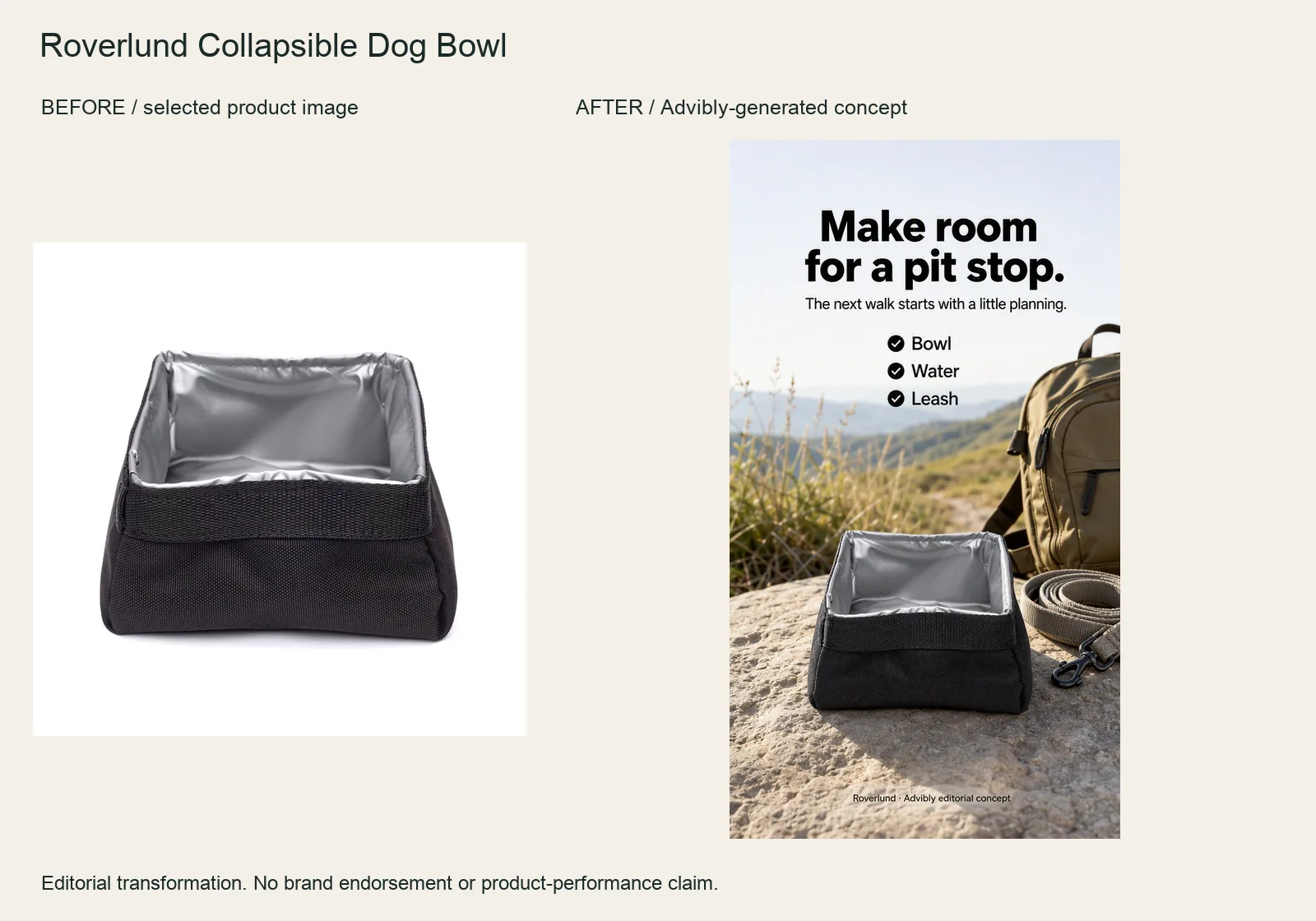
The rectangular Roverlund bowl moves from its product image into an outdoor scene with a short “Bowl / Water / Leash” checklist. The product is still the visual anchor.
Use the actual bowl reference and explicitly preserve the square rim and dark sides. Ask for a packing context, not a dog performing a behavior. An empty generated bowl is not a capacity, safety or durability test.
Roverlund Collapsible Dog Bowl product source · Open the finished editorial image
The supplied image and returned native output establish a creative intervention. They do not demonstrate the physical bowl folding, holding water or being used by an animal.
An illustrative digital example: preserve an original product photo, record the background-removal operation and show the exported result against a contrasting backdrop so edge defects are inspectable. Label it as a digital edit. Don't imply that the physical product changed.
For a physical transformation, keep the same item, lighting and relevant conditions, and show the action between the two states. This format is inappropriate when the asserted result was generated instead of observed. Use the wider before-and-after advertising guide for transformation-claim planning if that becomes the main task.
Diagnose the concept before producing it
Use these seven checks to find the missing part of the argument. Give each a zero or one, then review what failed rather than relying only on the total.
|
Check |
What a pass looks like |
|---|---|
|
One doubt |
The buyer question is specific enough to answer in this demo. |
|
Visible baseline |
The viewer can inspect the input or starting condition. |
|
Product action |
The consequential operation is visible rather than asserted. |
|
Decision evidence |
The result helps the viewer choose or understand use. |
|
Matched conditions |
Relevant variables are controlled or disclosed. |
|
Claim fit |
Text and narration stay within what the evidence supports. |
|
Completion |
The finished task and a proportionate next action are clear. |
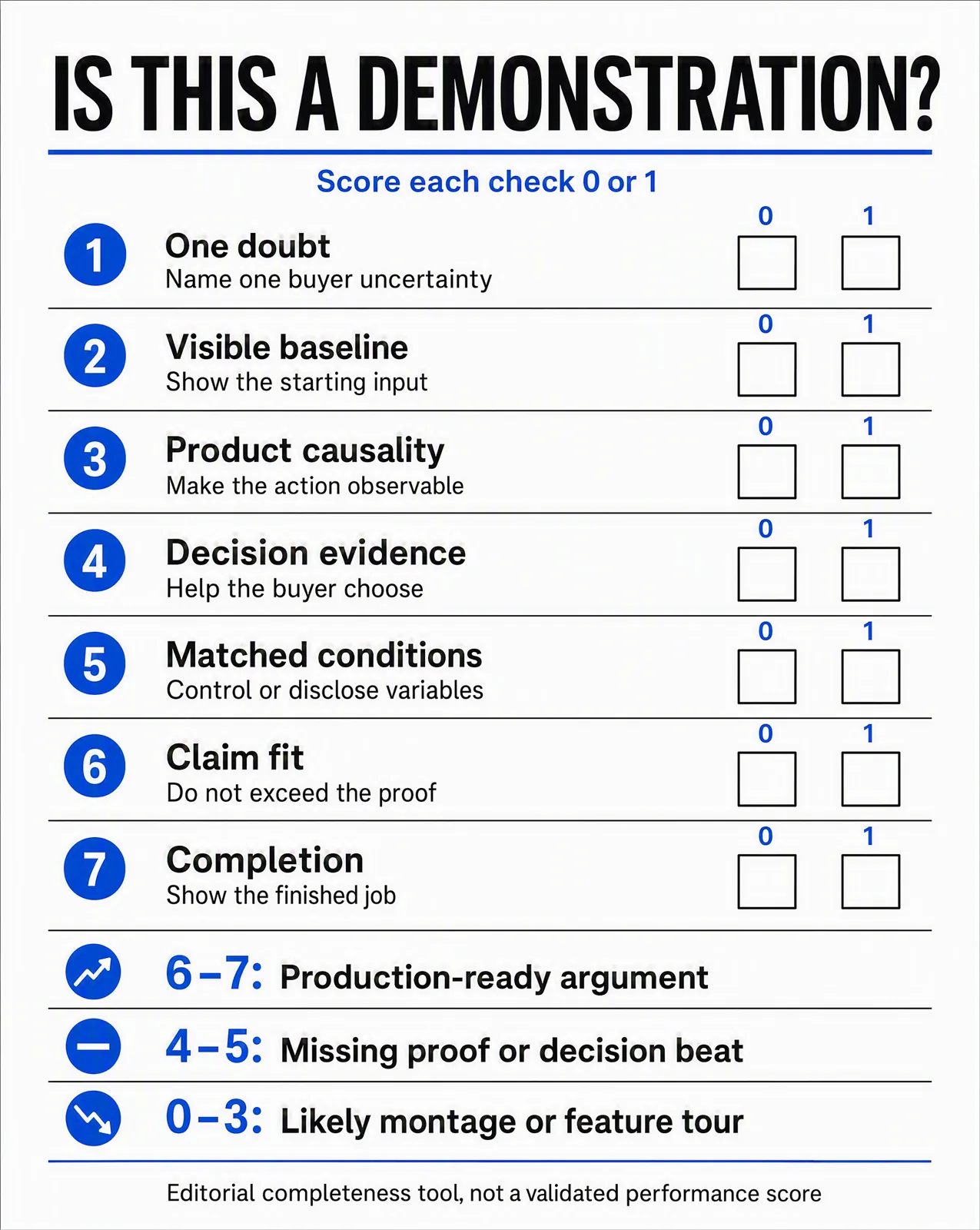
The scorecard is an editorial aid. Its 6–7 band is not automatic approval: missing causality, mismatched conditions or an unsupported claim still require repair, regardless of the total.
Treat 0–3 as a sign to rebuild the concept; 4–5 means a proof or decision beat needs work. At 6–7, inspect the actual failures before refining the craft. A six-point video that hides the operation still has a central problem.
A concrete diagnosis: a clip opens on three pencils beside an empty organizer, cuts to the filled organizer and ends with a layout link. It can show a baseline and an outcome while concealing whether the items actually fit as depicted. Add a continuous placement shot with the same items, then a close-up of their position. Don't try to solve missing evidence with a louder voiceover.
Choose the shots that carry the evidence
Three to five well-chosen shots can make a small demonstration executable. The number is a planning suggestion, not a performance formula.
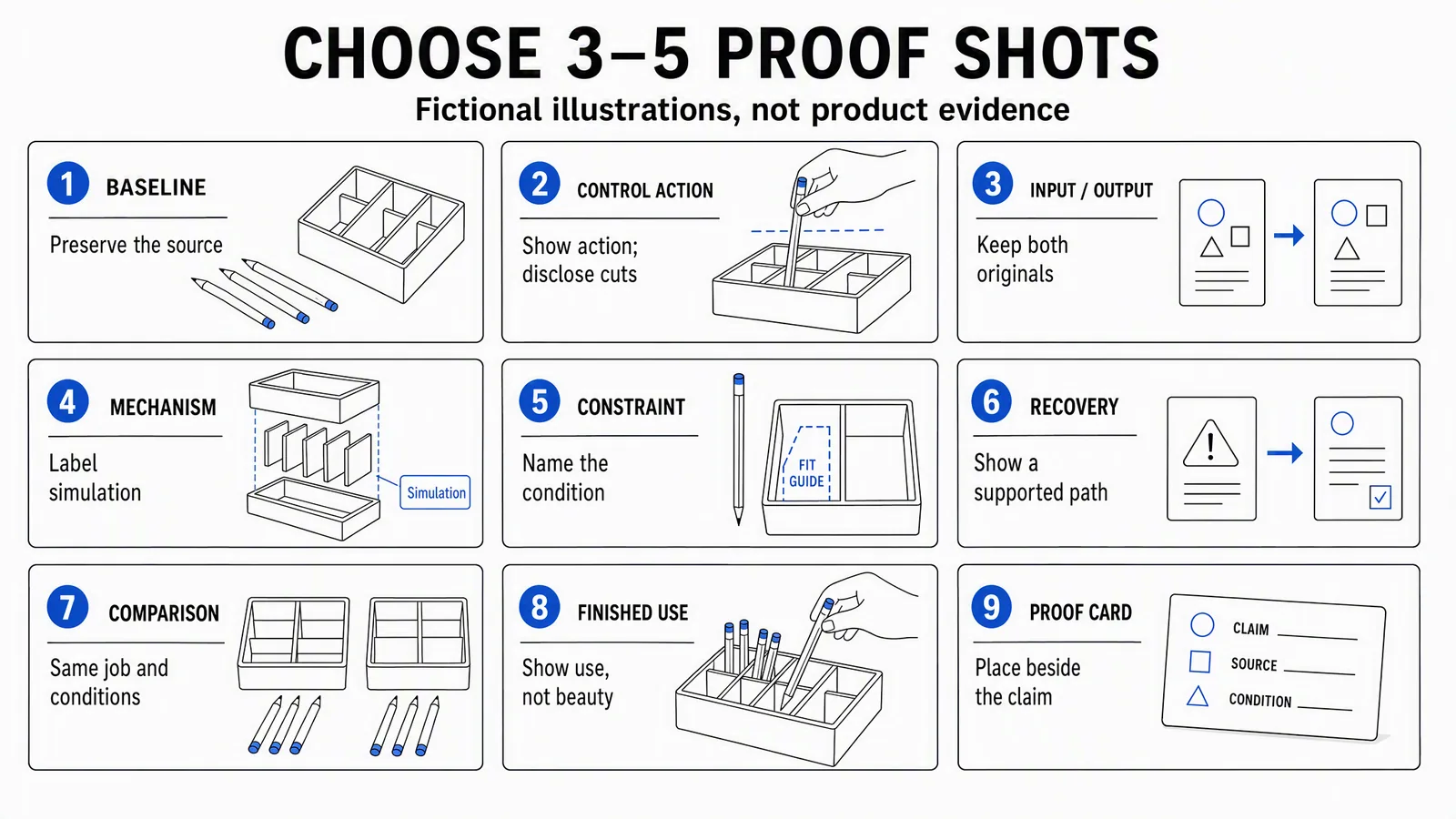
These neutral illustrations are a shot library, not footage of a real product test. Select the shots your claim needs; don't make nine scenes simply because nine options are shown.
The accessible version of the library is below. A single shot can do more than one job when its evidence remains clear.
|
Shot |
Evidence and control |
|---|---|
|
Baseline |
Show the original item or file; retain the source. |
|
Control action |
Keep the consequential operation visible; identify material cuts. |
|
Input/output |
Show the real source and actual result at comparable scale. |
|
Mechanism |
Label animation or simulation and use approved product information. |
|
Constraint |
Name the condition being tested without generalizing beyond it. |
|
Recovery |
Demonstrate a real supported response to the relevant failure. |
|
Comparison |
Use the same job, items and meaningful conditions across options. |
|
Finished use |
Show the output being used, not only presented beautifully. |
|
Proof card |
Put the claim, condition and source beside the supporting shot. |
A filled product demonstration brief: the desk organizer
The following is a fictional production exercise, not a product test. It develops the approved illustrative storyboard into a brief a small ecommerce team could adapt after supplying its own product and evidence.
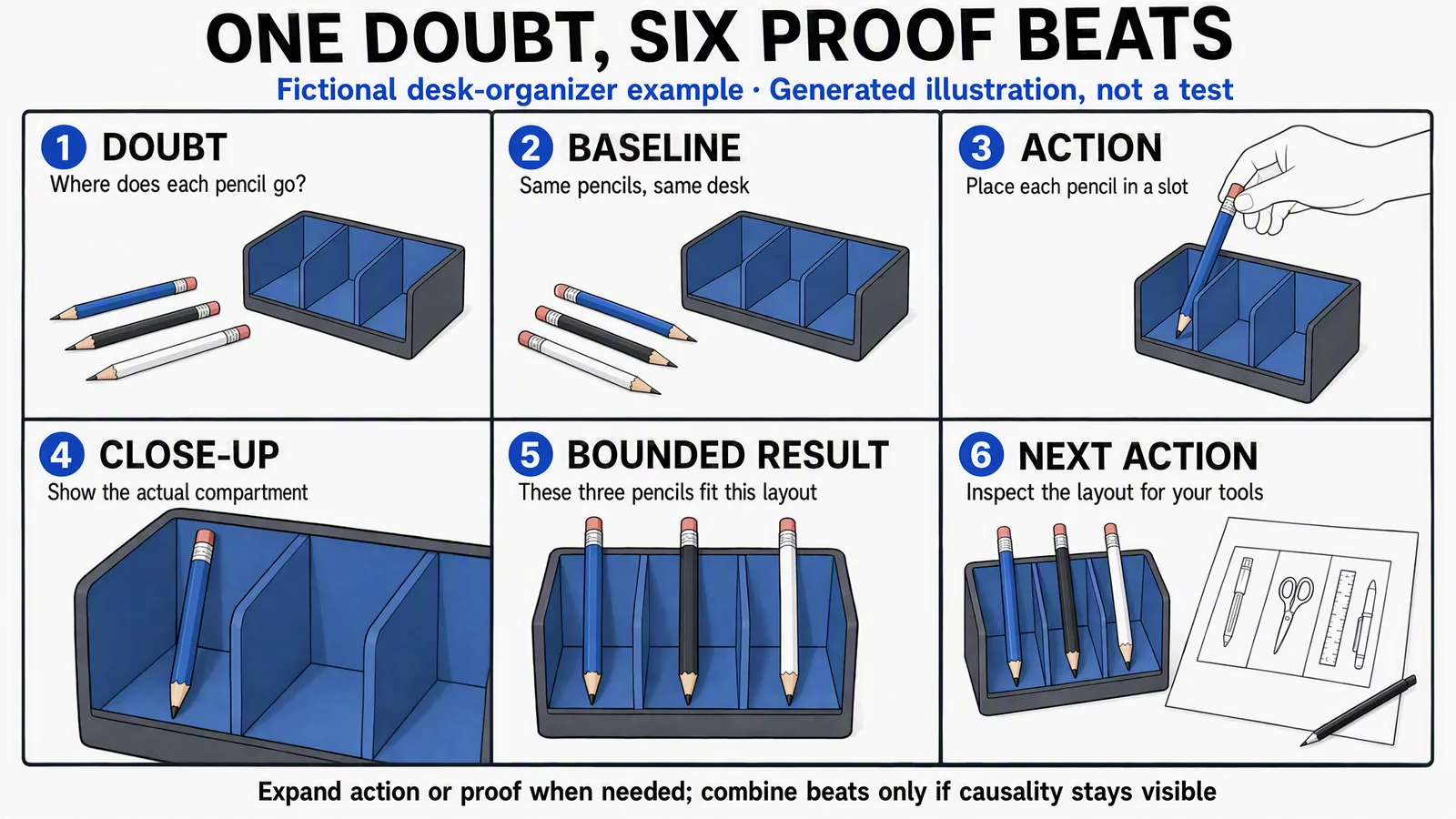
The storyboard's fit statement belongs to a fictional example. Before making that statement about a real organizer, replace the illustrations with the actual product, specified items and a recorded fit demonstration.
Audience, decision and doubt: someone choosing a desk organizer wants to understand where three frequently used pencils would sit. The question is “Where does each pencil go?” It is not “Will this hold every stationery item?”
Product truth and input: use the actual three-compartment SKU, approved dimensions, the same blue, black and white pencils throughout, and a clear desk. Record the item sizes before the shoot. No dimensions or capacity figures are invented for this exercise.
Action and result: place each pencil in the intended compartment, then show the final layout close enough to inspect. The proposed claim is limited to those items and that arrangement, and may be used only after the real capture supports it.
Proof shots and variables: use the baseline, placement action, detail and finished-use shots. Keep the organizer and pencils unchanged. Maintain camera framing and lighting where they affect interpretation; disclose any cut that interrupts the action. Keep the source take even if the final edit is shorter.
Boundary, format and next action: produce a short vertical demonstration and an accompanying layout carousel. Don't claim universal fit, extra capacity or improved productivity. Direct the viewer to the actual dimensions and layout guide so they can compare their own tools.
Evidence owner: the product owner verifies the SKU, input measurements and wording; the editor checks continuity and labels. Those are production responsibilities in this proposed brief, not claims about native software approval features.
Turn the brief into six readable beats
- Doubt: show the three pencils beside the organizer and ask where they go.
- Baseline: establish the unchanged items and empty compartments.
- Action: place the pencils without hiding the consequential movement.
- Detail: show the actual compartment and item position.
- Bounded result: describe only the arrangement the capture demonstrates.
- Next action: point to the real layout and dimensions, not an unsupported performance promise.
Combine the first two beats if they read clearly in one shot. Give the placement enough screen time to understand it; don't accelerate it merely to meet an arbitrary runtime. The three pencils must remain the same three pencils across the edit.
Produce a campaign around the demonstration with Advibly
Keep the factual demonstration as the anchor, then use Advibly to produce the related creative and publishing workflow. Start with the product page, actual photos or screen captures, approved claims and the assets already associated with the correct brand.
Save that context in the brand kit. If the buyer doubt is still vague, use Brand Intelligence to organize product research and customer language into a brief. Check the underlying evidence before turning research wording into a product promise.
For the organizer example, the creative set could include the real demonstration, a matching thumbnail, a layout carousel and a clearly labeled Whiteboard Doodle explainer showing how to compare one's tools with the supplied dimensions. Advibly supports video production, captions and assembly, along with static images and carousels. The generated explanation complements the fit capture; it doesn't replace it.
Through the portal or a compatible MCP client, reuse the correct brand assets and prepare channel-specific versions from the same brief. Keep the product geometry and proof visible when reframing. A cropped close-up that hides the base of a pencil can weaken a fit demonstration even when it looks attractive.
After review, schedule the social posts to the connected destinations and check the publication status. Scheduled, processing and published are different states. Use post-publishing analytics and the questions people actually ask to decide which doubt deserves the next demonstration, without treating views alone as evidence of product performance.
On the configured Instagram post, a “Comment LAYOUT” automation can deliver the actual layout-guide link. Choose the keyword, destination and button wording; a configured trigger is not proof that a particular person received a DM. Other networks need their own supported next action.
The final check: can a viewer explain what happened?
Ask someone unfamiliar with the product to identify the input, the action, the outcome and the remaining limitation. Treat that as a small editorial check, not a validated usability study. If they can repeat the slogan but cannot explain the operation, repair the missing shot.
Keep the raw evidence, the approved wording and the final export together. Then create the supporting product creative around the demonstration, rather than asking a generated visual to supply proof the product never showed.