

Evaluate Synthesia for avatar-led learning, Creatify for product-ad variations, InVideo AI for model-assisted editing and stock footage, and Advibly for a product-led campaign across formats. Keep HeyGen if its presenter, translation and team workflow already delivers the result you need. These are four alternatives for different jobs, not a ranking of output quality.
The useful question is what must change. If your team spends hours rebuilding product context for every social asset, another avatar library might not fix the problem. If your bottleneck is reviewing translated training in an LMS, a broader campaign generator might not fix it either.
A short HeyGen alternatives selector
The shortlist uses current official product information, checked September 12, 2026, plus Advibly's maintained product reference. We selected a small set with different production emphases. We did not run a controlled generation benchmark, measure conversion performance or test every plan's interface.
|
Job causing the switch |
First evaluation and the decision to test |
|---|---|
|
Presenter-led training or localized instruction |
Synthesia versus your eligible HeyGen plan. Test the actual learner interaction, review and delivery requirement. |
|
Several ad directions from a product page |
Creatify. Test whether the URL-to-ad workflow reduces the work needed to produce approved variations. |
|
A film assembled from footage, stock and generated scenes |
InVideo AI. Test model access, editing control and the complete cut, not an isolated generated shot. |
|
One product brief across videos, images, carousels and social publishing |
Advibly. Test reusable brand context and the handoff from creative production to distribution. |
|
Existing presenter and translation production already works |
Keep HeyGen. Improve the specific bottleneck before paying to migrate the entire workflow. |
The vendor sections below link the defining capabilities to official evidence and specify what to test. A listed use case is not an exclusive capability: several tools can serve more than one row.
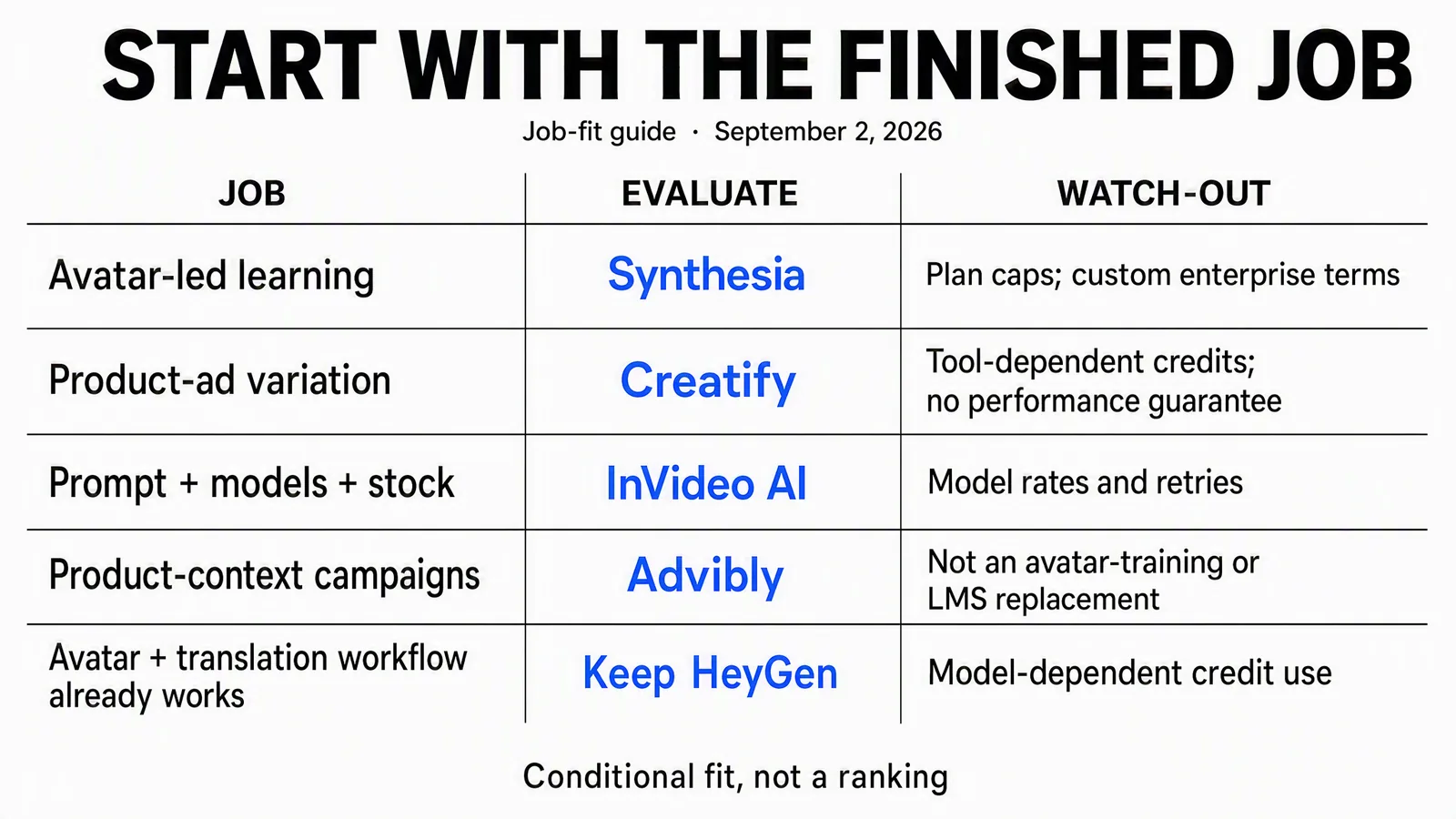
Preserved September 2 job-fit diagram, not a ranking. Its Synthesia route means evaluate a learning workflow, not that HeyGen lacks SCORM or that every Synthesia plan includes it. The current text table supplies the plan-aware comparison.
A product-ad example to make the shortlist concrete
For the product-ad row, start with a real product source rather than an abstract avatar-quality contest. This existing Advibly demonstration pairs Coffeeverse's pack photo with a frame from a creator-style coffee ad. It makes a specific review task visible: does the generated scene preserve the product and communicate the approved angle?
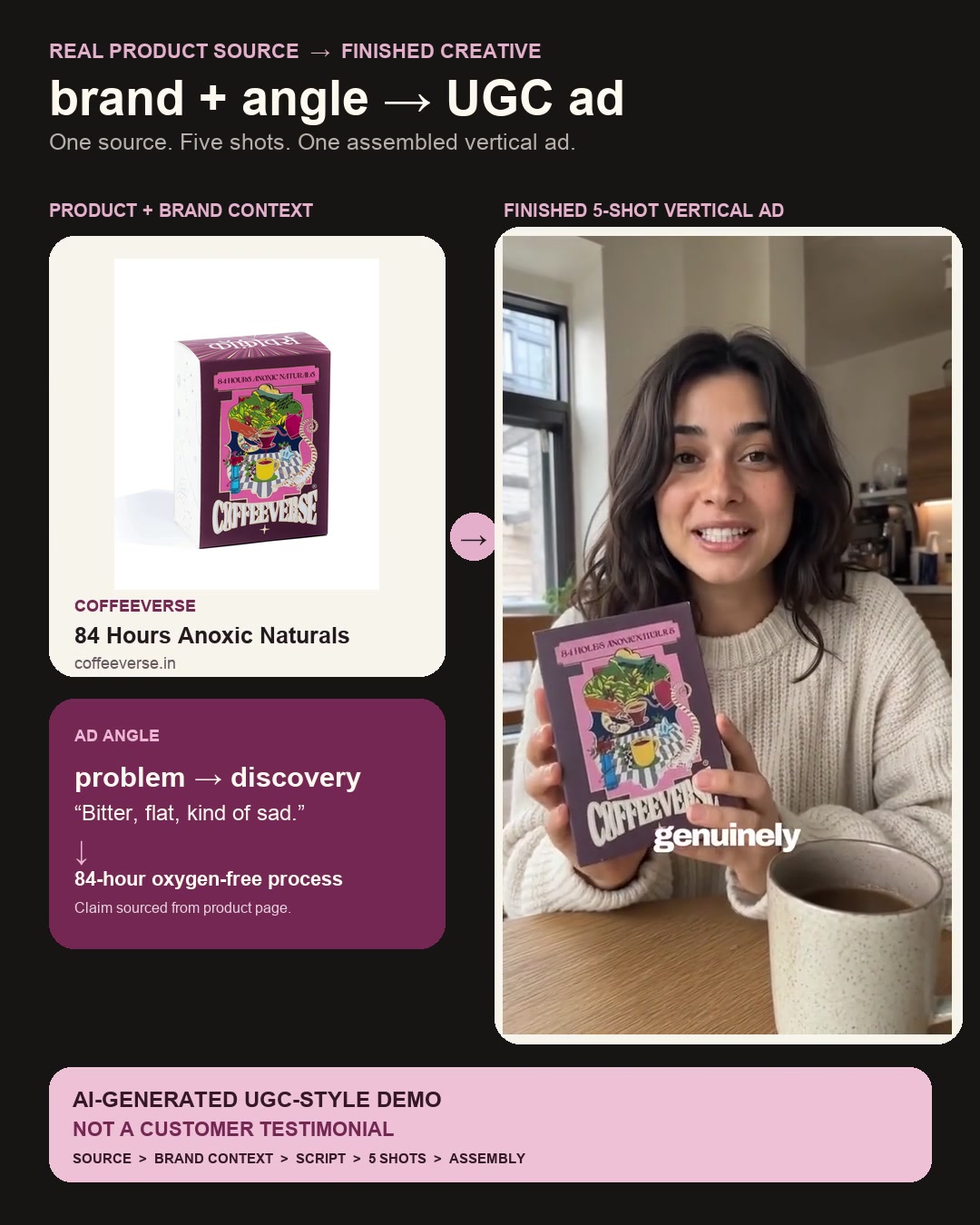
Existing Advibly UGC-style demonstration, shown as a still. The creator is synthetic—not a customer, reviewer or Coffeeverse spokesperson. The permanent non-testimonial disclosure is part of the asset. This is not a HeyGen or Creatify output and was not produced as a matched vendor benchmark.
The package changes a product reference into a problem-to-discovery story with creator scenes. To attempt the format in Advibly, supply the product URL and cleared pack image, check the saved brand context, approve a script and storyboard, then generate the clips and assemble the reviewed result. Keep the product large enough to inspect; reject garbled labels and invented personal-experience claims. Review voices and motion in the full film, not this still alone.
Inspect the current UGC workflow, example and documented limitations.
Take that same product, angle and acceptance rule into a HeyGen or Creatify pilot if the actor-led ad is the job. Add static assets and social publishing only if the brief actually needs them. A nice Advibly sample is evidence of an available creative format, not evidence that replacing HeyGen will save money or improve results.
First establish what HeyGen already does
HeyGen's public plan page includes avatars and translation, and its Business plan lists interactive video, SCORM export, LMS integrations, SAML/SSO and collaboration. It is therefore misleading to recommend leaving simply because a rival lists “SCORM” or “team features.” Compare the particular requirement and eligible plan on both sides. HeyGen pricing and features.
For example, “we need training video” is not a complete requirement. “The learner must answer a question, resume in our LMS and have the required completion status recorded” is testable. Ask the person responsible for that LMS to verify the exported package and reporting behavior in the intended environment. A feature label does not establish that the complete handoff works for your organization.
Check legacy-plan consequences before cancellation
HeyGen's credit guide distinguishes newer credit-based plans from legacy unlimited plans. It says a legacy subscriber who cancels or moves to a credit-based plan cannot switch back to that old legacy plan. Confirm which system your account uses before treating cancellation as a reversible experiment.
The guide also distinguishes operation rates and recovery options: Creator and Pro do not use one-time credit packs on the newer system, while Business supports additional purchases. Don't assume another vendor's top-up or rollover rule applies to HeyGen. You can evaluate a new workflow without immediately abandoning the old commercial terms.
1. Synthesia: evaluate the learning workflow, not just the avatar
Synthesia is a useful shortlist candidate for an avatar-led lesson, internal instruction or localized presenter module. Its public offering includes interactive video and enterprise learning features, with SCORM and SSO positioned on Enterprise. Its API access is limited to Creator and Enterprise. Synthesia plans; API eligibility.
For a learning pilot, choose one lesson with a real review problem: a technical term, a changed policy or a screen sequence that must match the narration. Use the same approved script and acceptance criteria in Synthesia and HeyGen. Review the pronunciation, captions, required interaction and destination behavior. Then revise one factual sentence and record the work needed to deliver the corrected version.
Choose it when the tested learning process is a better fit, not merely because it advertises learning features. Keep HeyGen if its eligible plan handles that same job satisfactorily and the new workflow creates more review or migration work.
Localization needs a complete brief. Synthesia's dubbing guide says dubbing translates spoken audio, not text embedded in the source video. If a lesson contains English labels inside a screen recording, include replacing those labels and reviewing the target-language result. Don't count an audio-only translation as the whole localized lesson.
2. Creatify: start from the product page and test ad variation
Creatify's URL-to-video workflow takes a product link and uses product assets and a script to construct a video ad. Its offering also includes AI actors and ad templates. That makes it a relevant evaluation when the recurring task is turning a product into several ad directions, rather than delivering a fixed presenter lesson. Current plans.
A useful pilot is three genuinely different hooks for the same product. For a hypothetical travel organizer, one hook could show packing order, another could explain access to small items, and a third could demonstrate the verified compartments. Hold the product, offer and destination constant so the review has something meaningful to compare.
Check the imported information before generation. A product page might mix a current price, an old promotional image and features from a different variant. A generated actor should not describe unverified personal experience. Use actual product footage where the audience needs proof of a compartment, material or mechanism; a plausible generated scene is not a product test.
Choose it if that URL-to-ad process improves your approved-variation workflow. If the task remains a single presenter explanation with established templates, compare the proposed benefit against staying in HeyGen. Neither an ad template nor more variations proves better campaign performance.
3. InVideo AI: consider the full editing job
InVideo's current product surface emphasizes an editing agent, a multitrack timeline, storyboarding and uploaded footage, alongside generated media and stock. Its plan page makes access to models and features dependent on the selected plan. This is a broader editing evaluation than asking which tool has the largest avatar collection. InVideo product; plan options.
For a short explainer, give the pilot a script, two owned screen recordings and a defined need for supporting footage. Ask for a complete cut with the correct sequence, readable captions and a usable ending. Include one requested edit, such as replacing a stock shot while keeping the narration and timing intact.
Choose it when assembling and revising that mixed-media film is the work you need to improve. Check stock rights, source attribution where required, selected-model access and human finishing. A cheap generation at one setting does not price a narrated film assembled from several operations. HeyGen also offers video and asset-generation workflows, so test the editing difference rather than assuming an avatar-oriented product cannot do anything else.
4. Advibly: carry product context into a campaign
Advibly fits when the deliverable is a connected set: a product demonstration, an animated explainer, supporting images, a carousel and posts for the launch period. Start from a website, store or app listing, real screenshots or product photos, and the assets already approved for the brand. Save that context in the brand kit and use Brand Intelligence to develop the sourced brief.
For a fictional app launch, use real screens in a feature walkthrough, a Whiteboard Doodle explainer to clarify the problem, and a LinkedIn carousel to summarize the steps. Create related thumbnails and channel-specific captions from the same brief. Reuse approved assets before generating replacements, and check factual screens and claims separately from illustrative scenes.
The workflow continues through scheduling and publishing, publication status and analytics. A relevant Instagram post can include a configured comment-keyword flow to deliver an existing setup guide. The guide, destination and promise must agree; configuring the trigger does not prove delivery to a particular recipient.
You can work in the portal or coordinate supported operations through a compatible assistant and MCP. Reusable skills supply methods for production tasks; they are not evidence that every client's controls are identical. Keep each client's saved brand and connected destinations separate when producing agency work.
Choose this route when maintaining context across formats and distribution is the job. It does not establish parity with HeyGen's avatar library, translation coverage, learning exports or enterprise controls. An existing presenter workflow and an Advibly campaign workflow can coexist; replacing every tool is not a requirement for using a better process for one part of the work.
Entry prices are a filter, not a value ranking
The following public USD references were checked September 12, 2026. They identify entry offers and internal units, not equivalent outputs. Prices and plan access can vary with region, billing selection and account terms; no authenticated checkout was tested.
|
Public entry reference |
What to check for the actual job |
|---|---|
|
HeyGen Creator: $29/month, 600 monthly credits |
Model and operation costs, eligible features and whether your account is on a newer or legacy plan. Source. |
|
Synthesia Starter: $29/month, 1,200 monthly credits |
Required delivery features and chargeable editor work; don't assume all credit-consuming operations use the same rate. Price; credits. |
|
Creatify Starter: displayed $39/month, 100 monthly credits |
Selected billing terms, the particular creation tool and actual credit use for approved ads. Source. |
|
InVideo Basic: $9/month, 190 monthly credits |
Selected models and complete production workload. The captured annual alternative is $108 upfront, not a different monthly saving. Source. |
|
Advibly Create: $29/month, 30 monthly credits |
The selected generation workflow and the plan for brands, calendar and connected accounts. Publish is listed separately at $59/month. Source. |
For Synthesia, the USD FAQ is the reference; our browser's plan selector localized to INR. For InVideo, we use the current rendered Basic configuration, corroborated by its current product page, rather than the older Plus configuration in the previous version of this article. Replacing one number while keeping an old credit system would produce a misleading comparison.
Free starts are useful for screening a workflow, but don't assume they include paid export, branding, duration or team entitlements. Advibly offers starter credits for initial creatives; the number of outputs depends on the settings and model. Its illustrative output counts are not a guarantee of a fixed number of videos.
Never divide one vendor's credit balance by another's and call the result better value. Compare the cost of the same accepted work, including rejected attempts, human finishing, missing steps and unused subscription capacity. Keep any paid media budget separate from creative production and social publishing.
Run a filled switch test
Here is an illustrative brief for a fictional appointment-booking app. It is a planning example, not a claim about results from these tools.
Deliverable: one 45-second vertical feature walkthrough, three distinct opening hooks, a five-slide LinkedIn PDF carousel, thumbnails and platform-specific launch captions. The app's real booking screens must remain accurate. The launch owner wants the approved social posts scheduled and their publication status checked.
Inputs: the current app listing, three approved screen captures, logo files, brand voice and a setup-guide URL. The content owner verifies the guide before any caption promises it. No customer testimonial, invented appointment data or generated replacement interface is allowed.
Shortlist: keep HeyGen as the baseline for a presenter introduction if that component already works. Evaluate Advibly for the combined campaign and publishing handoff. If the brief changes to a batch of product ads, add Creatify to that pilot; if it changes to a longer mixed-media film, evaluate InVideo. A tracked training course would require a different brief and eligible learning plans, not the same scorecard with a new heading.
Acceptance: each video shows the right booking sequence, each hook promises what the walkthrough demonstrates, the PDF is readable, and every destination and caption matches the approved offer. The owner reviews the scheduled account and post state separately from the creative. A visually attractive clip with a fictional interface fails, even if it was cheaper to generate.
Record: attempted outputs, accepted deliverables, net credits, human minutes, missing steps and recurring subscription cost attributable to this work. Log migration setup separately. This gives the team a decision record instead of an impression formed from the best-looking sample.
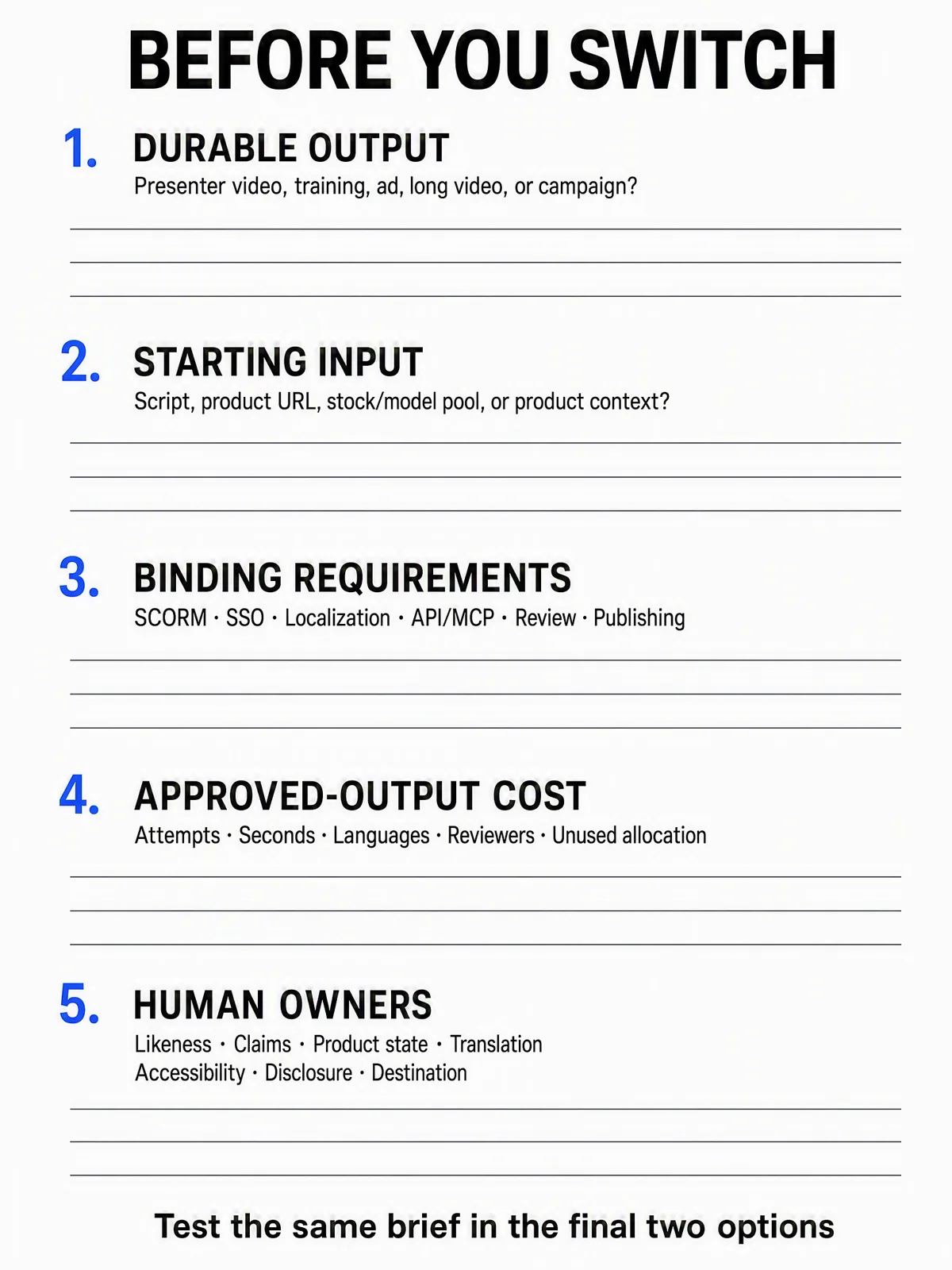
Use the worksheet with a filled brief such as the app example above. It is an illustrative planning form, not an interactive tool or a completed vendor benchmark.
Include migration cost before calling the switch cheaper
Suppose a hypothetical switch reduces recurring tool costs by $90 per month but adds one hour of review at $30. The recurring saving is $60, not $90. Initial setup takes eight hours at $40/hour, and necessary subscription overlap costs $160. Total one-time migration cost is $480: 8 × $40 + $160.
At that constant workload, cost-only payback takes eight months: $480 ÷ $60. Over twelve months, the net saving after migration is $240. These are illustrative inputs, not prices or measured efficiency results for any vendor above. The recurring tool-cost difference excludes the separately counted one-time overlap.
If you expect to use the new workflow for only three months, the same assumptions don't justify a switch on savings alone. If the new tool fails a hard delivery requirement, a positive payback calculation doesn't rescue it. If it produces a materially different, more useful deliverable, evaluate that benefit explicitly rather than disguising it as a cheaper equivalent video.
Before closing the old account, retain source scripts, owned media, terminology, approved exports and a record of the destination settings you need. Check whether custom avatars, voices, templates and other assets are portable and permitted in the next system; don't assume account access equals transfer rights.
Use capability evidence without mistaking it for a quality test
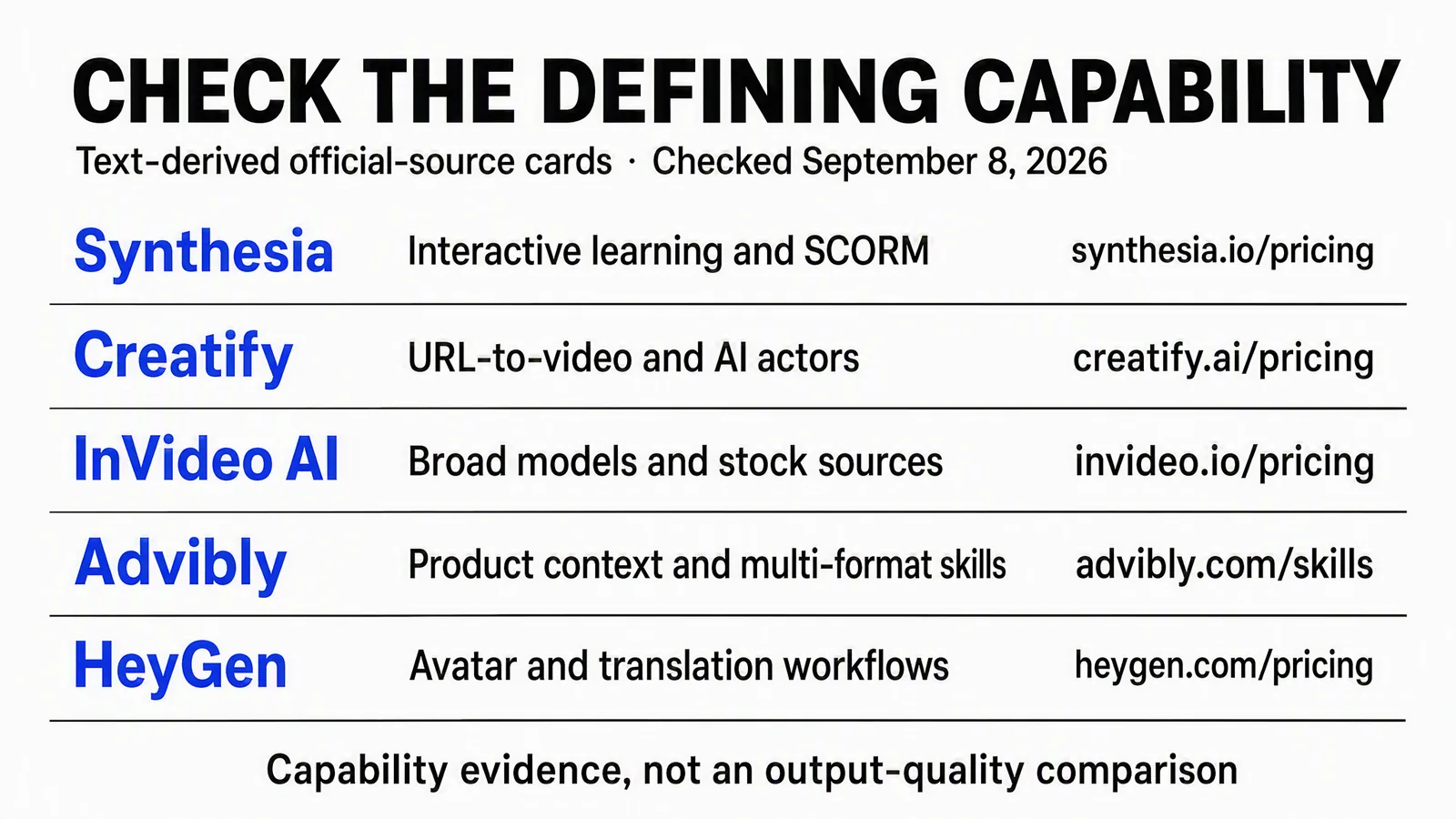
Preserved September 8 source-derived reference card, not a screenshot or benchmark. Current source links and plan qualifications are in each vendor section. A capability listed for one route is not a claim it is absent from the others.
A product page establishes that a vendor offers a capability under stated terms. Your pilot establishes whether the resulting workflow satisfies your brief. Keep those two kinds of evidence separate: neither a source card nor a generated sample proves better conversion, translation accuracy across all languages or a faster process for every team.
The final decision can be to keep HeyGen, replace one workflow, or use a second tool for a distinct job. If a product-led campaign is the missing piece, start from your existing product and brand assets in Advibly. Compare the completed handoff against the same brief, then move only the work for which the new process has earned the switch.
If a product-led creative brief is the job you want to test, generate your first creatives for free with Advibly. Starter-credit output depends on the selected model and settings; it is not a free completed campaign or publishing entitlement.