
Codex skills can take a creative job from its brief to a finished asset when they have the tools, source material and production steps to complete it. For an Advibly product ad, connect MCP, install the relevant skill, supply the correct brand and product, then work through the script, storyboard, generation and assembly.
Start with one deliverable. “Make a product ad” is manageable once you've chosen the product, angle and format. “Do all our marketing” hides too many different jobs inside one instruction.
A separate product-source example you can inspect
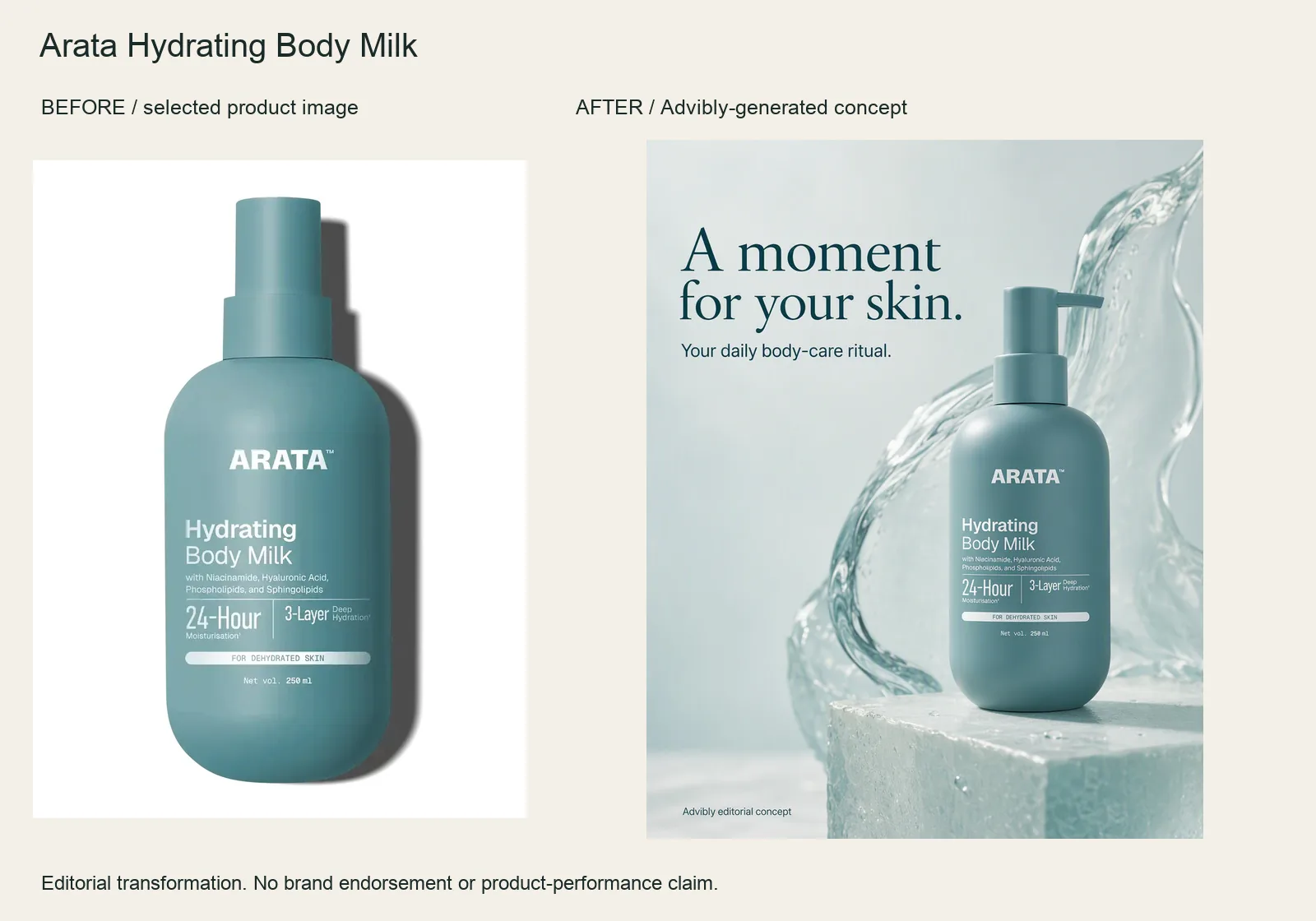
The input is the selected ARATA body-milk packshot. The result adds a translucent water sculpture, a plinth and a quiet headline while keeping the recognizable bottle and pump.
Use the product image as the reference; ask for a tactile studio composition and protect the label, pump and bottle shape. The water is artistic styling, not ingredient evidence. This before-and-after is about the advertisement—not anyone’s skin.
Arata Hydrating Body Milk product source · Open the finished editorial image
This new example was generated through Advibly’s native image tool from the linked product reference. It is an output example, not proof of a Claude or Codex skill session, a full campaign handoff or social publication. The older creative family below remains a separate demonstration.
Start with a finished output you can inspect
These existing Advibly assets make the brief concrete: an unbranded peach-can campaign image, a ten-second animation and a second holiday angle. The archived prompts describe the image and motion choices. They are real outputs, not the result of the fictional desk-organizer brief previously used here.

Existing 1152 × 2048 Advibly campaign image. The unbranded can, orange circle, peach slices and paper arcs are generated concept art, not a photographed product.
Actual Advibly-generated concept creative, not a real beverage, customer campaign or measured result. The examples establish output and creative choices, not a recorded Claude or Codex session.
Use the workflow below to request comparable work in Codex. The distinction matters: an image proves that a creative exists; a client execution receipt would be needed to prove which assistant called the generator.
Set up Codex skills and the creative connection
Use a local Codex client with access to the project where you want to work. Have an Advibly account, an onboarded brand, usable product sources and enough credits for the approved job. You also need Node/npm if you use the third-party installer below.
Connect Advibly MCP
OpenAI's MCP documentation supports remote HTTP servers and OAuth. In your existing Codex configuration, add this server table without replacing unrelated settings:
[mcp_servers.advibly]url = "https://advibly.com/mcp"
Then run:
codex mcp login advibly
Complete the browser authorization for the intended account. In the Codex terminal interface, use /mcp to inspect active servers. Confirm that the actions needed for your job are visible. A configuration entry proves only that a server was configured, not that its tools are usable.
The Advibly setup page publishes that endpoint and the OAuth connection flow. Don't paste a CMS publishing key into MCP configuration: the blog CMS and Advibly creative account are separate services.
Install one workflow
For a source-grounded static concept, install the static-ad method rather than defaulting to a five-shot creator ad:
npx skills add advibly/skills --agent codex -s static-ads
This is the third-party Vercel Labs installer, not an OpenAI command. Inspect the repository and installation destination before confirming. Project installation is the default; use a user-level install only when you intend it.
In Codex CLI or the IDE extension, use /skills or explicitly mention $static-ads. The official skills guide documents selection and local discovery. Skill availability and authenticated MCP access are separate checks.
What each layer contributes
The skill supplies a repeatable method. Codex follows it and coordinates the work. MCP exposes the connected service's data and actions; Advibly performs the supported creative operations. That separation is the point of skills alongside MCP, not an extra installation ritual.
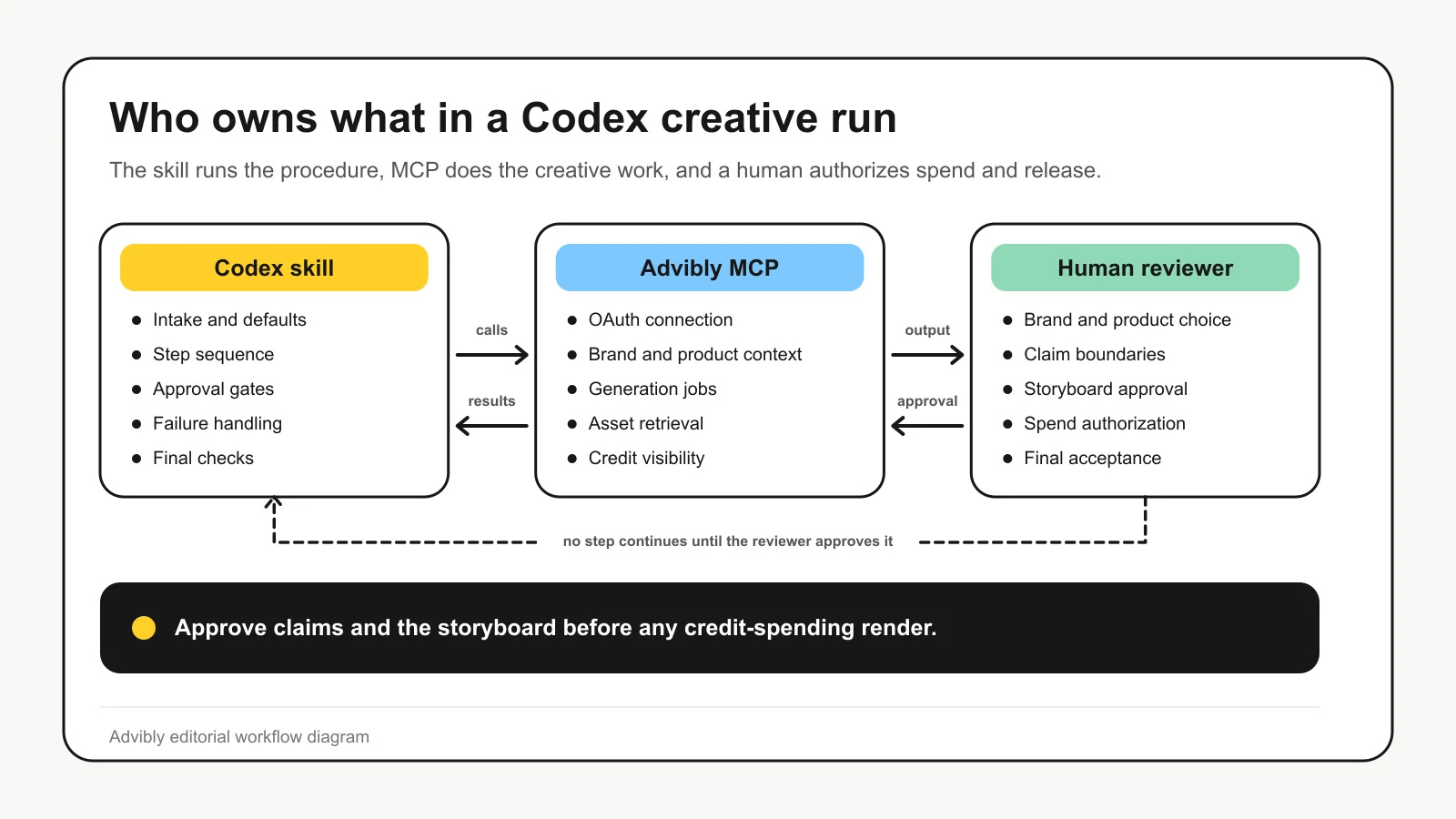
Read the approval arrows as defined checkpoints, not approval of every mechanical step. Approve storyboard-image spending before creating the frames; approve the completed storyboard before video renders. MCP provides access to Advibly, rather than generating the creative independently.
For this job, ask Codex to show three things before spending: the selected skill source, the selected brand and product references, and the proposed production inventory. A missing item has a different fix. Reinstalling a skill won't repair an expired account connection; rewriting a prompt won't supply a missing product photo.
If your job only needs a written brief, an instruction-only skill can be enough. If you already have the finished film and want another treatment, choose a restyling workflow. Don't generate a new creator simply because a UGC skill happens to be installed.
Turn the existing creative into an executable brief
The first archived prompt asked for a matte apricot can on a low cream cylinder, peach slices, water droplets and sculptural orange paper arcs. It also specified a plain orange circle, no wording, no health claim and no imitation of a brand. Those constraints explain why the image is usable as concept art without pretending to prove a real product.
For a real client, replace that fictional can with approved product photographs and the selected product reference. Keep the actual packaging. An invented scene can illustrate a campaign mood; it cannot establish ingredients, durability or customer experience.
$static-adsUse the selected brand and approved product photograph.Propose two written directions: studio hero and summer escape.Return the visual idea, exact copy and source for each claim.Do not use reviews, performance numbers or offers not supplied.Override the default batch: two concepts, one approved render first.Show the generation cost and wait for approval.Return the image and its source reference. Do not publish.
This is an illustrative request, not a transcript of an executed Codex session. The current static-ads recipe builds a source bank, writes concept cards, asks for approval and renders the chosen concepts. Explicitly narrow its default batch before spending.
Change the angle without losing the product

A second existing Advibly output: the peach-can design on a miniature lounger under a parasol. This is a surreal holiday concept, not a real product-use demonstration.
The holiday prompt preserves the can's plain circle and proportions but changes the scene to a lounger, peach raft and parasol. That is an actual second output and a meaningful angle change, not a color swap. Use reference-image inputs for continuity, then compare the finished silhouette and markings. The prompt's instruction to preserve a product is not proof that it succeeded perfectly.
Animate the approved image, rather than rebuilding it
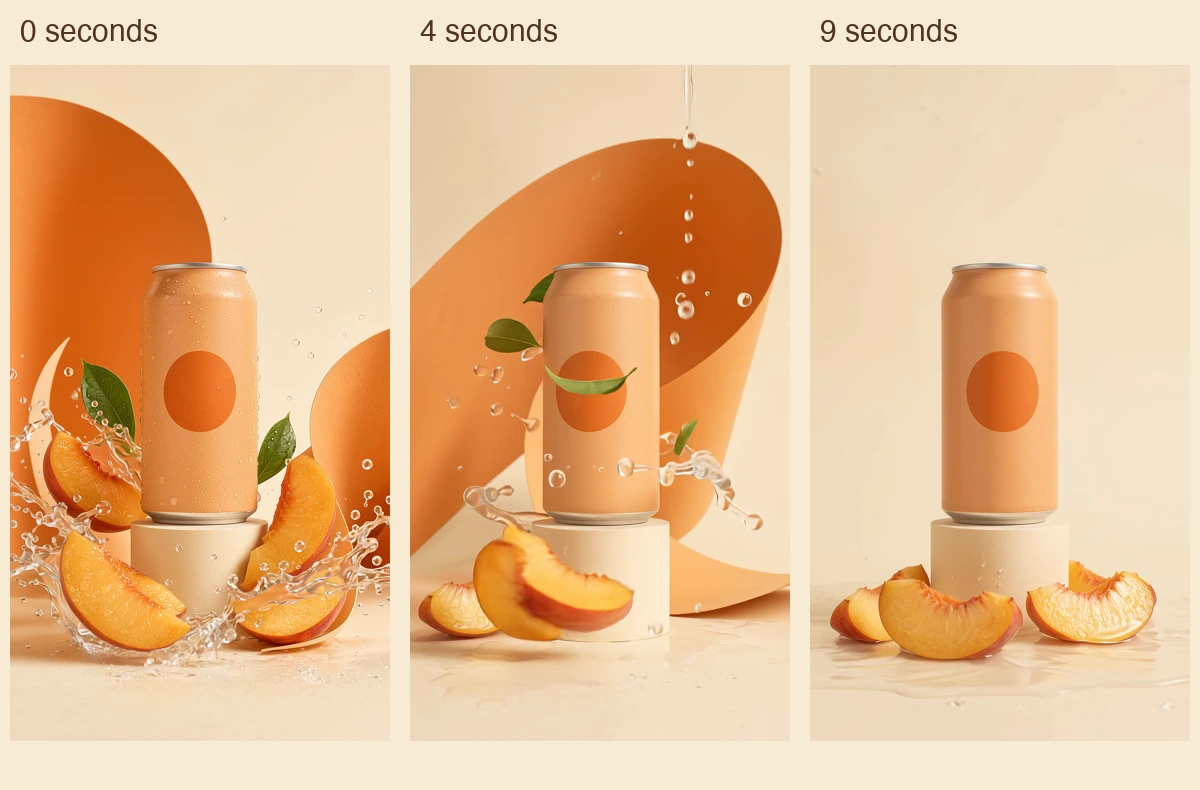
Actual frames from the existing 1080 × 1920 animation at 0, 4 and 9 seconds. Picture unchanged; audio removed for this example. No TikTok interface or campaign-performance result is shown.
Watch the 10-second peach-can animation (silent MP4)
The archived motion request says to animate the apricot campaign image, move water and paper, keep one continuous shot and finish on a quiet hero hold. The live video tool supports start_image_url for image-to-video. Ask Codex to reuse the selected image through that supported input, choose an available model and disclose cost before generation. Do not assume a static-image skill owns video assembly.
Review the returned motion, not only its status. In this example, the original request said no speech, yet speech appeared. The displayed derivative removes that audio while retaining the original picture. For a narrated job, that correction would not be sufficient: you would need the approved narration and final mix.
Budget the missing work
If the image and clip already fit, retrieving them does not require new generations. A new angle needs a separate image operation; new motion needs its own video operation. Count corrections and any finishing separately. Installation is free, but model operations consume credits. A list of tool calls is not a price quote.
Keep the source image, selected variant, output link and actual dimensions together. If a result is pending, reconcile its ID before requesting a replacement. The requested deliverable determines completion: one still, one clip and a assembled multi-shot ad are different jobs.
Recover the failed stage, not the whole campaign
If the skill is absent, inspect installation scope and invoke the intended name. If the connection is unavailable, resolve authorization or tool access. If the source belongs to the wrong product, stop and reload the correct context before generating anything else.
A factual error belongs in the script or source brief first. A malformed product in a start frame belongs in storyboard correction before another video attempt. Good individual clips with poor pacing belong in the edit. Treating all three as “try another prompt” wastes the information you've already gathered.
Preserve completed asset references where the platform supports retrieval and selective retries. Record which replacement supersedes which original. A project full of files is not a selection decision.
When a different route fits better
Use the Advibly portal when you prefer visual control without configuring an agent. Use an instruction-only skill when the output is a script or brief. Use real capture when the creative must prove physical performance.
For a terminal-led alternative, Higgsfield's CLI documents installation, browser authentication and companion skills. That is another access route worth evaluating, not evidence of better output or lower finished-ad cost. Compare the actual product inputs, editing needs and accepted deliverable rather than the length of either model list.
Choose one format from the Advibly skills catalog, supply a real product source and define what must come back. A useful skill run ends with a reviewable asset and a clear record of what remains, not another prompt for someone else to execute.
Generate your first creatives for free. Start with your own product source and starter credits; output quantity depends on the model and settings. Generation and social publication are separate decisions.