

Claude Design is Anthropic's conversational canvas for creating visual work, including designs, interactive prototypes, presentations, and one-pagers. It can use screenshots and reference images, and it can inherit an organization's design system. That makes it a strong place to shape a campaign concept. It does not automatically make every canvas output ready for every ad format or social channel.
The practical answer is to divide the work. Use Claude Design to establish the campaign idea, message hierarchy, and key visual. Then, if the campaign needs multiple statics, carousels, short videos, or scheduled posts, move an approved design-fidelity handoff into a creative-production workflow.
This distinction matters because "design" hides four separate jobs: defining the system, choosing the concept, producing channel-ready assets, and distributing them. One tool can sometimes cover all four. It should not be assumed to.
Key Takeaways
- Use Claude Design to shape the campaign system, message hierarchy, concept, and key visual. Treat multi-format production and distribution as separate jobs.
- Approve a design-fidelity handoff that carries product truth, proof, message hierarchy, visual motif, format plans, and review criteria, not just a screenshot.
- Preserve the campaign's promise and visual grammar across formats, but recompose each static, carousel, and video for its actual channel job.
What is Claude Design?
Claude Design is a product from Anthropic Labs for collaborative visual creation. Anthropic introduced it in April 2026 for work such as designs, prototypes, slides, and one-pagers.
Its conversational canvas lets you develop visual material while discussing the reasoning behind it. According to the Claude Design help documentation, you can add screenshots, images, and other references. An organization can also connect a design system from files, repositories, or a codebase, so the canvas can work with approved components and visual rules.
That combination is especially useful early in a campaign. You can explore several territories, challenge the message, refine the visual grammar, and present a coherent key visual before paying the cost, in time or generation credits, of producing every format.
Claude Design can also be the final tool when the deliverable is the canvas itself: a prototype, presentation, one-pager, or internal design artifact. The handoff described below is for campaigns that continue into a larger production and distribution job.
Separate the four jobs hidden inside "design"
The hardest campaign decision is not which tool has the longest feature list. It is where the concept becomes approved production truth.
|
Job |
Question it must answer |
Typical output |
Best checkpoint |
|---|---|---|---|
|
System |
What visual and brand rules are allowed? |
Tokens, components, fonts, colors, logo rules |
The approved system is connected and current |
|
Concept |
What should this campaign say and look like? |
Territory, promise, proof, message hierarchy, key visual |
One direction is selected for a defined audience and offer |
|
Production |
How should the idea change across channels? |
Statics, carousels, clips, captions, size variants |
Each asset preserves the promise and passes format review |
|
Distribution |
Where, when, and in what final form will it run? |
Calendar items, destinations, scheduled posts |
Copy, links, safe zones, and approvals are final |
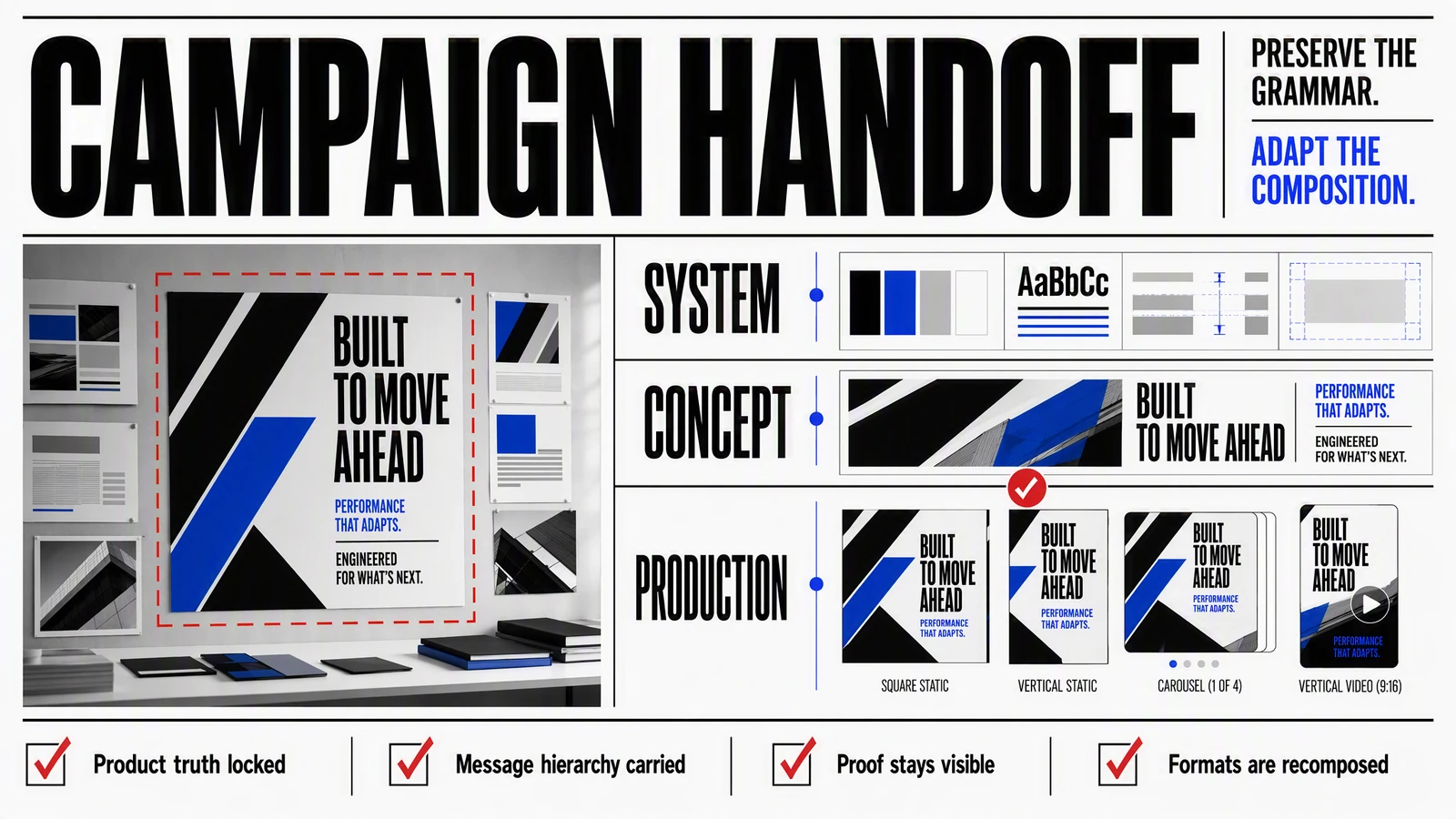
Claude Design's documented strengths sit mainly in the system and concept stages. Its canvas, reference inputs, and design-system connection help a team turn an abstract brief into something visible and discussable.
Production asks different questions. Does the vertical clip reveal the product soon enough? Can the core proof survive in a square static? Does a carousel disclose the idea in the right sequence? Is each output using the correct screenshot, offer, CTA, and destination?
Distribution adds another layer: final captions, platform destinations, approvals, timing, and publishing state. Treating all of this as one undifferentiated design task is how a polished concept quietly becomes a messy campaign.
The design-fidelity handoff
A screenshot is evidence of appearance. It is not a complete production brief.
If you pass only the key visual downstream, the next tool or person has to infer the audience, the claim that matters most, which product detail is non-negotiable, and which parts of the composition may change. That is where reference drift begins: the surface style survives while the message does not.
A useful handoff carries eleven things:
- Product truth: the exact feature, behavior, screenshots, and approved claims the creative may show.
- Audience: who the campaign is for and the situation that makes the message relevant.
- Core promise: the single idea every format must communicate.
- Proof: the product fact, demonstration, or evidence supporting that promise.
- Offer: the commercial terms, eligibility, dates, and exclusions, if an offer exists.
- Message hierarchy: what must be understood first, second, and third.
- Visual motif: the recurring composition, object, movement, or contrast that makes the campaign recognizable.
- Non-negotiable assets: approved logo, screenshots, product imagery, legal text, or interface states.
- Visual constraints: fonts, colors, accessibility rules, prohibited treatments, and required clear space.
- Format plan: destination, aspect ratio, duration or slide count, safe zones, caption needs, and CTA for each asset.
- Approval criteria: the checks that determine whether an output is usable, not merely attractive.
The message hierarchy and visual motif should remain stable. The composition should not.
A 1:1 static can hold a concise proof point beside a product image. A 9:16 clip may need the product to enter earlier, the copy to become captions, and the visual motif to move through several shots. A carousel needs a sequence, not a wide layout chopped into slides. Google's own creative guidance distinguishes horizontal, vertical, and square video coverage and also checks details such as brand visibility, duration, and voice-over. Different formats have different production requirements.
The handoff therefore protects campaign grammar, not pixel identity. Every asset should make the same promise with the same proof and recognizable visual logic. Each format should still be composed for its actual job.
A worked campaign workflow
Suppose a mobile app is launching a feature across a one-page concept, two static ads, one carousel, and one short video.
1. Give Claude Design the inputs that constrain the truth
Attach the product brief, approved app screenshots, audience definition, offer details, and current design system. A design system can govern visual consistency, but it cannot supply missing product or market context. Include both.
Ask for three campaign territories. Each territory should define:
- the audience tension;
- the core promise;
- the supporting proof;
- the visual motif;
- the CTA.
Do not begin by requesting three polished layout families. The expensive mistake is scaling a weak idea beautifully.
2. Approve one territory before producing variants
Build a key visual and a one-page rationale for the strongest territory. Check the product behavior, claim wording, screenshot state, contrast, text size, and reading order.
This is the concept gate. If the message does not work here, more formats will multiply the problem rather than solve it.
3. Export the handoff, not just the canvas
Record the eleven handoff fields above. Add a channel matrix with one row per asset:
|
Asset |
Format |
What it must do |
Permitted adaptation |
|---|---|---|---|
|
Static A |
1:1 |
Establish the feature and primary proof |
Crop or simplify the motif; keep the proof visible |
|
Static B |
4:5 |
Lead with the audience tension |
Reorder supporting copy; preserve the same promise |
|
Carousel |
4–5 slides |
Move from problem to mechanism to CTA |
Extend the narrative; do not invent new claims |
|
Short video |
9:16 |
Demonstrate the feature in motion |
Recompose shots and captions; keep product states accurate |
This matrix prevents "make it in every size" from becoming the brief.
4. Produce the least expensive proof formats first
Create the static and carousel versions before the video when they can validate the visual grammar and copy hierarchy. Review them against the handoff, then use approved frames as references for motion where appropriate.
The sequence is not a quality guarantee. It is a risk-control decision: resolve message and visual errors before adding timing, audio, transitions, and shot continuity.
5. Review continuity, not sameness
For every output, ask:
- Is the same audience problem still clear?
- Is the promise unchanged?
- Is the proof visible and accurate?
- Is the visual motif recognizable?
- Has the format been recomposed rather than merely resized?
- Are the CTA and destination correct?
- Does the asset meet accessibility and platform requirements?
Only move to scheduling when those checks pass. AI-generated variants still require product, accessibility, and channel review.
Where Advibly fits, and where it does not
Advibly does not replace Claude Design's canvas, interactive prototypes, or design-system governance. Its relevant job begins when approved campaign direction needs to become reusable, multi-format creative.
Advibly stores product and brand context from sources such as websites, app listings, screenshots, stores, and brand files. That context can then support image ads, short videos, carousels, posts, and campaign assets. Its public Agent Skills package repeatable production workflows, such as multi-shot UGC-style ads, explainers, restyling, and animated formats, with scripts, storyboards, rendering steps, and approval gates.
In a combined workflow, Claude Design supplies the approved concept and handoff. Advibly supplies the saved product context and the format-specific production path. The Claude output remains a reference, not permission to copy another brand's work or fill missing product details with invention.
The boundary is useful because brand compliance alone is not enough. A weak idea can follow every font and color rule. A striking generated visual can also fail if it cannot carry the same truthful message across a static, carousel, and short video. The concept gate tests the idea; the production gate tests whether it travels.
Choose the simplest workflow that covers the job
|
Choose |
Best fit |
Important limitation |
|---|---|---|
|
Claude Design alone |
Prototypes, presentations, one-pagers, internal design artifacts, and concept work using an established design system |
Do not assume the canvas completes multi-format production and publishing requirements |
|
A creative-production tool alone |
The concept, copy hierarchy, and visual direction are already approved; the remaining job is asset production |
Weak or incomplete direction will be reproduced at scale |
|
Claude Design plus Advibly |
Concept exploration and multi-format production are both material, and reusable product context must continue into assets and publishing |
The handoff adds process and must be reviewed; combined-workflow fidelity has not been independently tested |
Claude Design alone is the strongest credible alternative when the final deliverable lives naturally in its canvas. Advibly alone is simpler when the campaign direction already exists. Combining them earns its complexity only when the campaign needs both deliberate concept work and repeated, format-specific production.
If that is your situation, approve the concept first, complete the design-fidelity handoff, and then use Advibly skills to turn the approved direction into the required campaign formats. Do not scale the word "design." Scale a verified campaign system.