
To make a brand video, define one audience and the belief or action you want to change, collect the product facts and footage that support it, write a focused script, and plan the shots before filming or generating them. Assemble the cut, add captions and audio, then adapt and review it for its destination. The example below shows how this becomes a short product-launch video rather than a logo placed over generic footage.
The brief keeps those decisions together. A camera, editor, video model or AI agent can execute part of it, but none can supply missing product truth or decide what the brand stands for.
For a founder or marketer working without an agency, the reliable path is:
- Define the audience change.
- Lock the claims and source material.
- Choose a story form that can create that change.
- Approve the script and storyboard before generating expensive shots.
- Adapt the message for each placement, then complete a human review.
That sequence matters more than which video tool you open first.
Key Takeaways
- Give the video one leading audience job before choosing a format or tool.
- Lock claims, source material, and approval owners before scripting multiplies them across assets.
- Approve the cheapest faithful representation first, then move from storyboard to stills, motion, and channel versions.
Brand video or performance ad: decide before you write
A brand video builds or reinforces memory: what the company stands for, who it serves, and how it should feel. A performance ad asks for a measurable action, such as visiting a page or starting a trial. One video can do both, but one job must lead.
If the desired audience change is “understand why this company exists,” a founder story, manifesto, or customer narrative may fit. If it is “believe this product is easier because you can see the workflow,” a product demonstration is usually the clearer choice.
|
Desired audience change |
Strong starting format |
Main risk |
|---|---|---|
|
Understand the brand's point of view |
Founder story or manifesto |
Abstract language with no proof |
|
See how the product works |
Product demonstration |
Feature tour with no narrative |
|
Trust a sensitive claim |
Customer interview or documented proof |
Manufactured testimony or weak substantiation |
|
Remember a new launch |
Short product story with a visual motif |
Polish overwhelms the product truth |
|
Take an immediate action |
Performance-led video with one CTA |
Too many claims and competing actions |
This is the first hard decision because it determines the evidence, footage, script, production method, and review standard. Cinematic polish cannot rescue the wrong story form.
Worked example: a 15-second SaaS launch video
Suppose a SaaS company wants operators who expect a long setup to understand that the product can produce a first useful output quickly. That is an illustrative brief, not a performance claim about Advibly or another product.
The team has an approved UI screenshot, documented feature steps, a product-cleared claim, and one destination page. Because the desired belief depends on seeing the mechanism, it chooses a product demonstration rather than an abstract manifesto.
An illustrative five-beat production map could look like this:
|
Time |
Beat |
Visual job |
Required proof |
Review question |
|---|---|---|---|---|
|
0–2s |
Problem cue |
Make the old expectation recognizable |
None beyond an honest scenario |
Is the problem specific without exaggeration? |
|
2–5s |
Product source |
Show what the workflow starts from |
Current interface or source asset |
Is the UI or input represented accurately? |
|
5–9s |
Transformation |
Make the mechanism understandable |
Approved feature steps |
Can a viewer follow the change without narration? |
|
9–12s |
Finished output |
Resolve the opening expectation |
Authentic or clearly illustrative output |
Does the result match what the product can produce? |
|
12–15s |
CTA |
Give one next action |
Correct destination and offer |
Is the action legible and truthful? |
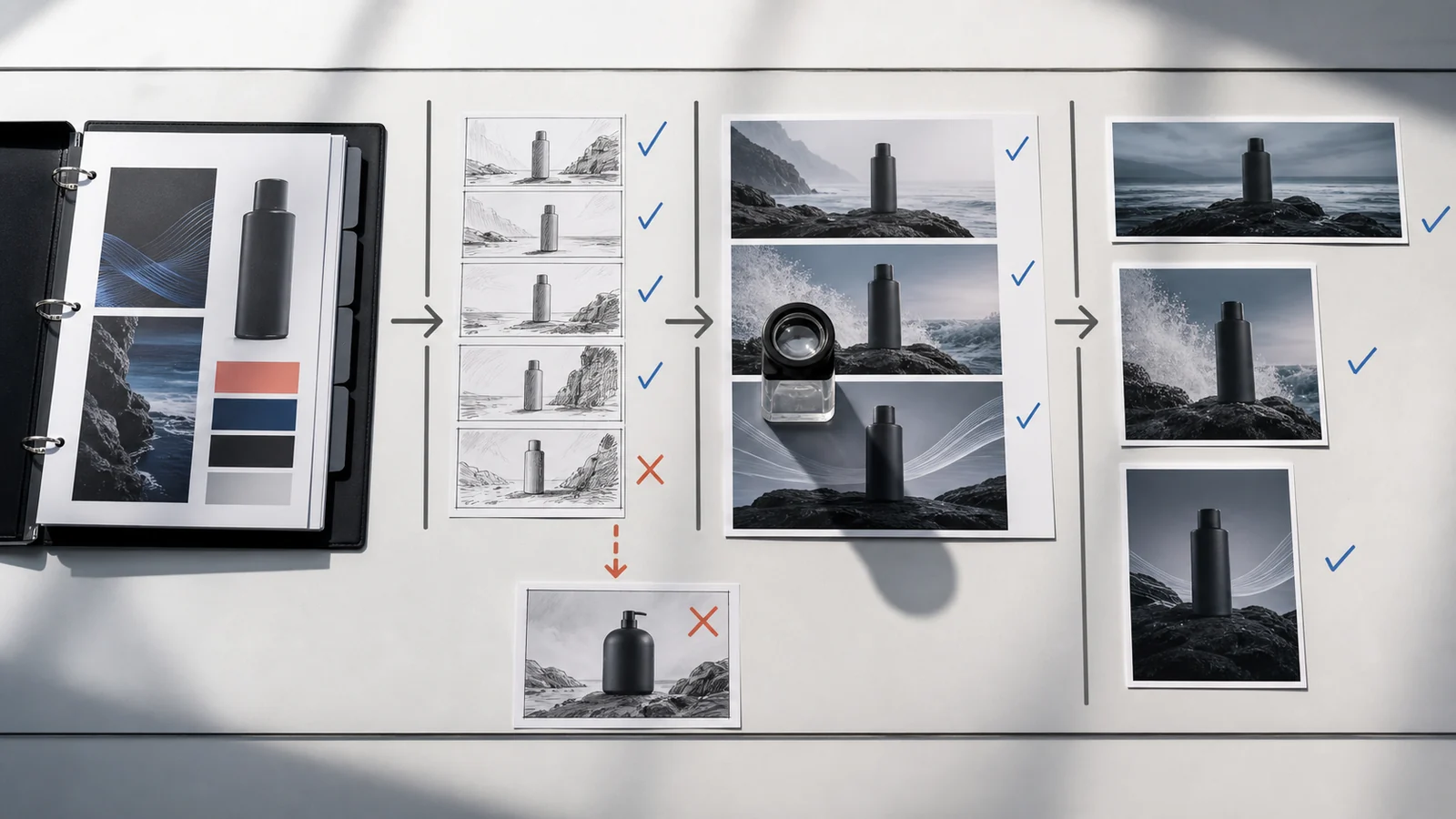
The team approves the script, vertical storyboard, text safe zones, and a square key visual before generating motion. It renders shots separately, replaces only failures, assembles the cut, adds captions, and checks audio, legibility, product truth, logo integrity, and continuity.
It then derives a square static and short carousel from the same message hierarchy. These are not automatic crops: the static carries the promise and proof in one frame, while the carousel gives the transformation room to unfold.
Plan the video from brief to finished cut
Business video production normally moves through planning, pre-production, production, post-production, and publishing. A written brief connects those stages and keeps stakeholders aligned, as Wistia's video production guide explains.
For a lean brand video production workflow, turn that process into five approval gates:
|
Gate |
Decide and document |
Do not proceed until |
|---|---|---|
|
Purpose |
Audience, current belief, desired belief or action, primary channel, one success measure |
The video has one leading job |
|
Truth |
Approved product claims, proof, offer, prohibited claims, rights-cleared assets |
Every consequential line can be traced to a source |
|
Creative |
Story form, hook, message hierarchy, visual motif, voice, duration, aspect ratio |
The concept can express the desired audience change |
|
Cost |
Script, storyboard, shot list, reusable frames, generation or filming plan |
Cheap decisions are approved before costly production |
|
Distribution |
Captions, first frame, CTA, destination, channel versions, final reviewer |
Each asset works in its placement and points somewhere real |
The gates are not bureaucracy in a nicer outfit. They move rejection earlier, when changing a sentence or frame is cheaper than replacing a finished sequence.
1. Define what the viewer should understand or do
“Make a video about our launch” is a topic. It does not tell a writer, editor, or agent what success looks like.
Use this sentence instead:
After watching, [specific audience] should move from [current belief] to [desired belief or action] because they saw [proof or mechanism].
Then select one success measure appropriate to the job. A brand-led piece might be evaluated through completed views, branded search, or a brand-lift study when the budget supports one. A product-launch video might use qualified visits or product-view actions. Platform guidance can improve execution, but it does not guarantee lift, conversion, or sales.
2. Collect product facts, footage and brand assets
Brand colors and fonts help recognition. They do not make an unsupported script true.
Before scripting, collect the smallest source set that can govern the video:
- current positioning and audience;
- approved product and feature descriptions;
- screenshots, product shots, logos, fonts, and brand references;
- exact offer and CTA;
- proof for factual or comparative claims;
- prohibited language and usage rights.
Turn consequential claims into a simple ledger: claim → source → owner → approval status. If a claim has no source or owner, remove it or label it for review. This prevents one doubtful sentence from multiplying across narration, captions, statics, and channel variants.
An AI agent can retrieve and carry approved context through the workflow. It cannot decide that an unverified claim has become true because the sentence sounds convincing.
3. Write a story the audience can see
A strong creative idea is not merely a style. It is a mechanism for changing the audience's belief.
If the belief depends on product speed, show the shortest truthful path from source to outcome. If it depends on expertise, explain a decision the audience recognizes as difficult. If it depends on trust, use real evidence or human testimony with the required consent, not an AI-generated substitute.
Vimeo's guidance on branded video emphasizes a clear objective, consistent look and voice, and audience fit. Treat those as constraints around the story, not a recipe for the story itself.
Write the message hierarchy before the full script:
- What must the viewer understand first?
- What proof makes the next statement credible?
- What can be removed without weakening the audience change?
- What single action should remain at the end?
Only then choose the hook, visual motif, pace, voice, and soundtrack.
4. Storyboard, produce the shots and assemble the cut
A useful production system increases fidelity in stages:
brief → message hierarchy → script → storyboard → still frames → motion shots → assembled cut → channel versions
Each stage should answer a different question:
- Script: Is the argument clear and truthful?
- Storyboard: Does each beat have a visual job?
- Still frames: Are composition, product representation, text zones, and visual grammar right?
- Motion shots: Are movement, continuity, labels, hands, characters, and audio acceptable?
- Assembled cut: Does the sequence work at speed?
For generated video, produce shots independently when the workflow allows it. Keep the generation instruction, source assets, aspect ratio, duration, output ID, and review result attached to each shot. A failed third shot can then be replaced without gambling the approved first and second shots.
The model instruction belongs here, inside a governed shot record. It is not the production system.
5. Adapt the finished video for each placement
A vertical video, square feed post, and LinkedIn carousel do not have the same pacing or information density. Google's current creative guidance checks factors including early brand visibility, duration, voice-over, and coverage across horizontal, vertical, and square formats. That is a useful reminder to design for placements rather than export one master and hope cropping behaves.
Preserve these elements across versions:
- the audience change;
- claim and proof;
- message hierarchy;
- visual motif and recognizable brand cues;
- CTA and destination.
Recompose these elements for the placement:
- shot timing and sequence;
- text size and safe zones;
- caption density;
- crop and focal point;
- first frame or thumbnail;
- amount of context carried in each asset.
Consistency means the assets feel like the same argument from the same brand. It does not mean forcing the same layout into every rectangle.
Review the cut against the job
Google's ABCD framework, Attention, Branding, Connection, and Direction, can provide a practical final lens for video ads. Use it after selecting the right story, not as a universal script template.
A final human review should answer:
- Does the opening establish the intended audience and tension?
- Is the brand recognizable without interrupting comprehension?
- Does every factual claim match an approved source?
- Are product screens, labels, logos, hands, and recurring characters accurate and continuous?
- Do captions remain readable inside platform safe zones?
- Does the audio support rather than obscure the message?
- Is there one CTA, and does its destination work?
- Does each channel version preserve the idea while fitting the placement?
- Is generated UGC-style footage clearly distinct from real customer testimony?
Do not approve a generated shot because it is almost correct in a place where accuracy matters. Replace it, cover it with verified footage, or change the story.
When not to use an agent-first workflow
An agent-first workflow is strongest when the job is short, repeatable, source-led, and needs several coordinated formats. It is not the default answer to every kind of brand video.
|
Production route |
Best fit |
What it does better |
|---|---|---|
|
Agent-first generation |
Short product or brand creative, controlled variants, reusable multi-format campaigns |
Carries structured context through repeatable production steps |
|
Editor with existing footage |
Precise product demonstrations, continuity-sensitive edits, repurposing a strong footage library |
Gives direct control over verified footage and timing |
|
Human production team |
Interviews, documentary work, sensitive testimonials, physical interaction, long-form narrative |
Directs real people, places, products, and nuanced performances |
Choose the human team when authenticity is the evidence. Choose the conventional editor when exact footage and continuity are the constraint. Choose an agent-first system when the value comes from preserving approved context across a short sequence and its channel variants.
Where Advibly fits
Advibly is built for the third case: short, repeatable creative based on saved product and brand context. You can add a website, app listing, store, screenshots, product assets, or brand files; reuse that context for video, statics, and carousels; and work through the product interface, MCP, or installable skills.
Advibly can create product videos, UGC-style ads, narrated explainers and animated films, including Vox-style collage, claymation and stickman workflows. Supported steps include scripts, storyboards, image and video generation, voiceover, captions, stitching and final assembly. A single generated clip and a finished multi-scene video are different deliverables: duration, audio and aspect-ratio options depend on the selected model and workflow. Review the assembled film rather than treating a completed clip as the whole job.
Advibly does not replace brand strategy, claim approval, human testimony, location production, or final editorial judgment. Its useful role is narrower and more concrete: keep approved source context connected while you create and adapt short brand and product creative.
Start by writing the audience-change sentence and assembling the truth set. If the job fits short-form production, use that approved context to create the brand video and its supporting assets in Advibly.
Sources
- Vimeo: What's a branded video?, updated January 30, 2026.
- Wistia: Video Production Guide, published September 27, 2023.
- Google Ads Help: Creative guidance, accessed August 4, 2026.
- Google Ads Help: ABCDs of effective video ads, accessed August 4, 2026.
- Advibly and Advibly Agent Skills, accessed August 4, 2026.