

An AI video agent can turn a product brief into a UGC-style ad, product demonstration, animated explainer, or short social video. Unlike a single clip generator, the agent coordinates the script, storyboard, generation, audio, assembly, and final checks needed to return a finished video file.
Start with the product source, audience, placement, target duration, and CTA. Advibly supplies reusable brand context and creative tools; a compatible assistant and a suitable skill coordinate the production. One initiating brief can start that workflow, but it still involves multiple steps, generation credits, review, and separate permission to publish.
Choose the video by what the buyer needs to see
Use real product material to choose the format before you choose the visual style. Advibly's supported formats and published skills give you these options:
- UGC-style ad: use a product image and an approved angle for a creator-led demonstration or problem-solution story. A synthetic creator is not a real customer's endorsement.
- Product or app walkthrough: use accurate screenshots or supplied footage when the interface or action is the proof. Do not let generated screens invent a feature.
- Animated explainer: use a script and product context to explain an unfamiliar mechanism. Published options include narrated explainers, paper-collage motion, claymation, and stick-figure animation.
- Video restyle: start with existing footage when the story already works and you want another visual treatment. Inspect identity, timing, audio, and any product details in the result.
For a first run, choose one deliverable rather than an entire campaign. The five-shot example below makes the production workload and the point of review concrete.
A worked five-shot product ad
The published Advibly UGC ad skill provides a concrete five-shot example. Its documented workflow, checked on 11 September 2026, starts with a creator reference and product context, writes a script, creates storyboard start frames, gets storyboard approval, renders five vertical clips, and assembles the ad. This is a documented workflow example, not a claim that we ran a new campaign for this article. Read the published workflow.
The workload before retries is transparent:
1 creator reference + 5 storyboard frames = 6 images5 shots × 1 render = 5 video renders5 clips × 8 seconds = 40 seconds of raw generated footage
The final ad may be shorter after trimming and assembly. The important decision is when to spend. Approve the script and all five frames before starting the five video renders. If shot three loses product fidelity, keep the four valid outputs and rerender shot three.
There is no honest fixed cost to attach to this example without a current in-product quote. Model, duration, and settings can change credit use. The calculation is useful because it exposes the workload and retry boundary, not because it pretends the production cost never moves.
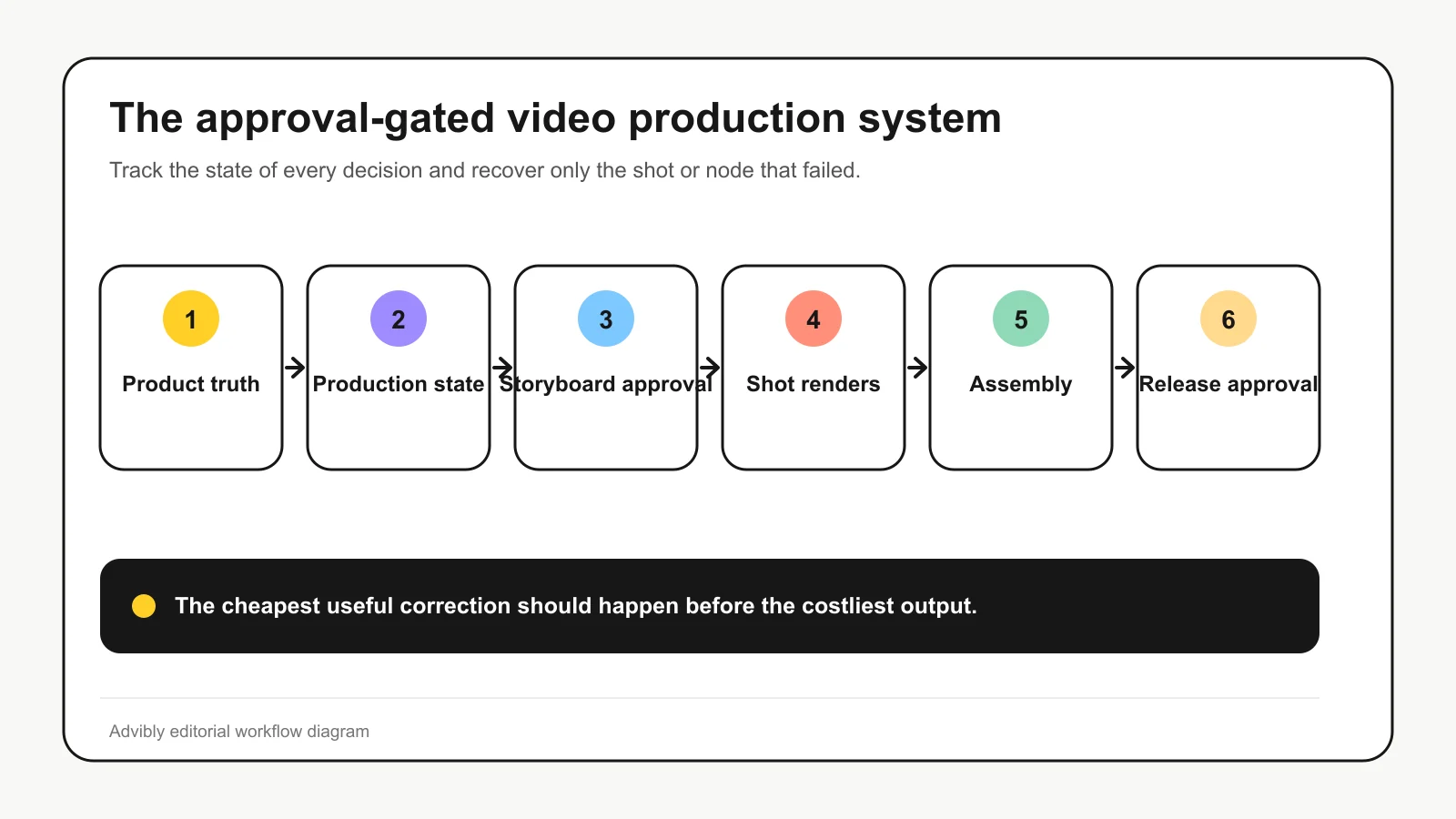
From product brief to finished video: the production steps
The hardest part is not generating motion. It is deciding what the agent may resolve, what a person should approve, and how the workflow recovers when an output is wrong.
1. Define the deliverable
Specify the channel, aspect ratio, duration, audience, offer, CTA, disclosure requirements, and delivery state. “Finished file” and “published campaign” must be separate outcomes from the start.
A 9:16 social ad needs a different shot rhythm and safe area from a 16:9 product explainer. If the placement is unknown, the agent should stop before storyboarding rather than make an expensive guess.
2. Resolve source truth
Retrieve the product page, screenshots or product images, brand kit, audience, offer, and approved claims. Mark what is confirmed, what is creative direction, and what remains unknown.
This is where brand context becomes operational rather than cosmetic. Colors and fonts matter, but so do the exact product name, interface, packaging, offer, and claim boundaries. If required proof is missing, the agent should request it. A polished fabrication is still a fabrication.
3. Choose the format and narrative
Select a format that fits the product and placement: UGC-style video, product demo, presenter video, animated explainer, or another suitable form. Then choose the narrative arc and shot cadence.
The format changes the evidence burden. A product demo needs accurate interface or product depiction. A UGC-style ad needs careful handling of testimonial language. An explainer may need a visual metaphor, voiceover, captions, and separately mixed audio.
4. Write the script or beat map
Make every shot purposeful. Record the dialogue or narration, on-screen words, claim source, visual action, and transition.
Do this before rendering. The script is the cheapest place to fix a weak offer, unsupported claim, awkward CTA, or overlong sequence. The agent can propose options, but a person should approve any consequential claim or testimonial-style line.
5. Build and approve the storyboard
Create or select a start frame for each shot. Review product identity, creator or character continuity, composition, scene order, text, and where the product first appears.
This is the main pre-render gate. It catches structural mistakes while they are still images rather than several paid video generations. It also prevents reference leakage: if a product reference is supplied to a pre-reveal shot, the model may introduce the product before the story intends to show it.
Approval gate: do not render the full sequence until the script and every start frame are approved.
6. Route each shot by constraint
Do not choose one model for the whole campaign simply because it is familiar or new. Route each shot according to what it needs:
|
Shot requirement |
Routing question |
|---|---|
|
Product or character continuity |
Can the model use the required reference reliably? |
|
Fixed start or end state |
Does it support start frames, end frames, or both? |
|
Spoken dialogue or ambient sound |
Is native audio supported for this shot? |
|
On-screen words |
Should the text be generated, or added during assembly for control? |
|
Exact duration |
Does the model support the required clip length? |
|
Vertical, square, or landscape delivery |
Is the target aspect supported without destructive cropping? |
|
Motion realism or stylization |
Which model best matches the shot rather than the campaign label? |
Model routing is a production decision, not a model leaderboard. The right choice is the model that satisfies the shot’s constraints with the least avoidable rework.
7. Render, track, and recover at shot level
Video generation is often asynchronous. The agent should store the generation ID, shot ID, model, settings, output, and status for every render. It should poll pending jobs rather than assume silence means failure.
When a shot fails, classify the problem before retrying:
- Factual failure: wrong product, interface, offer, or claim. Return to source truth or the storyboard.
- Continuity failure: character, product, scene, or camera state drifts. Strengthen references or revise the start frame.
- Composition failure: the subject is cropped, text is unreadable, or the safe area is broken. Correct framing before rerendering.
- Motion failure: movement is implausible or conflicts with the shot. Change the motion instruction or model.
- Tool failure: the job times out or errors. Check the existing generation ID after a timeout before deciding whether a retry is needed; keep retries bounded.
The recovery rule is simple: rerender the smallest failed unit. Restart the campaign only when the underlying brief, source truth, or narrative has changed.
8. Assemble the sequence deliberately
Generation does not produce a finished campaign by itself. Order and trim clips, add voiceover, music, sound effects, and captions where needed, normalize audio, and export the requested aspect ratio.
Generated on-screen text deserves special suspicion. Keep it short, inspect it throughout the shot, or add it during assembly when the workflow allows. Voice, music, native dialogue, and effects may also need separate generation and mixing rather than one undifferentiated audio pass.
9. Run factual and creative QA
Review the final file, not only its parts. Check:
- product and interface depiction;
- spoken and on-screen claims;
- creator, character, and product continuity;
- captions, legibility, and safe areas;
- audio balance and speech clarity;
- CTA and destination;
- required synthetic-content or advertising disclosures;
- playback, dimensions, duration, and export format.
If realistic generated content will appear on YouTube, review its altered or synthetic content disclosure guidance. For UGC-style advertising, do not present a synthetic actor as a real customer or imply an experience that did not happen. The FTC’s endorsement guidance focuses on how people are likely to understand the message, not the label the production team uses internally.
10. Deliver first; publish only with authority
Save a reviewable final file and its production record. Publication should require a separate confirmation that names the destination and action.
This is not bureaucracy for its own sake. Exporting a video is reversible. Posting it to a brand account or launching it as an ad is an external action with policy, budget, and reputational consequences. The agent should never blur those states to make the workflow sound more autonomous.
An agent is a production system, not a text box
A video generator accepts an input and returns a video. An AI video agent manages a sequence of dependent decisions and tool calls around that generation.
The distinction becomes obvious when something fails. If the third shot shows the wrong product, a generator gives you another attempt. A well-designed agent knows which source material informed the shot, which model rendered it, which generation job produced it, and which parts of the campaign can remain unchanged. It can rerender the failed shot instead of starting over.
This is the practical test:
|
Capability |
Video generator |
AI video agent |
|---|---|---|
|
Turns text or an image into video |
Core job |
One step in the job |
|
Retrieves brand and product context |
Sometimes |
Should happen before creative decisions |
|
Plans scenes and dependencies |
Limited or manual |
Maintains a production plan and state |
|
Chooses a model by shot requirement |
Usually left to the user |
Routes work based on constraints |
|
Tracks asynchronous renders |
Returns a job or result |
Stores job state and resumes the workflow |
|
Handles a failed shot |
User retries manually |
Retries the failed node without discarding valid work |
|
Stops for approval |
Product-dependent |
Should gate expensive and external actions |
|
Publishes |
Separate feature or integration |
A distinct, explicitly authorized step |
The Model Context Protocol tool specification makes the control boundary explicit: tools are model-controlled actions, but implementations should keep calls visible and allow people to deny or confirm sensitive operations. For video production, rendering and publishing are exactly where that discipline earns its keep.
Start by defining the state the agent must manage
Before choosing a model, define the deliverable and the information required to produce it. A workable production state includes:
- placement and aspect ratio;
- target duration;
- audience, offer, and call to action;
- approved product facts and claims;
- source images, screenshots, brand assets, and references;
- script, shot purpose, dialogue, and on-screen text;
- storyboard approval status;
- model choice and settings for each shot;
- generation IDs, outputs, and failures;
- final review status; and
- separate authority to publish.
This prevents a common failure: treating a loose request such as “make a launch video” as a complete brief. The agent cannot make a sound creative decision when the audience, placement, claim boundaries, and intended action are undefined. It can fill structural gaps, but it should not invent product truth or silently decide where an ad will run.
When a different AI video agent is the better choice
HeyGen is a strong alternative when the job centers on avatars, presenters, multilingual delivery, or longer business video. Its official AI Video Agent page describes a pre-render blueprint, scene-by-scene planning, conversational refinement, voice and avatar options, high-resolution output, and element-level editing after generation.
Choose that route when presenter video or multilingual delivery is the central requirement. A conventional editor-led workflow can be a better fit when the team already has its footage and wants direct manual control over scene replacement, subtitles, music, reframing, and export.
Advibly is the more natural fit when the production job begins with reusable product and brand context, spans different creative models or formats, and needs to run from an MCP-compatible AI client or an installable workflow skill. That distinction is narrower, and more credible, than claiming any one system makes universally better video.
How Advibly supports the workflow
Advibly is a brand-context-first AI creative generator. You can save product and brand context, then use it from the workspace, through MCP-compatible clients, or through public production skills. Its current AI video generator supports starting from product images, references, or text and offers multiple video models with model-dependent duration, aspect, reference, and audio controls.
The practical advantage is continuity across the job. Source material can inform the storyboard; shot requirements can inform model selection; generation outputs can be retrieved and assembled; and the resulting creative can remain part of a broader campaign workspace.
A single prompt can initiate a connected production workflow, including supported scheduling after approval. It is not a promise of one tool call or immediate publication. An installed skill still needs compatible tools, source assets, credits, and an actual final-file review. Confirm the destination and account before using the separate publishing step.
If that controlled workflow matches your job, connect Advibly to your AI tools or start with its video creation workspace. Bring an approved product source, a defined placement, and clear claim boundaries. Let the agent orchestrate the production, not invent the truth.