

An AI reel maker can shorten production, but a useful reel still needs a clear job, native framing, defensible claims, readable captions, and a measurement plan. Start with one audience and one message. Build a short sequence around proof. Then adapt the master edit for Instagram Reels, TikTok, and YouTube Shorts instead of assuming one export behaves identically everywhere.
Key takeaways
Write the opening, proof, and close before generating shots.
Use vertical 9:16 video, audio, and safe-zone placement for Reels-first creative.
Measure retention and the intended action, not raw views alone.
What is an AI reel maker?
An AI reel maker helps create short-form vertical video from prompts, scripts, product images, clips, screen recordings, avatars, voices, or templates. It may generate new footage, edit existing media, add captions, resize a composition, or assemble a sequence.
The phrase describes a production tool, not a creative strategy. A reel succeeds when the opening earns attention from the right viewer and the rest of the video repays that attention. More transitions cannot repair a vague message.
Give the reel one job
Choose the viewer and desired action before the format. A reel can introduce a product, demonstrate a feature, answer an objection, announce an offer, retarget a visitor, or teach one useful idea. Combining all six creates a rushed list.
Write a one-line brief: For [audience], show [problem or opportunity], prove [one claim], and ask them to [one action]. This line becomes the review standard for every shot.
Use an opening-proof-close structure
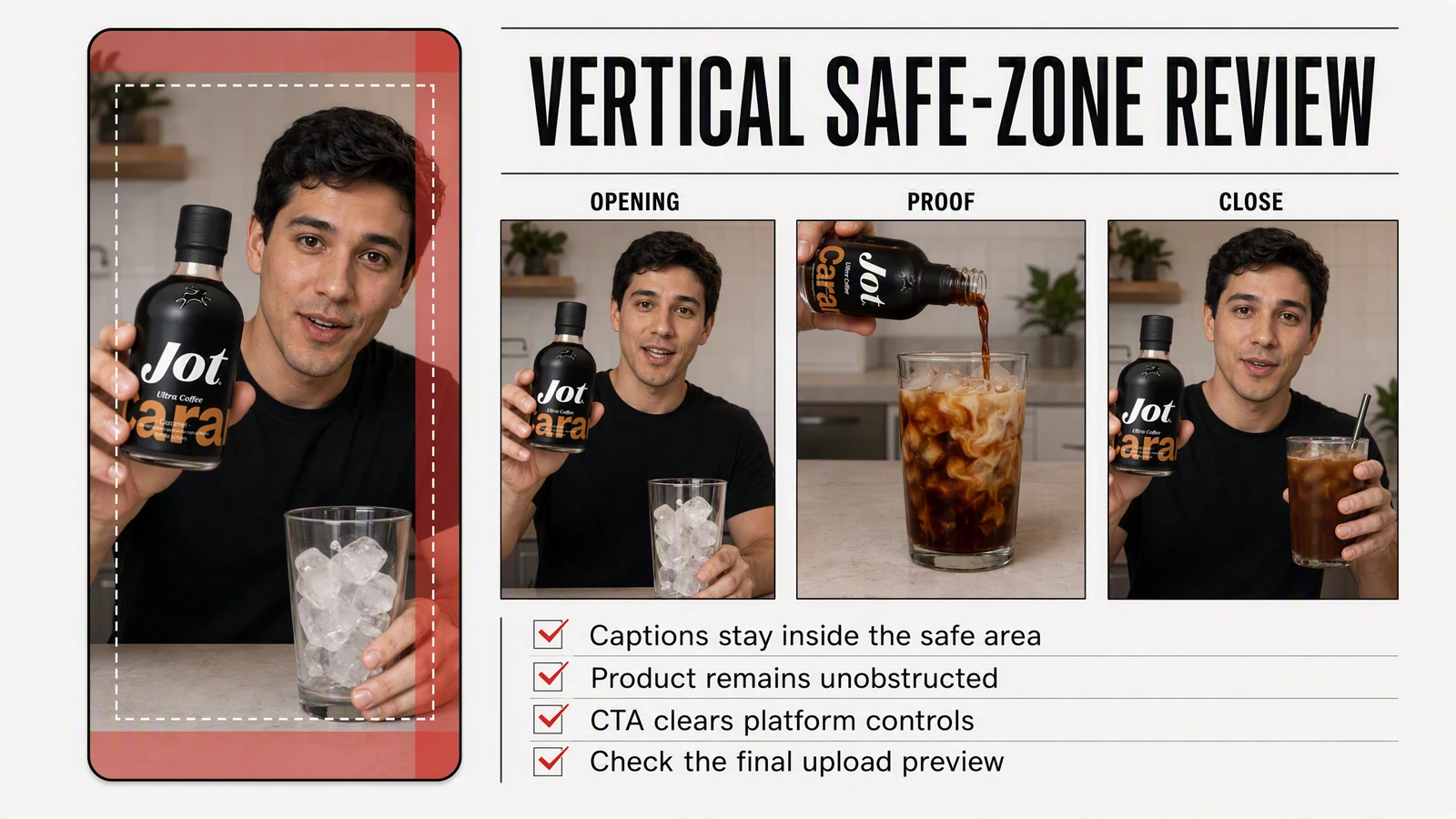
A simple reel needs three parts. TikTok's official Creative Codes calls the analogous pattern hook, body, and close. The names matter less than the jobs.
|
Part |
Job |
Good source material |
Failure to avoid |
|---|---|---|---|
|
Opening |
Make the relevance obvious |
Specific problem, surprising result, or recognizable situation |
Logo animation before context |
|
Proof |
Show why the claim is credible |
Product action, demonstration, comparison, or sourced evidence |
Generic generated lifestyle footage |
|
Close |
Give one next step |
Clear CTA, offer, or next episode |
Several competing actions |
For a software feature, the sequence might be: show the repetitive task, reveal the live feature replacing it, then invite the viewer to try the workflow. For a physical product, show the use case, demonstrate the product accurately, then state the offer or destination.
Write for pictures, sound, and captions
A reel script has three synchronized layers. The spoken line carries the argument. The visual shows evidence or context. On-screen text preserves comprehension and emphasis. Do not make all three repeat the same sentence.
Read the voiceover aloud and cut setup that the image can supply. Keep important text away from interface overlays. Correct automatic captions, especially product names, numbers, and technical terms. When meaningful audio carries information, captions also support the accessibility requirement described in the W3C's WCAG captions guidance.
Build vertical-first creative
Meta's official Reels ads guidance, retrieved August 4, 2026, recommends 9:16 video with audio and key messages in the safe zone. Meta reports that, in a global meta-analysis of 15 split tests, Reels campaigns using this combination produced a 34.5 percent lower cost per result than campaigns using image ads in the Reels placement. The evidence is specific to those ad tests, not a promise that every vertical video will outperform.
TikTok's Creative Codes similarly recommends 9:16, resolution of at least 720p, space for the interface, sound, and a hook-body-close structure. Build the composition around those constraints rather than cropping a wide ad at the end.
Generate shots with continuity controls
List recurring elements before generation: product, actor, wardrobe, setting, lighting, lens, palette, and camera behavior. Keep those fixed across shots. Change only the action and framing needed for the next beat.
Use real product references wherever accuracy matters. Generated packaging, interface text, hands, and reflections require frame-by-frame review. Put final prices, legal copy, captions, and calls to action into the editing layer rather than asking a video model to render them perfectly.
Adapt the master reel for each platform
Create a clean vertical master without platform watermarks. Then produce separate exports or upload settings.
- Instagram and Facebook Reels: Check safe zones, cover crop, caption, audio rights, partnership labels, and ad placement previews.
- TikTok: Leave room for the interface, use permitted music, review the current ad policy, and apply an AI-generated label when required.
- YouTube Shorts: YouTube currently categorizes square or vertical uploads up to three minutes as Shorts under its three-minute Shorts guidance. For Shorts longer than one minute, an active Content ID claim can block the video globally, so music rights deserve a separate check.
Do not export another platform's watermark into the master. It consumes screen space and can make the creative feel recycled.
Handle realistic AI media transparently
TikTok requires labels for realistic AI-generated images, audio, and video. YouTube requires disclosure when realistic content is meaningfully altered or synthetically generated, such as making a real person appear to say something they did not say or generating a realistic event that did not occur.
Disclosure settings are part of publishing. Record which shots are generated, which likeness and voice rights apply, and what label each destination needs. A label does not cure false advertising, unauthorized likeness use, or an unsupported claim.
Review the reel on a phone
- Mute it: Can the viewer follow the point through pictures and captions?
- Listen without watching: Does the script make sense and pronounce every detail correctly?
- Watch at full speed: Is there enough time to read each line and inspect the proof?
- Pause on product frames: Are packaging, screens, hands, and claims accurate?
- Preview the destination: Does the interface cover text, faces, or the CTA?
Measure the reel against its job
Raw views can be a weak comparison across platforms. YouTube changed Shorts view counting on March 31, 2025 so a view counts when a Short starts or replays, while retaining the older measure as “Engaged views” in Analytics. This makes the metric definition part of the analysis, especially when comparing exports across channels.
Track the opening with hold or swipe behavior, the middle with retention, and the close with the intended action. For ads, compare cost per result and conversion quality. For education, track engaged viewing, saves, and relevant follow-up. Keep a record of the hook, proof, length, CTA, and audience so the next variation tests a clear hypothesis.
A repeatable AI reel workflow
- Define one viewer, message, proof, and action.
- Write the opening, proof sequence, and close.
- Collect product references, brand rules, approved claims, and rights.
- Generate or assemble one shot per beat.
- Edit the vertical master with sound, captions, and controlled text.
- Run truth, accessibility, identity, and synthetic-media checks.
- Create platform-specific exports and settings.
- Publish, annotate the result, and change one major variable next time.
Where an AI reel maker fits in the stack
Advibly can generate short product, UGC-style, and voiceover video from saved brand context using multiple models, then move approved assets into a content calendar and publishing workflow. Teams can also run creative workflows through MCP or start from a guided template.
Frequently asked questions
Can AI make Instagram Reels?
Yes. It can generate footage, assemble clips, write or refine scripts, create voiceover, and add captions. A person should still verify claims, product accuracy, rights, disclosures, and the final placement.
What size should an AI reel be?
Use a vertical 9:16 master for Reels and TikTok, and keep essential content inside the destination's safe zone. Export at the quality required by the platform and preview it on a phone.
How long should a reel be?
Long enough to deliver the promise and proof, with no filler. Platform maximums are limits, not targets. Test duration only after the message and structure are clear.
Can I post the same reel everywhere?
Start from the same clean master, then adapt covers, captions, safe zones, music rights, disclosure settings, and analytics expectations for each platform.