

Choose an AI creative suite around the work you repeat. For mixed image, video and social campaigns, test whether the same product source carries into every format and into supported publishing. For presenter-led video, prioritize avatar and editing controls. For cinematic experimentation, prioritize the available generation and effects tools. More models do not automatically make a better campaign system.
The deciding test is not the best image in a demo. It is whether you can make the next asset, correct one product fact and deliver the accepted set without rebuilding the brief. Use the shortlist and trial below to compare that work before committing to a suite.
Shortlist by the campaign you need to deliver
These are selected alternatives for different recurring jobs, not a universal ranking or hands-on quality benchmark. First-party product pages were checked on 11 September 2026. Advibly is included because this is its buying guide; compare it with the same trial rather than treating its inclusion as proof of superiority.
|
Candidate |
Why evaluate it |
What still needs testing |
|---|---|---|
|
Product-source context carried into images, carousels, videos and supported social publishing; direct portal or compatible-agent operation. |
Your product's visual fidelity, the required formats, revision effort and plan/account eligibility. |
|
|
Image and video ads, UGC-style creation, brand kits, an editor, and documented content-calendar scheduling. |
The exact destination and format you need, creative control, approval fit and full campaign cost. |
|
|
Image and video generation, cinematic/effects tools, a canvas and advertised MCP/CLI access. |
How product context is reused, the exact agent actions and your export-to-publishing handoff. This guide does not establish native social scheduling. |
|
|
Avatar-led video and a video agent with editable motion elements in AI Studio. |
The chosen presenter's fit, editing limits and what other tools you need for static images, carousels and distribution. |
Start with Advibly and Predis if your recurring job spans creative plus social operations. Test Higgsfield first when cinematic exploration is the bottleneck, or HeyGen when a recurring presenter is central. These are fit-based starting points from documented capabilities, not claims that other products lack those jobs.
Key Takeaways
- A creative suite earns the name by connecting sources, brand context, model access, format production, review and publishing, not by bundling disconnected generators behind one login.
- Human judgment stays outside the suite: positioning, legal claim approval and performance interpretation are decisions the software should not infer on its own.
- Trial a suite with one real product source, two competing concepts and at least three formats, then confirm a corrected product fact propagates cleanly across all of them before trusting it.
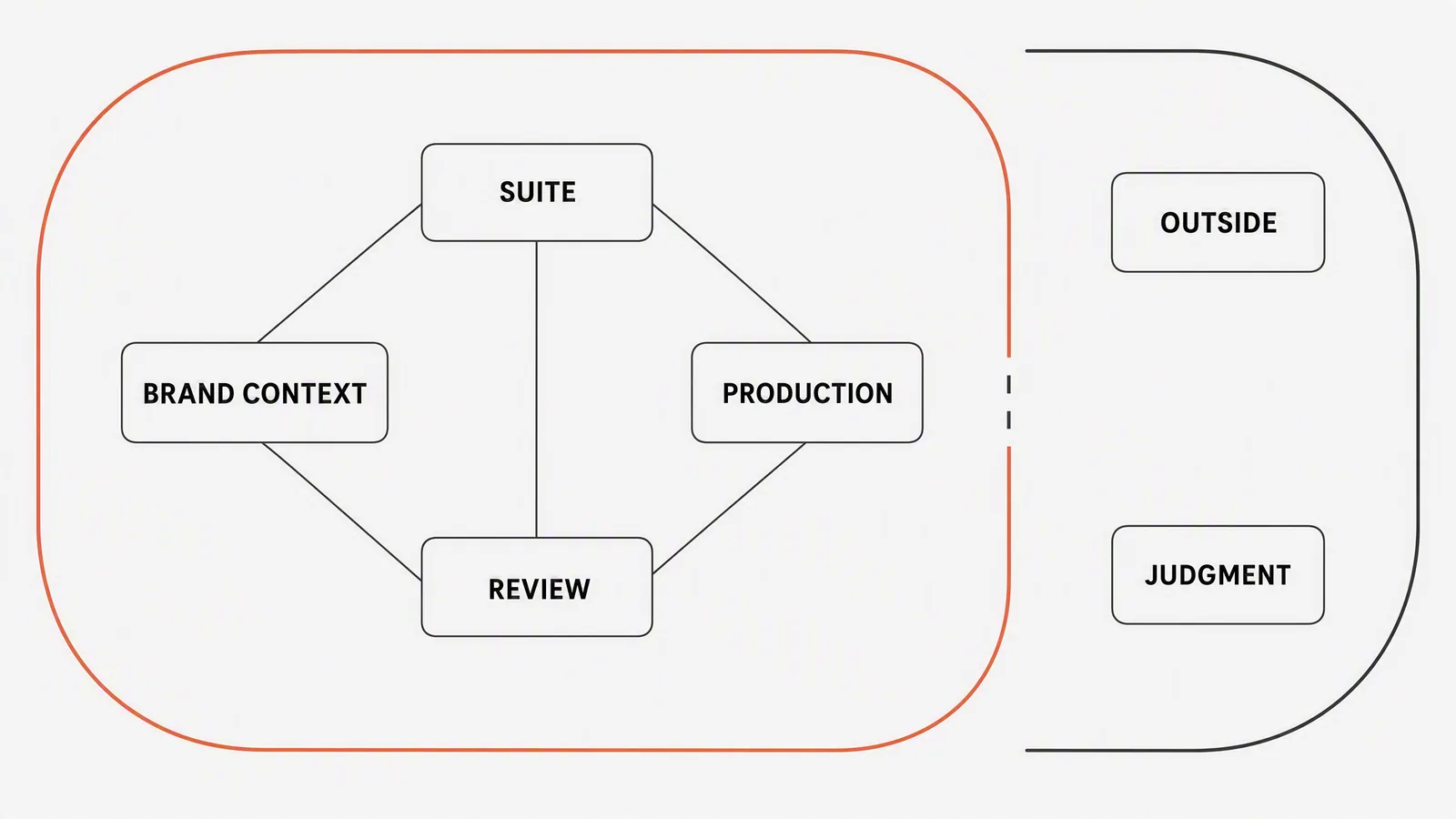
Compare the handoffs that could slow your campaign
|
Layer |
What should carry forward |
What remains a human decision |
|---|---|---|
|
Sources |
Website, store, app listing, screenshots, product images and approved brand files |
Which source is current and authoritative |
|
Context |
Product facts, audience, voice, visual references and constraints |
What the campaign should say |
|
Models and skills |
Access to the right production capability for the job |
Which trade-off matters: fidelity, speed, motion, text or cost |
|
Formats |
One direction adapted into ads, posts, carousels and video |
Whether each adaptation works in its channel |
|
Review |
Alternatives, usage visibility and a clear approval state |
Approve, revise or reject |
|
Publishing |
Calendar and connected destinations |
Timing, spend and final distribution |
Use this table as a trial checklist, not a claim that every suite supplies every layer. If your team already has a working editor or scheduler, integration with that tool may matter more than replacing it. A focused generator plus an existing production stack can be the better buy when only one part of the workflow is missing.
A suite must preserve continuity, not sameness
Reusable context does not mean every asset should look identical. It means the product facts and non-negotiables stay stable while the creative direction can change. A launch carousel may be explanatory; a paid-social image may be immediate; a short video may demonstrate the mechanism. The suite should make those differences easier without allowing the label, claim or offer to drift.
Trial scenario: a mobile app feature launch
A productivity app releases a shared focus room. The source package includes the App Store page, current interface screenshots, logo, colour system and an approved statement: teammates can join a shared timed session. The team needs a launch post, a three-frame carousel, two static ads and a short demo video.
- Save the verified feature description and screenshots once.
- Explore three campaign ideas: collective momentum, gentle accountability and a visible finish line.
- Choose one idea, then define how it changes by format.
- Use authentic interface captures wherever the UI is evidence.
- Generate supporting environments or transitions only when they make the feature easier to understand.
- Review the whole set together for message continuity and channel fit.
This is an illustrative buying test, not a measured result for any vendor. Record which formats each candidate actually returns, which parts need another tool and which product details need correction. An attractive video does not compensate for missing static assets if both are required every week.
Compare cost per accepted campaign, not credits per plan
Credit units are not comparable across vendors, and a low entry price can hide expensive retries or missing editing tools. Price the same workload in each candidate: the same image count, video duration and resolution, voice or caption needs, revisions, export rights, seats and connected accounts. Include the tools you must keep alongside it.
Use this calculation with your trial's actual costs: total production cost = subscription share + generation and revision charges + required external tools + staff time valued at your team's chosen rate. Divide by the number of campaign sets you accepted, not the number generated. No vendor cost winner is claimed here because this guide has not run a matched paid production test. Check current plan terms before buying.
Publishing belongs in the comparison
Advibly supports scheduling and publishing to connected Instagram, TikTok, LinkedIn, X, YouTube, Facebook and Threads accounts, subject to platform formats, permissions and plan entitlements. Facebook requires a supported Page rather than a personal profile. Check the actual target account and media type; a platform logo does not prove support for every native feature.
Predis also documents creation-to-calendar scheduling. For any candidate, verify whether the job ends at a download, a scheduled post or a confirmed public URL. Keep social publishing separate from paid-media buying: generating an ad or scheduling a social post does not establish that a campaign is running in an ads manager.
What an AI creative suite should not claim
- It does not know whether a marketing claim is legally substantiated.
- It does not replace original photography, contracted creators or exact CGI when those are required.
- It does not infer why an ad performed without valid campaign data and analysis.
- It does not make every output publishable merely because it is visually coherent.
Run one representative campaign through your shortlist
- Bring one real product source and one approved campaign objective.
- Create two genuinely different concepts.
- Turn the stronger concept into at least three formats.
- Change one product fact and confirm the context can be corrected cleanly.
- Compare the outputs together, not as isolated demos.
- Check usage cost before generation and export or publishing after approval.
Choose the candidate that passes your non-negotiable outputs first, then compare correction effort and total cost. If no suite passes, keep the specialist tool that does the hardest job well and connect the rest of the workflow around it. Do not pay for breadth you cannot use.
When Advibly belongs on the shortlist
Advibly brings product sources, reusable brand context, multiple models, images, carousels, social content and several video formats into one reviewable workspace. Compatible agents can also work through MCP and skills. The human keeps ownership of the brief, truth, selection and final publication.
Choose Advibly when you want to reuse product context across creative formats and operate either directly or through a compatible assistant, with supported social publishing in the same product. If you need exact editable design-system files or a specific specialist video workflow, require that output in the trial instead of assuming the suite provides it.
To learn the production methods after choosing your platform, use the interactive design-assistant guide or the agent-executed campaign-image guide.
Explore Advibly as an AI creative suite.
Sources
Current shortlist sources, checked 11 September 2026: Predis product capabilities, Predis scheduling, Higgsfield creative suite, and HeyGen video platform. The recommendations are editorial fit judgments; no comparative output-quality or cost test was performed.
- Google Ads: About Asset Studio, accessed 4 August 2026.
- Advibly product surface and Advibly skills, checked 4 August 2026.