AI commercials can be product demonstrations, creator-style ads, animated explainers or cinematic brand films. The useful starting question isn't “Which model should I use?” It's “What does the viewer need to see?”
If the answer is a product working, build around a real demonstration. If it's a process they don't understand, use an explainer. If it's a mood or imagined world, generated visuals can carry more of the film. That decision determines your source assets, prompt and production workflow.
See the creative before choosing the format
This existing Advibly example turns an original, fictional peach-can concept into a splash-led creative family. Start by looking at the actual still, then open the animation. The assets are synthetic campaign examples, not a retail product shoot, a customer campaign or a performance result.
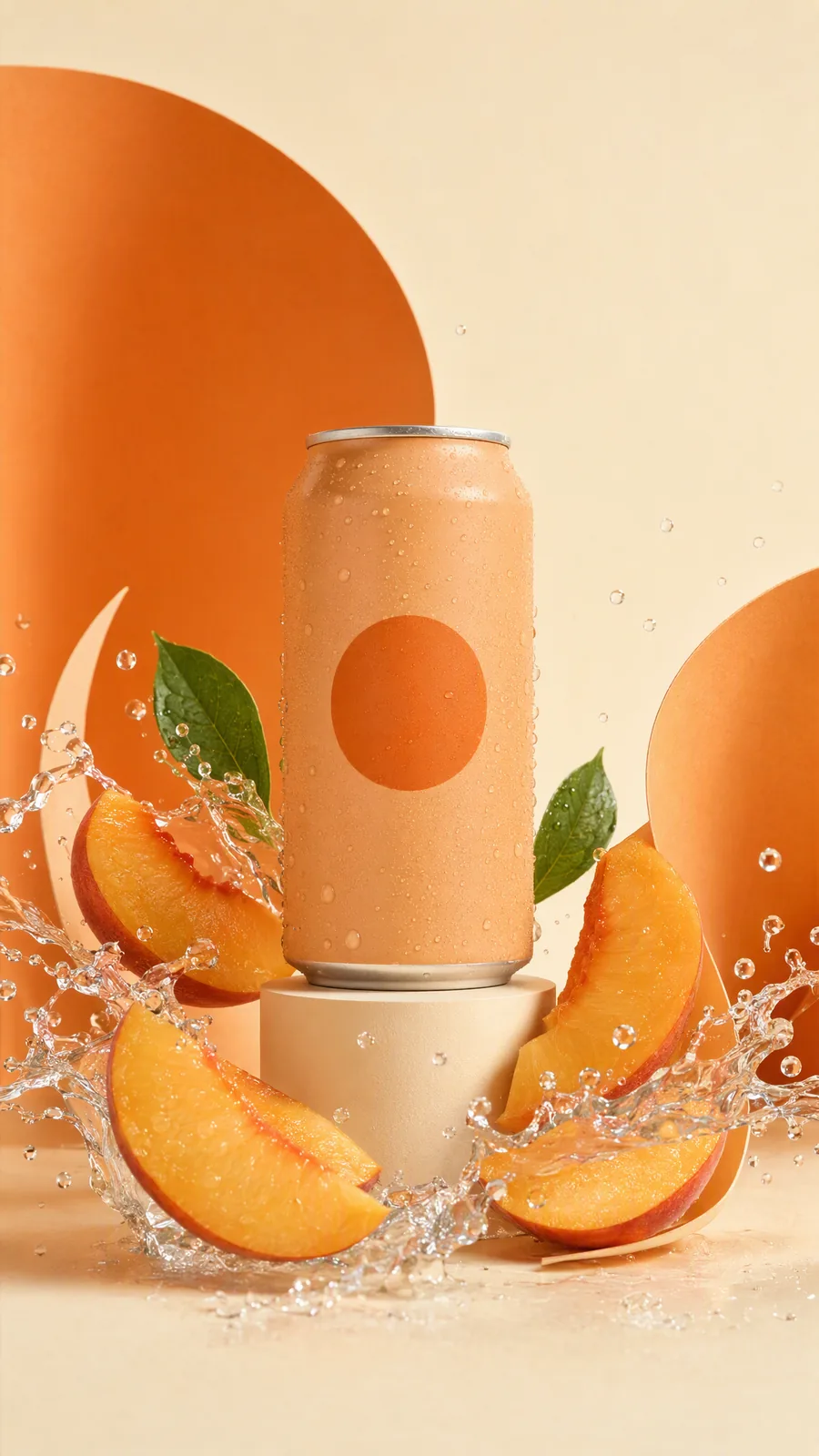
The still makes the can the focal point, with peach slices and warm orange shapes supplying the visual direction. It is already useful as a product-hero concept; the liquid does not establish taste, ingredients or refreshment claims.
Watch the actual peach-can splash animation (silent MP4)
The linked copy removes unrelated generated speech while retaining the original picture.
The animation adds orbiting fruit, moving liquid and changing background forms. That movement gives the opening a visual event without a presenter. It is an existing production component, not a complete ad with a verified offer and destination. Some objects move and change arrangement, so this is not an exact physical simulation.
A different occasion, not just a different crop

The holiday treatment changes the selling context: water, a tiny parasol and a citrus-slice raft suggest an escape rather than a studio product reveal. The fictional can remains recognizable. This is a new creative angle, not evidence that a drink produces a holiday feeling or that this image outperforms the splash.
To make your own version in Advibly, add your actual packshot and approved product facts to the brand context. Create one product-hero image with a clear setting; review the shape and label; use the accepted image as a reference for a short animated shot; then request an alternate occasion while retaining the product reference. Add only verified copy and an appropriate end card. These are reproducible production steps, not the historical tool log for this example. Generate your first creatives for free.
A matched creative-source transformation
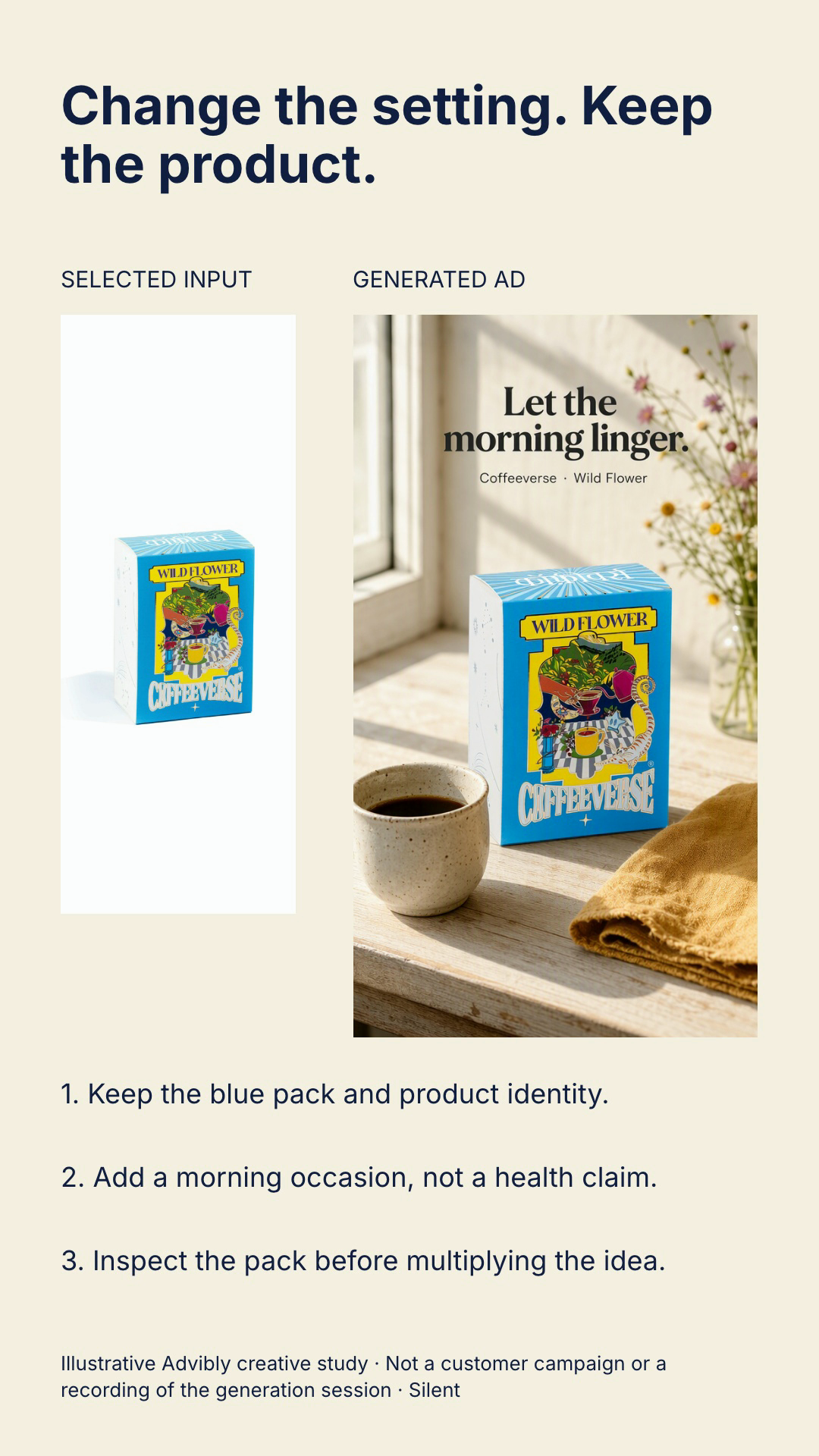
Play the complete 12-second source-to-creative explanation (silent MP4).
The actual Coffeeverse Wild Flower packshot precedes its Advibly-generated morning-scene result. Staged text explains preserving the blue pack, adding an occasion and inspecting identity. This is an editorial explanation of creative changes, not a recording of the generation operation, a product-efficacy before/after or a brewing demo. Use your actual authorized input and returned output, explain the meaningful decision, and inspect the full export rather than just the two endpoints.
Key takeaways
- Choose the commercial's job before its visual style or model.
- Keep evidence-bearing product behavior, comparisons and customer experiences accurate. Animation can explain a claim without proving it.
- Start with one useful scene or sequence, then build the complete ad around what survives review.
- Reuse the brief and brand assets across video, static, carousel and social versions; adapt each version for its destination.
Which AI commercial format fits your job?
Use this selector to narrow the choice, then read the production details below. The suggested first tests are planning examples, not platform limits or promises about performance.
|
What the viewer needs |
Start with |
|---|---|
|
See a feature work |
A product demo using real footage or screens. |
|
Hear a clear explanation from a person |
A creator-style or presenter-led ad. |
|
Understand a process or unfamiliar idea |
An animated or editorial explainer. |
|
Remember a story or brand world |
A narrative film with a defined visual direction. |
|
Notice the product's shape and mood |
A short cinematic product shot. |
|
Understand a supported difference |
A comparison with both real states visible. |
|
Receive the same message in a different context |
Variations of one approved master. |
Product demonstration: show the action that matters
A demo is the right choice when the buying question is “Does it do this?” Film the physical action or capture the actual screen. AI can help write the sequence, build supporting scenes, add narration and assemble the story around that evidence.
For an app, a useful first test is one input, one action and one visible result. Keep interface labels and output accurate. A generated screen that resembles the app but invents a feature defeats the point of the demo.
Advibly can use real app screenshots, listing context and product sources in app or SaaS explainers. Supply an actual screen recording when the claim depends on a sequence of working interactions rather than a still screen.
Creator-style ad: explain without inventing a customer
Use a presenter when a spoken objection or everyday situation carries the idea. A useful opening might be “Here's how this compartment opens,” followed by a real demonstration. It doesn't need an invented “I've used this for six months” testimonial.
Advibly supports UGC-style, talking-actor and presenter-led production, including script, scenes and supported voice or caption steps. Start with one explanation and one product action. Check the spoken claim, product interaction and identity of the performer, especially if a synthetic character could be mistaken for a real customer.
A creator-format specimen to critique
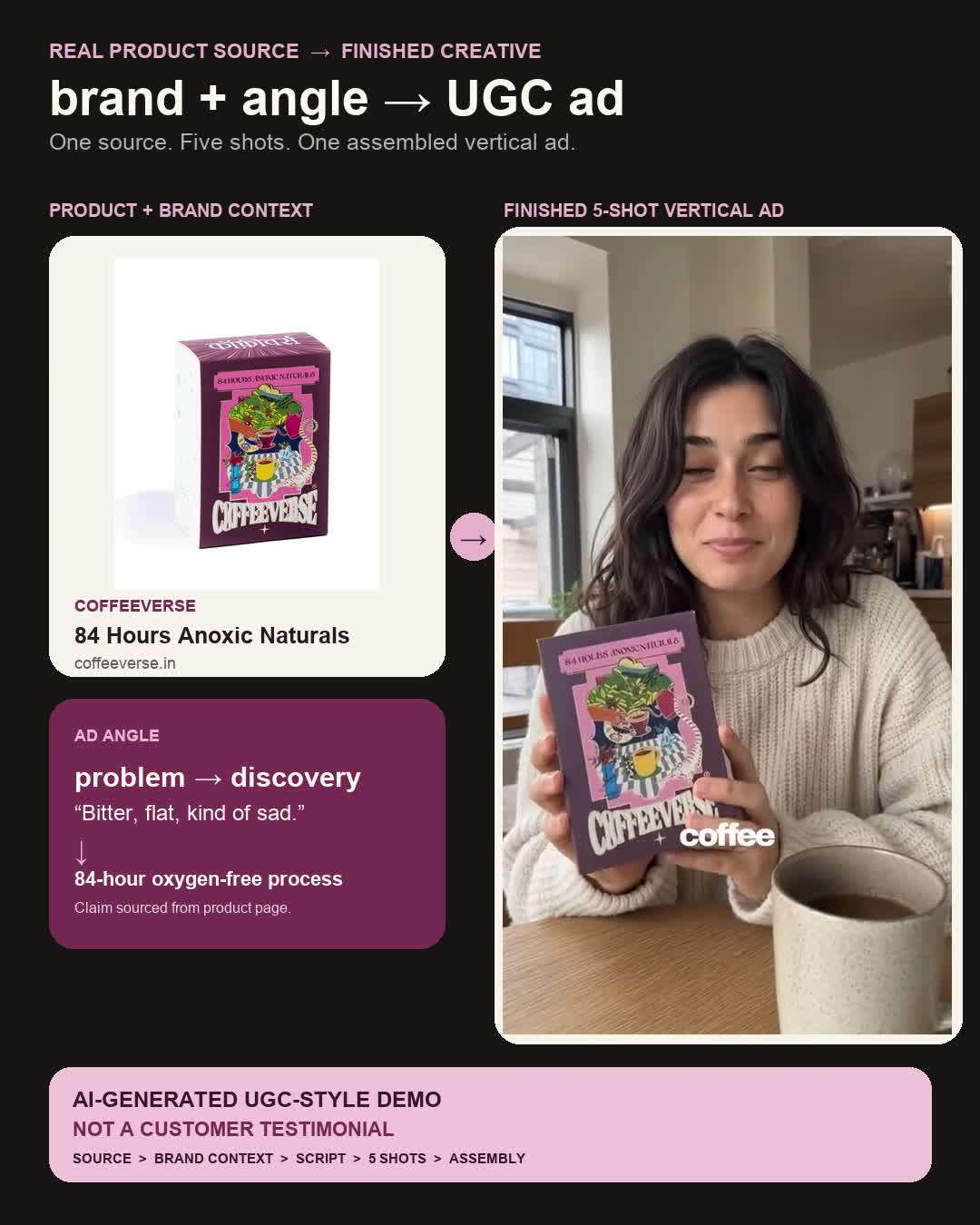
Watch the complete existing creator film (MP4 with narration)
This existing 40-second synthetic presenter film shows a pack-holding opening, gestures, a process explanation and a pack-led close. The disclosure wrapper remains visible. Study the sequence, not its claims: first-person taste and experience are scripted, not customer testimony; dispatch timing, superiority and the risk-free-sounding close are not verified here. It is not a claim-safe script to deploy. To reproduce the format responsibly, write a factual explanation from approved sources, remove invented personal experience and verify product/hand continuity throughout the final film. No new creator film or Claude session was executed for this article.
Explainer: give an abstract idea a visible structure
Animation earns its place when it clarifies something that would otherwise be a paragraph. A Whiteboard Doodle can connect the steps of a process. Isometric Flat Vector can show a system's parts. A Vox-style paper-collage sequence can connect one claim to screenshots and sourced facts.
Pick the treatment for the explanation. A playful claymation or 3D Papercraft product story has a different tone from an editorial collage. These are supported creative directions in Advibly, not a requirement to use every style or a claim of studio affiliation.
Test one complete explanation before extending the film. If the viewer can't describe the point after that sequence, more scenes won't repair the argument.
A complete narrated editorial-collage specimen
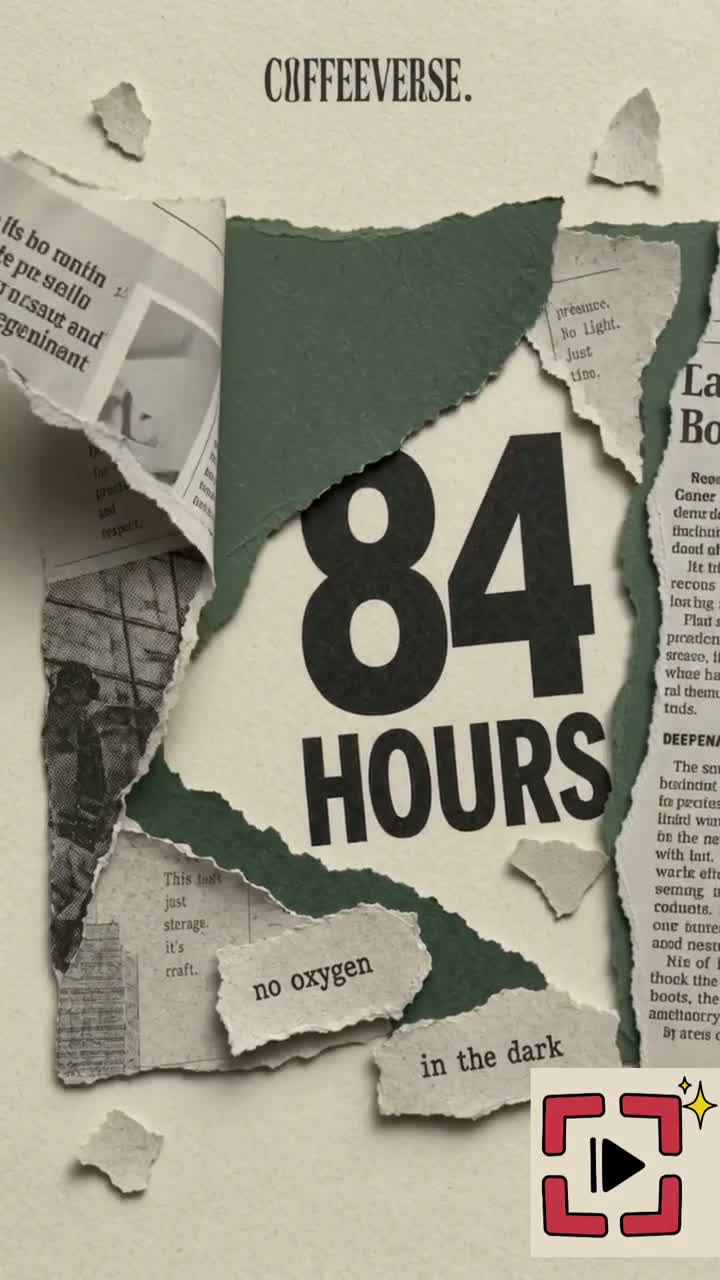
Watch the complete existing narrated-coffee film (MP4 with narration)
This existing approximately 35-second Coffeeverse film moves through six scenes: headline, clock and bags, illustrated tank, torn-paper product reveal, flavour collage and website ending. Timed narration gives the sequence a causal argument; it is a complete assembled explainer rather than a still or a creator wrapper. This is generated/spec work, not physical fermentation footage or a customer case study. The narration’s supermarket comparison, sourcing, taste and shipping statements are demonstration copy, not facts substantiated by this article. Do not reuse those claims without evidence. An editor mark is visible. Reproduce the structure with sourced claims, a scene per explanatory step, timed narration, then full picture-and-audio review. This demonstrates output, not a recorded Claude execution.
Narrative brand film: keep the world consistent
A narrative film works when the story is the commercial idea. Before generating scenes, decide the character, setting, product appearance, color palette and changes that are allowed between shots. Start with a short scene that has a beginning, turn and ending.
Advibly's multi-scene, narrated and stylized workflows can turn a brief into this kind of film. The work includes scene planning, references, generation, selection and final assembly. A finished film is a different deliverable from several attractive clips placed next to each other.
Use conventional filming where an exact performance, documentary event or complex continuous interaction is central. AI can still help develop the concept and supporting material.
Cinematic product motion: do one visual thing well
A short product shot can introduce a launch, establish a mood or give a product page movement. One restrained camera move around a clear subject is often a more useful first brief than an explosion of transformations.
The example below shows the scope: a fictional ceramic cup, a simple setting and a small camera move. It demonstrates a visual treatment, not the cup's heat retention, durability or manufacturing quality.
Open the fictional product-shot example
Five-second AI-generated fictional product shot, created with OmniFlash through Advibly. The cup is not a real SKU, and the clip is not a customer demonstration or a completed commercial. Audio was removed; the generated picture is unchanged.
For a real product, reuse the best approved source image and inspect shape, logo, texture and edges through the whole clip. A camera move that changes the packaging isn't a successful product shot, even if the lighting looks good.
Comparison or transformation: preserve the basis of the claim
Start with both real states and a specific comparison. “Here's where this setting appears before and after the update” is easier to support than “This makes everyone twice as productive.” Use AI for explanation, annotation or transitions without replacing the facts being compared.
Home fragrance: turn a product into a gifting idea
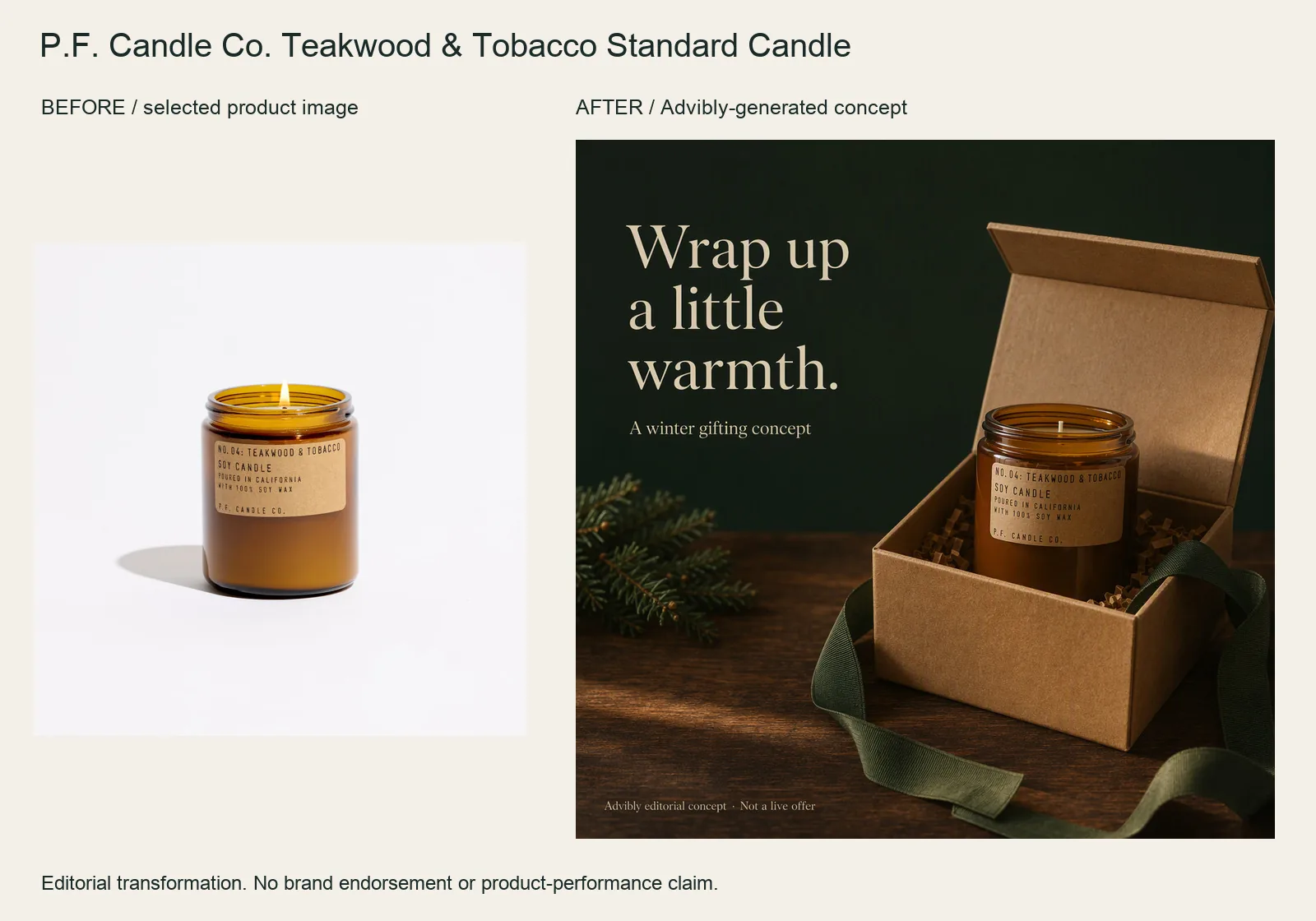
The selected amber candle jar becomes a winter-gifting composition with an open kraft box, green ribbon and an unlit wick. The change is the campaign occasion rather than a new candle.
Protect the jar and label in the reference-led brief. Ask for gifting props without presenting them as supplied packaging. This is a styling concept, not a current gift bundle, discount, burn-time claim or sleep benefit.
P.F. Candle Co. Teakwood & Tobacco Standard Candle product source · Open the finished editorial image
This still-image transformation is supporting preproduction evidence. A narrative brand film needs an actual sequence and finished motion; do not count a new poster as a produced commercial.
Your smallest test is one difference the viewer can inspect. Keep framing and conditions comparable when they affect interpretation. Generated “after” footage is an illustration, not evidence that an actual product caused that outcome.
Variations: change the context, keep the approved message
Versioning suits an offer or feature that needs different audience explanations, languages or placements. Write down what remains fixed and what can change. Three variations are a manageable initial review set, not a prescribed campaign size.
Saved brand context in Advibly lets you reuse the same product, visual identity and brief across formats. Make a direct product explanation for one audience and a process-led version for another, then check that both retain the same feature truth and offer terms. Review translations with someone competent in the language.
This is different from a custom system that synthesizes a celebrity performance for thousands of individual recipients. The large personalization campaigns below are production precedents, not promises that every tool provides their infrastructure.
“AI-made” describes several different production roles
You can choose an AI role independently of the commercial format. A narrative ad can have an AI-written script and entirely filmed footage; a conventional product demo can include generated background scenes.
|
Production label |
What AI contributes |
|---|---|
|
AI-written |
Script or narrative structure. People can still film the entire ad. |
|
AI-assisted |
Part of a human-led process, such as planning, transformation or adaptation. |
|
AI-generated |
Visual, audio or video components selected and assembled into the ad. |
|
Personalized or versioned |
Changes to an approved performance, message or template for a different context. |
|
Fully synthetic visuals |
Most or all visible footage is generated rather than filmed. Direction, editing and sound still matter. |
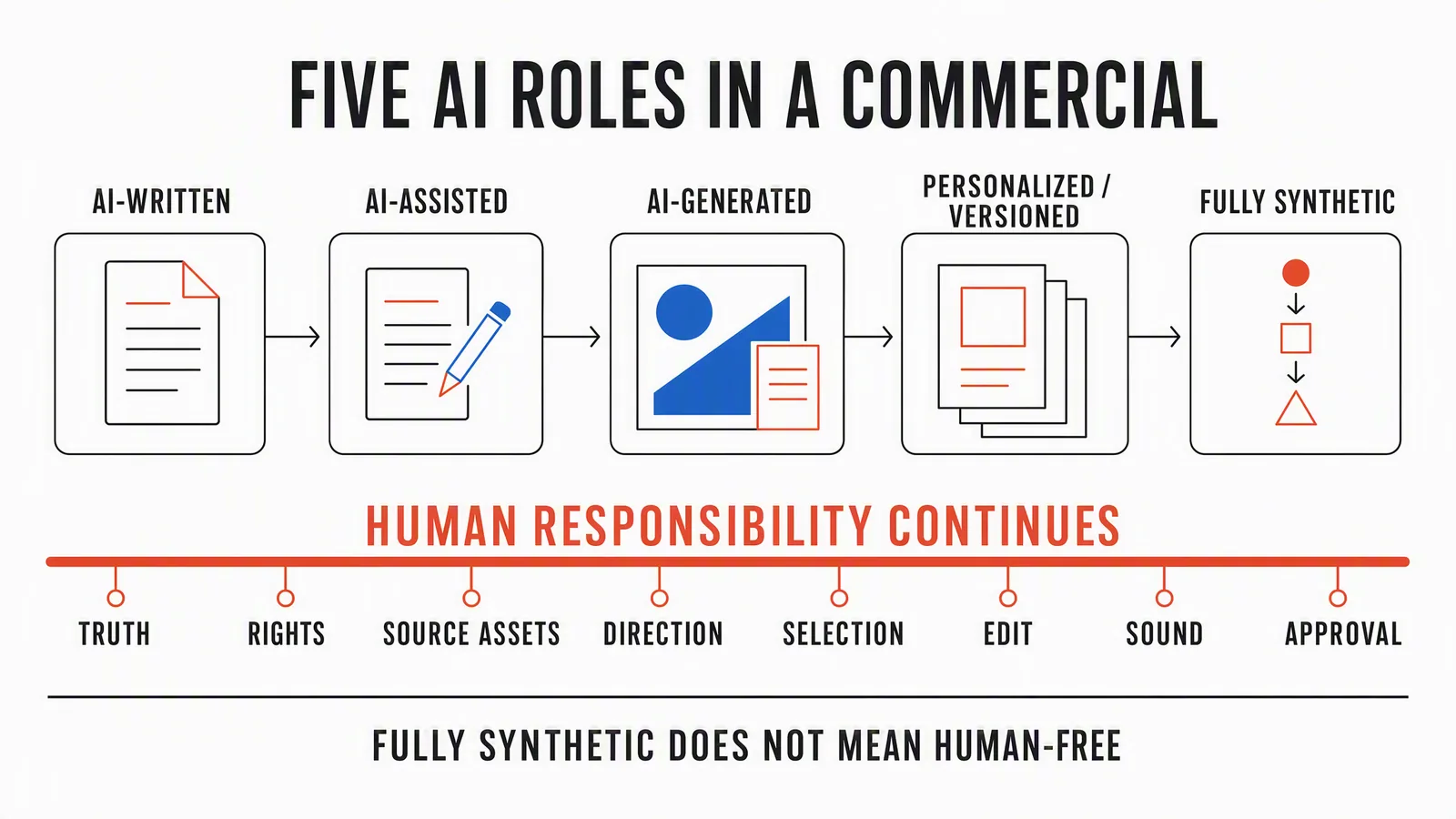
These roles can overlap. The arrows are not a maturity ladder or a recommendation to make each commercial more synthetic. People still own source material, claims, rights, direction, selection, sound and approval.
Eight campaigns that show different uses of AI
These historical examples come from brands, agencies, award submissions and production partners. They describe workflows, not controlled evidence that AI caused sales or saved a particular amount of money. The lessons are editorial applications; follow the links to see the original work.
Lexus: an AI script can become a filmed commercial
Lexus's 2018 Driven by Intuition production account describes a bespoke script system using IBM Watson, advertising examples and brand guidance. Kevin Macdonald directed the film.
The useful distinction is between generating the story and generating the footage. You can use AI to develop a narrative while retaining a conventional shoot for the performance and product. The source doesn't establish the AI script's independent effect on campaign results.
Heinz: the generation process can be the campaign idea
The A.I. Ketchup award submission describes Rethink and Heinz using DALL·E 2 to create ketchup imagery, including audience-suggested prompts. Selected images appeared in campaign executions including labels, galleries and outdoor advertising.
This was a generated-image campaign, not evidence of a fully generated live-action commercial. Its recognizable product cues supplied the idea. Borrow the method of choosing a strong visual constraint, not Heinz's bottle, artwork or claims that the model “prefers” a brand. The submission's campaign metrics are not independent performance validation.
Orange: transformation works because the underlying play is real
Marcel's Women's Football case for Orange describes a 2023 highlight compilation that initially appeared to show male football stars, then revealed women's performances underneath.
The reveal makes the argument. The athletic actions, not invented match events, are its basis. Treat this as a transformation/VFX precedent; the short public case doesn't disclose enough to assign every shot to a particular AI model or production method.
Cadbury: approve the performance before making variations
WPP's Shah Rukh Khan-My-Ad case describes machine-learning-assisted versions of a campaign featuring Cadbury's participating brand ambassador and local store names. The microsite let businesses create their own versions.
The lesson is to define the master and variable fields. Authorization, accurate local details and distribution were part of the campaign, not tasks made unnecessary by synthesis. The source doesn't establish causal store-level sales effects or a universally available personalization workflow.
Virgin Voyages: personalize something the recipient wants to use
VML's Jen AI case describes generative voice and video used for customized Jennifer Lopez invitations. Users could tailor an invitation around guests and a personal milestone.
The personalization completed an action: inviting someone. For a smaller campaign, ask what useful context changes, such as an event location or audience explanation, before generating variations. Don't treat a celebrity campaign as permission to synthesize another person's likeness. Agency-reported reach isn't proof of incremental bookings.
Toys“R”Us: synthetic scenes still need filmmaking
The Toys“R”Us and Native Foreign release describes a 2024 origin-story film made largely with Sora, alongside corrective VFX and an original score. It says the team narrowed hundreds of iterative shots to a much smaller selection.
Generated footage made an imagined historical world possible. It didn't remove direction, selection or finishing. If your concept depends on a character across scenes, test that continuity early. The release doesn't provide a reusable cost model for your film.
Coca-Cola: give the generated world recognizable boundaries
Coca-Cola's 2024 holiday account describes three production houses using AI-related tools to reinterpret its established Holidays Are Coming commercial. The visual world already had recognizable trucks, characters and seasonal cues.
For your campaign, build that reference set before asking for variations. Decide what identifies your own brand and which details must remain consistent. The source doesn't provide a shot-level AI percentage or a causal comparison against conventional production.
Lumen: the everyday use can be controlled adaptation
Adobe's Lumen case describes designers creating flexible templates while copywriters developed persona-specific messages. GenStudio then helped adapt content for placements and audiences.
Not every useful AI campaign is a synthetic film. An approved system that produces coherent variations can be the more relevant model for an ongoing content program. Adobe is the vendor reporting the case, so its efficiency claims shouldn't become your forecast.
A commercial brief you can actually produce from
Use these eight fields to move from a format choice into production. A blank “proof” field means you still need to gather evidence or choose an illustrative concept; it doesn't mean you need to invent a more convincing prompt.
- Job: The one viewer decision or action the commercial should support.
- Audience and situation: Who is watching and what they already understand.
- Message: One specific point, not a list of every feature.
- Proof: Real screens, product actions, source facts or authorized experiences supporting that point.
- Format and placement: The chosen format, destination and intended runtime or shape.
- AI role: What to generate or adapt and what must stay real.
- Assets and rights: Sources, brand files, footage, voices, faces, music and permission status.
- Review owner: Who checks claims, product accuracy, continuity and final export.
Worked example: a task-app feature commercial
Imagine a fictional app that turns a spoken note into an editable task. This is a sample brief, not an Advibly customer result or a claim that a particular app has this feature.
Job and audience: Help a solo founder understand what happens to a captured thought. Message: Speak the thought, then review and edit the resulting task. Proof: A real recording of that exact behavior in the app, using non-sensitive sample content.
Format: A short narrated app explainer for an Instagram Reel. AI role: Create the surrounding explanation and supporting motion, while keeping the actual app recording intact. Assets: The owner's real screens, approved logo, voice and music with suitable rights. Review owner: The product owner checks functionality; the marketer checks the final story and destination.
An initiating brief for a connected assistant could be:
Use our saved app brand context and the supplied recording of voice note to editable task. Draft a short explainer: open on the problem of losing a thought, show the real capture-and-edit sequence, then end with an invitation to see the feature. Use Whiteboard Doodle only for the surrounding explanation. Don't invent screens, speed claims or customer quotes. Reuse suitable existing assets first. Show the scene plan before generating missing components, then assemble the approved scenes with narration and captions. Prepare a social draft for review; don't publish it yet.
That is one initiating brief for a workflow, not a promise of one tool call or immediate completion. If the real recording is missing, the next action is to capture it. A generated interface isn't a substitute.
From the brief to a finished campaign in Advibly
Start by inspecting your existing brand library. Keep the current product photos, screenshots, logo and approved creative references that fit the chosen format. Add a website, Shopify product page or app listing when it supplies useful product context, and update saved brand information when the offer changes.
Brand Intelligence can turn product information and research into a brief and sourced dossier. Use that context to select the objection or explanation worth addressing. Customer language helps write the hook; it doesn't turn an anonymous phrase into a testimonial you can attribute to a customer.
Next, choose the production method. Work directly in the portal or use a compatible assistant with Advibly's creative skills. A skill supplies the method, the assistant coordinates supported steps, and Advibly creates the assets. Generate only the components missing from the chosen concept, then assemble the whole sequence with the supported audio and caption steps it needs.
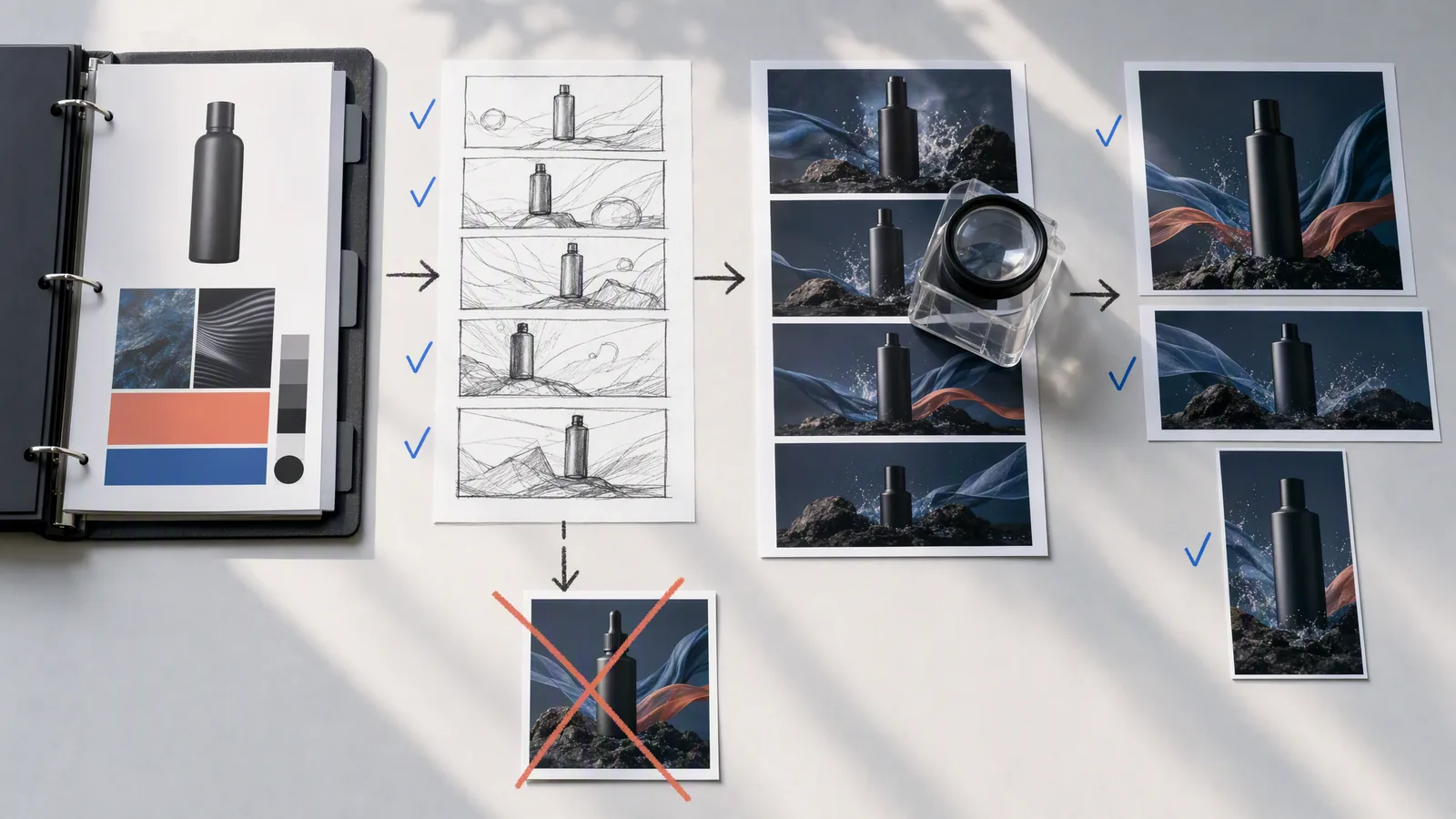
Illustrative planning board, not a product screenshot or a verified campaign result. The checkmarks represent review decisions in the illustration, not automatic fidelity or rights approval. Keep the source product recognizable while checking each scene and destination crop.
Review the entire export, not just its thumbnail. Check whether the opening states the idea, the middle supports it and the ending gives the viewer a next step. Inspect moving product edges, screen text, narration and captions. Fix the scene causing the problem before commissioning a larger set.
Then adapt the approved concept. The task-app video could become a carousel explaining the steps and a static showing the finished task. In Advibly, create destination-specific copy, schedule the approved posts and retrieve publication status. A scheduled item and a published item are different states; check the result before reporting delivery.
For an Instagram post offering a useful guide, you can add keyword comment-to-DM automation that sends the chosen link. Use it only when the promised resource is ready. It's an Instagram link-delivery flow, not a general DM bot or proof that every commenter received the message.
After publication, use analytics to decide what needs another iteration. Treat an observed difference as a question to investigate unless the test design supports a stronger conclusion. Social publishing is also separate from buying paid placement in an advertising platform.
Check disclosure and claims before distribution
For U.S. endorsements, FTC guidance says endorsements must be truthful and not misleading, material connections should be disclosed, and endorsers shouldn't describe experiences they haven't had. A synthetic presenter can't establish a real customer's experience.
YouTube's current GenAI guidance requires disclosure for meaningful AI changes or generation that appears realistic, including a person doing something they didn't do or a realistic scene that never happened. Minor edits and clearly unrealistic visuals are treated differently. Check the destination's current requirements for the actual export; one platform's rule doesn't cover every network or legal obligation.
Start with the scene that decides whether the idea works
For a demo, that is the product action. For an explainer, it is the sequence that makes the process understandable. For a narrative, it is a scene that holds its character and story together.
Make that first. Once it works, use the same brief and brand context to create the rest of the commercial and its supporting social assets. You can start the commercial workflow in Advibly with the product sources and format you've chosen. Check the current workflow, generation cost and publishing entitlements before committing the full set.
Sources
Official specifications, product guidance and production accounts checked for this article. Vendor accounts describe their own work; they are not independent performance tests.
- media.lexus.co.uk: driven by intuition car by lexus story by artificial intelligence camera by oscar winning director
- oneclub.org: ai ketchup
- marcelww.com: women s football
- wpp.com: ogilvy and wavemaker notjustacadburyad
- vml.com: jenai
- prnewswire.com: toysrus studios and native foreign use openais sora to narrate the origin story of beloved toyrus brand 302180332.html
- coca-colacompany.com: groundbreaking digital experience and films fuse holiday heritage with cutting edge tech
- business.adobe.com: lumen.html
- ftc.gov: advertisement endorsements
- support.google.com: 14328491